
Adampower
![]()

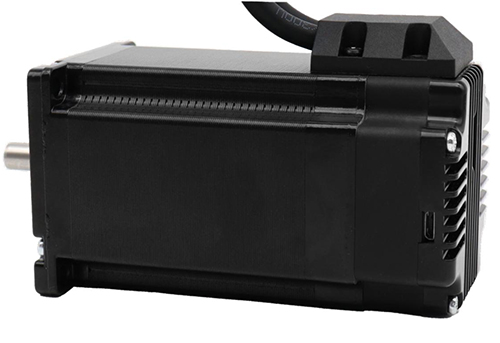
The IM23ET Series Integrated Motors represent a perfect integration of stepper drivers and stepper motors, combining the technologies of both in a single unit.
They are fully compatible with 1599-revolution mechanical absolute encoders, which not only save installation space but also streamline wiring connections.
By reducing your design and production costs, they stand as the premier choice for your stepper system solutions.
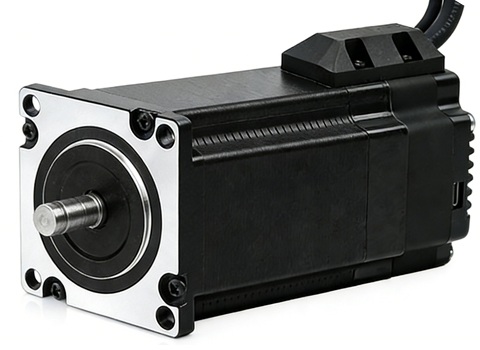
Frame Size: NEMA23
Holding Torque: 0.8–3.0 N·m
Supply Voltage: 24–60 VDC
Supported Protocols: Modbus/RTU, RS485
Built-in Programmable Multi-Turn Feedback: 1599 revolutions; supports user-defined home position with memory, no sensor required
Software Limit Function Supported: More reliable than mechanical limit switches
Closed-Loop Control: 4096-line (16384 counts) encoder feedback
Torque Modes Supported: Homing on collision, constant torque, object gripping
Input Compatibility: 5–24 VDC; Output: Open-collector (OC) output, withstanding voltage up to 30 VDC
Comprehensive Protection Features: Over-voltage, under-voltage, over-current, winding open-circuit, and position deviation protection
Non-Volatile Memory: Configuration parameters stored in the on-chip FLASH of the MCU
Wide Filter Frequency Range: 50 kHz–5 MHz adjustable, factory default at 300 kHz
User-friendly PC interface with full-featured functionality
Motor Parameters:
| Model No. | Total Length L (mm) | Length L1 (mm) | Shaft Dia. (mm) | Phase Current (A) | Resistance (Ω) | Inductance (mH) | Holding Torque (N.m) | Inertia (g.cm²) | Weight (g) |
|---|---|---|---|---|---|---|---|---|---|
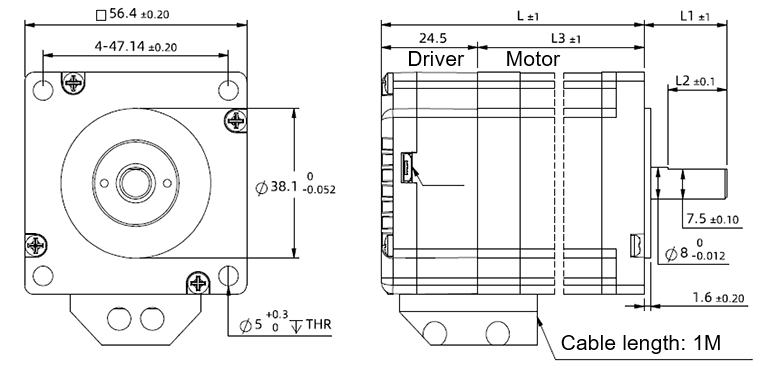
| IM23ET12S | 80.1 | 21 | 8 | 4 | 0.44 | 1.4 | 1.2 | 280 | 820 |
| IM23ET20S | 100.1 | 21 | 8 | 5 | 0.30 | 2.0 | 2.0 | 480 | 1200 |
| IM23ET12B | 80.1 | 30 | 8 | 4 | 0.44 | 1.4 | 1.2 | 280 | 820 |
| IM23ET20B | 100.1 | 30 | 8 | 5 | 0.30 | 2.0 | 2.0 | 480 | 1200 |
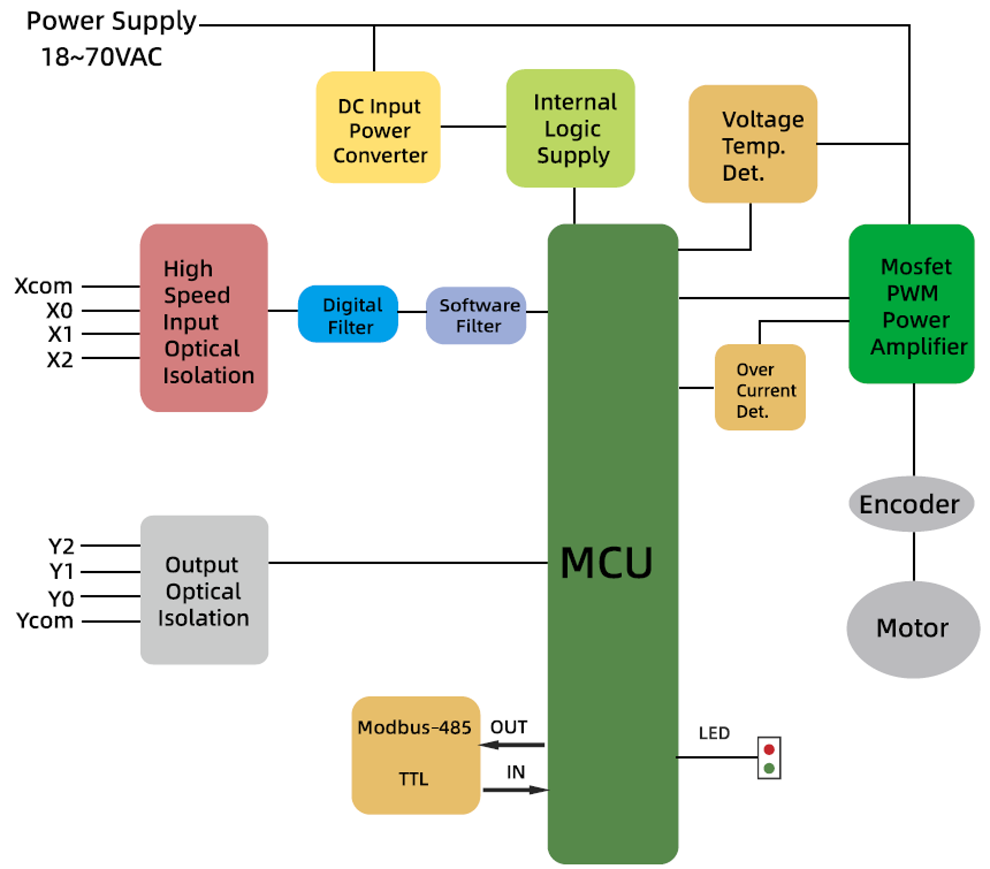
Block Diagram:
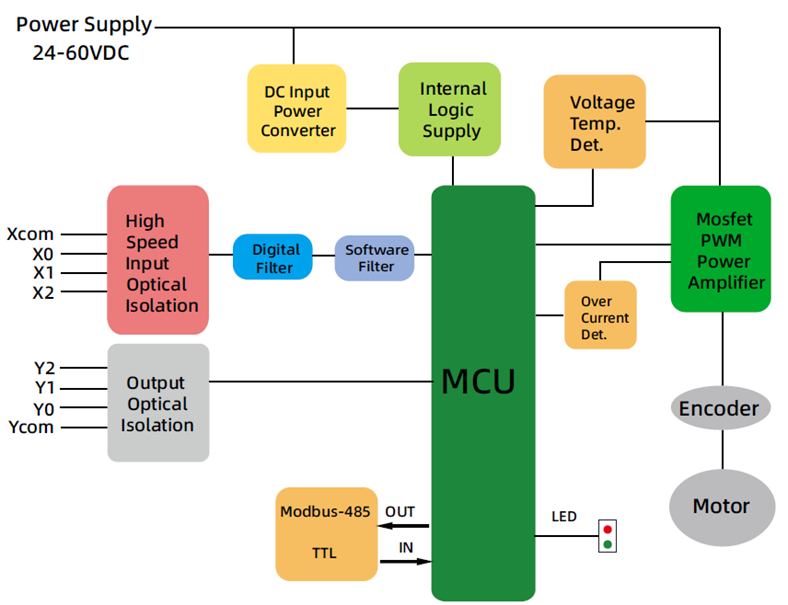
RS485 Multi-turn Absolute Encoder type Integrated Stepper Motor
Terminal Definition
| Terminal | Color | Name | Description |
|---|---|---|---|
| 1 | Red | V | 24~60VDC |
| 2 | Black | V- | GND |
| 3 | Yellow | X com | INPUT COM, compatible with NPN and PNP |
| 4 | Yel/BLK | X0 | 3 Programmable Inputs (Active Low) Port functions configurable via commands or host computer. Pulse Mode: X0 = Pulse, X1 = Direction |
| 5 | Blue | X1 | |
| 6 | Blu/BLK | X2 | |
| 7 | Green | Y2 | Y0: Default alarm output, Normally Closed (NC), Y1: Default position reached output, Normally Closed (NC) Y2: Undefined,Users may configure or redefine the functions of the corresponding ports via commands. Y2 can be customized to input X3 upon request before delivery; it defaults to an output port. |
| 8 | Gre/BLK | Y1 | |
| 9 | Purple | Y0 | |
| 10 | Pur/BLK | Y com | OUTPUT COM, COM GND |
| 11 | Orange | 485A | RS485 Communication port, default baud rate is 115200 |
| 12 | Ora/BLK | 485B |
3-channel isolated digital signal input, the function of each input channel can be configured via software or commands, with the correspondence between input signals and functions as follows:
| Signal | Interface | Function |
|---|---|---|
| X0 | X0,Xcom | • General Input (Default) • Pulse / Limit / Home / Emergency Stop / Speed Switch / Interrupt Positioning / Forward Rotation |
| X1 | X1,Xcom | • General Input (Default) • Pulse / Direction / Limit / Home / Emergency Stop / Speed Switch / Interrupt Positioning / Reverse Rotation |
| X2 | X2,Xcom | • General Input (Default) • Limit / Home / Emergency Stop / Speed Switch / Interrupt Positioning |
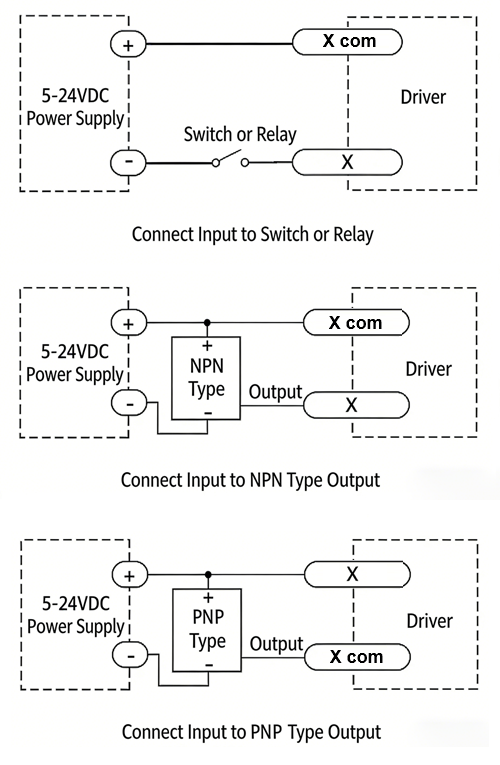
XCOM is the common positive terminal for single-ended input signals and shall be connected to the positive pole of the power supply.
It only accepts sinking NPN signals.
The figure below illustrates the typical wiring configurations for the X0–X2 input ports.
3-channel isolated digital signal output, the function of each output channel can be configured via software or commands, with the correspondence between output signals and functions as follows:
| Signal | Interface | Function |
|---|---|---|
| Y0 | Y0, Ycom | • Alarm Output (Default) • Alarm / Position Reached / Running Status |
| Y1 | Y1, Ycom | • Position Reached Output (Closed Loop Default) • Running Status Output (Open Loop Default) • Alarm / Position Reached / Running Status |
| Y2 | Y2, Ycom | • General Purpose Output (Default) • Alarm / Position Reached / Running Status |
The figure below illustrates the typical wiring configurations for the Y0–Y2 output ports.
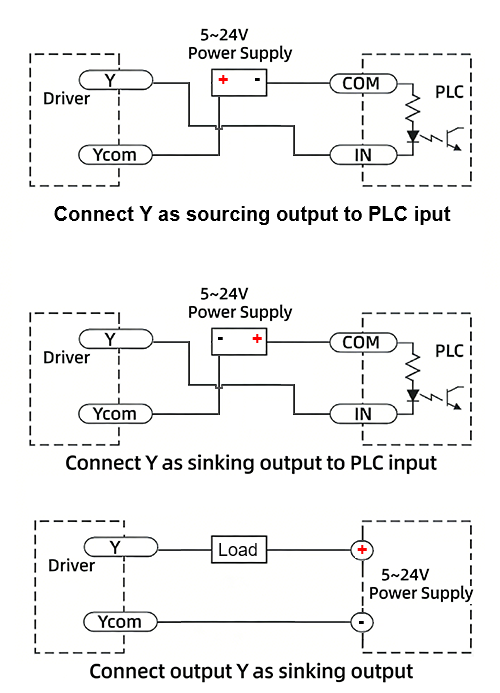
Warning: Output terminal → DC voltage < 30V, Inflow current ≤ 50mA.
CRC Check Routine (C#)
UInt16 Funct_CRC16(unsigned char * puchMsg, UInt16 DataLen)
{
UInt16 i,j,tmp;
UInt16 crcdata=0xFFFF;
for(i=0;i<DataLen;i )
{
crcdata=(*puchMsg)^crcdata;
puchMsg ;
for(j=0;j<8;j )
{
tmp=crcdata&0x0001;
crcdata=crcdata>>1;
if(tmp){
crcdata=crcdata^0xA001;
}
}
}
return crcdata;
}
RS485 Integrated Stepper Motor Commissioning and Control Software:
Modbus Poll

Adampower
Quick Start Guide – Follow the steps below:
1. Extract the zip file, open CommFile folder and Click Step-Config.exe or Adampower.exe


2. Open Project.

3. Click Browse
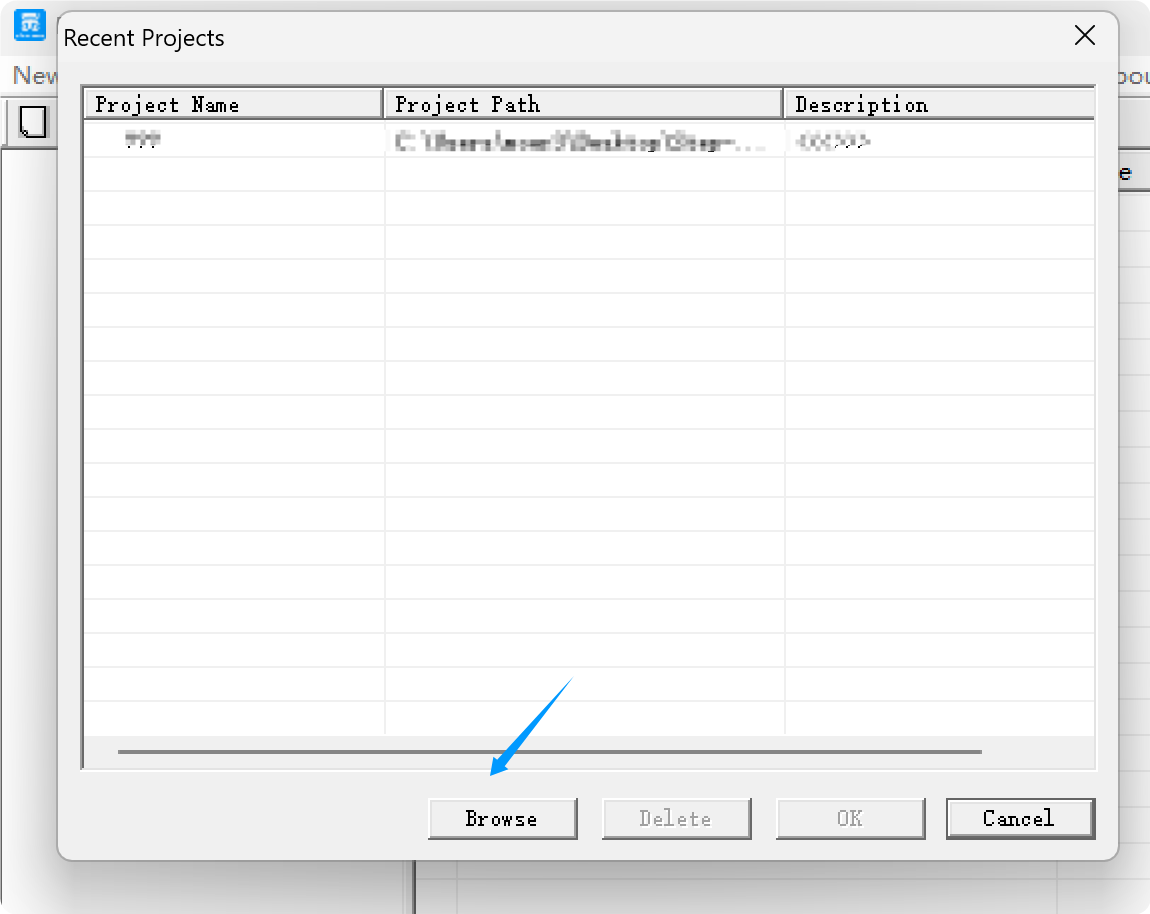
4. Select the Project.prj in the Project folder, in the same path as CommFile.
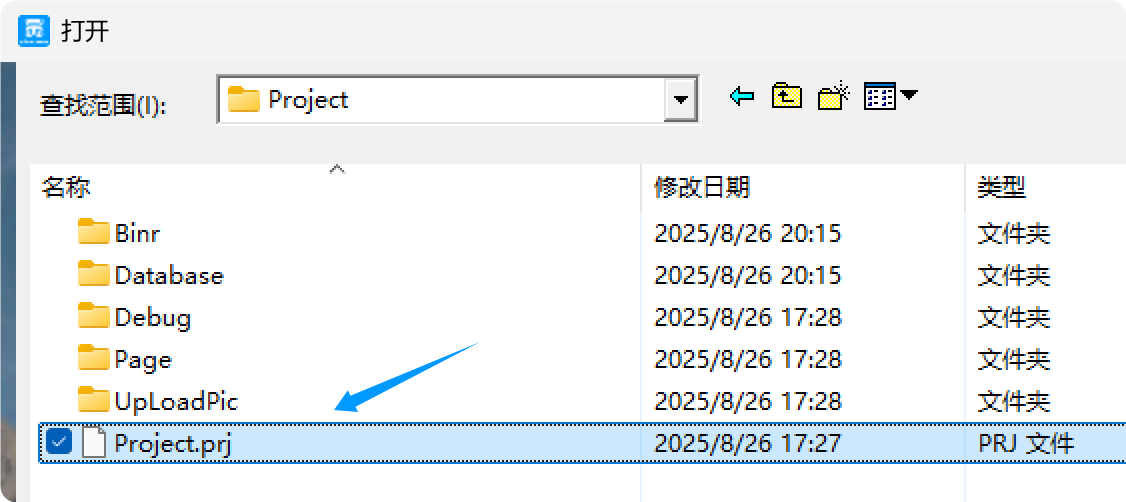
5. Double Click the Project.prj path
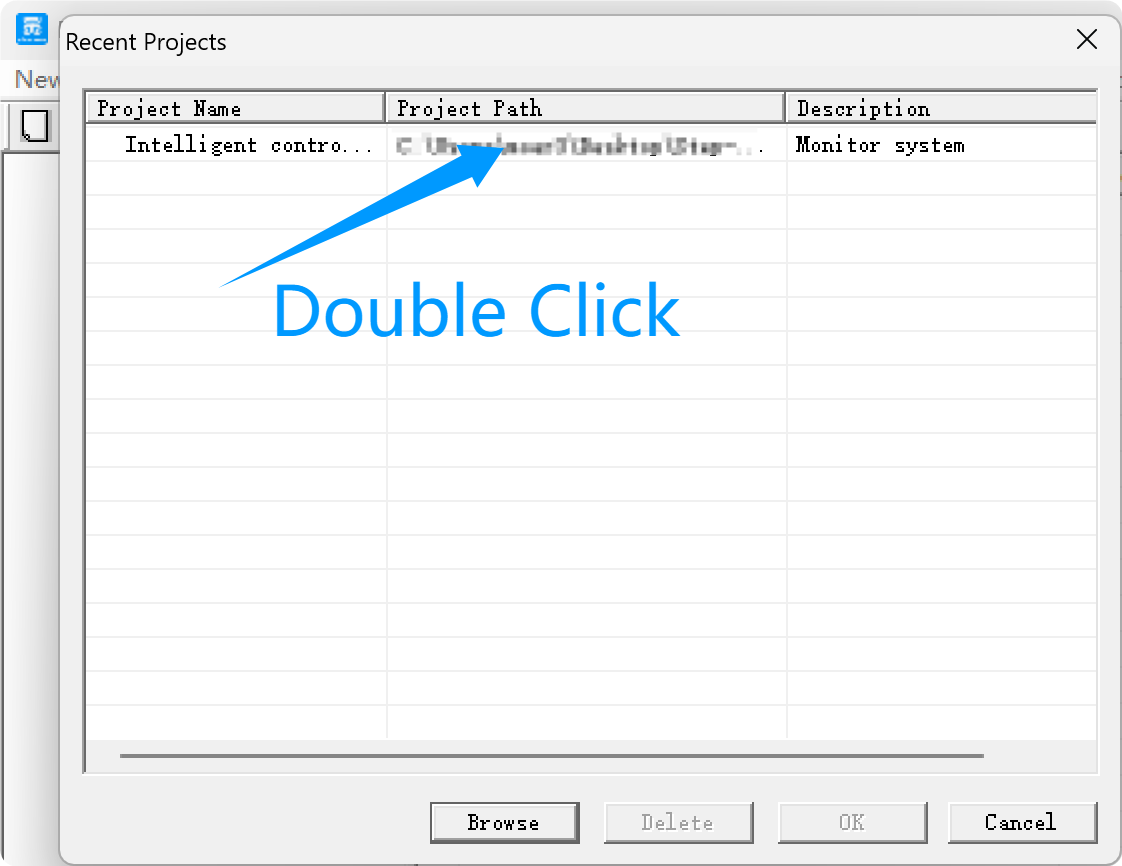
6. Right Click Modbus_485, and Click Property:


7. Click Property ComNN, Choose COM port, Baud rate and click Save and OK.


8. Start to use software control the RS485 Integrated stepper motor by below buttons:


Optional: USB-TTL debugging cable
RS485 Stepper Motor Controller Commands Manual

LED indicator and status:
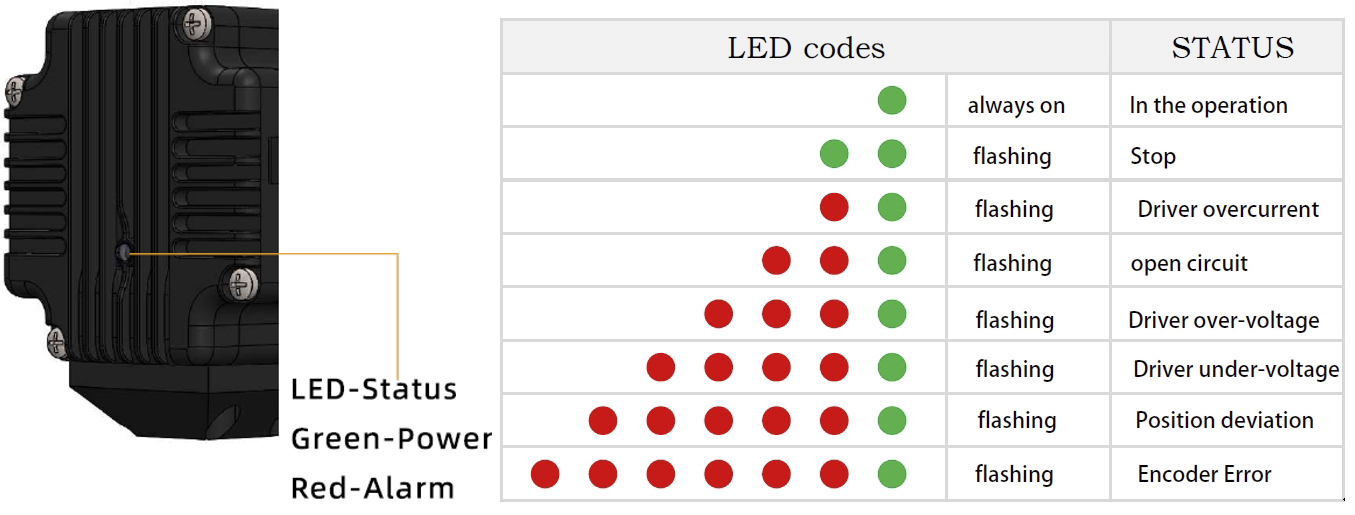
more Information on detail, please feel free to contact me


AR57 NEMA23 RS-485 Integrated Stepper Motor
Product Introduction
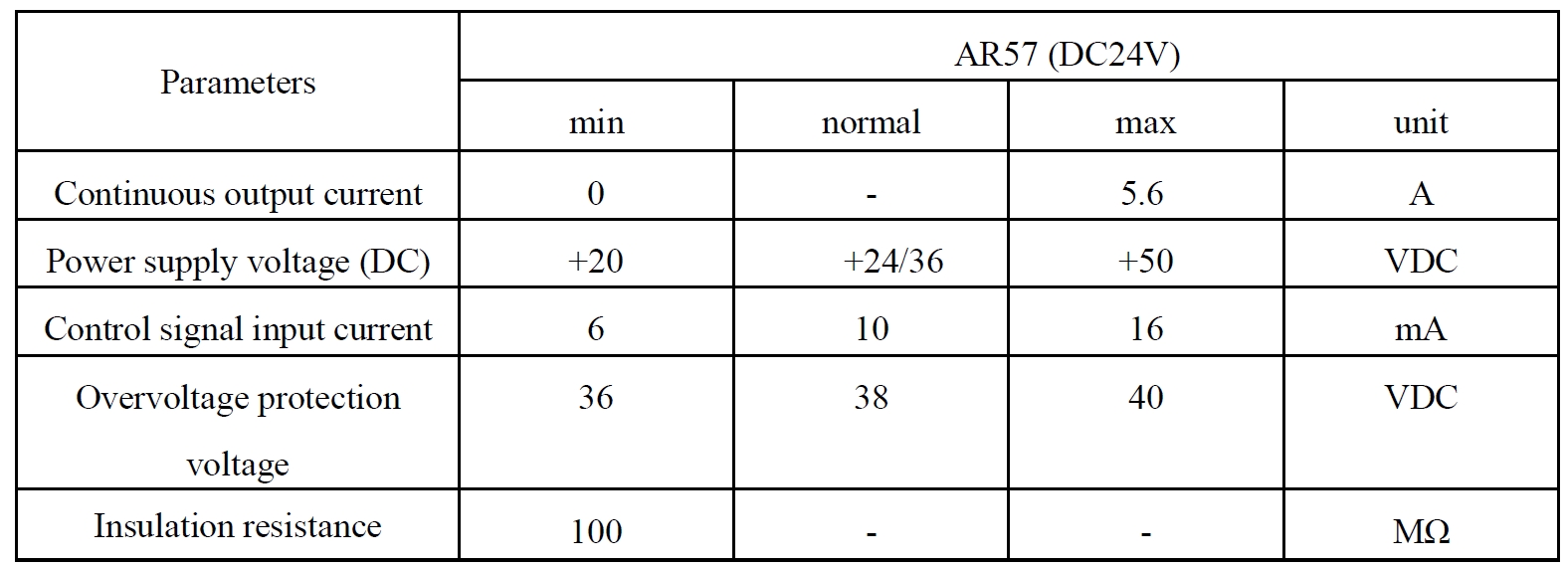
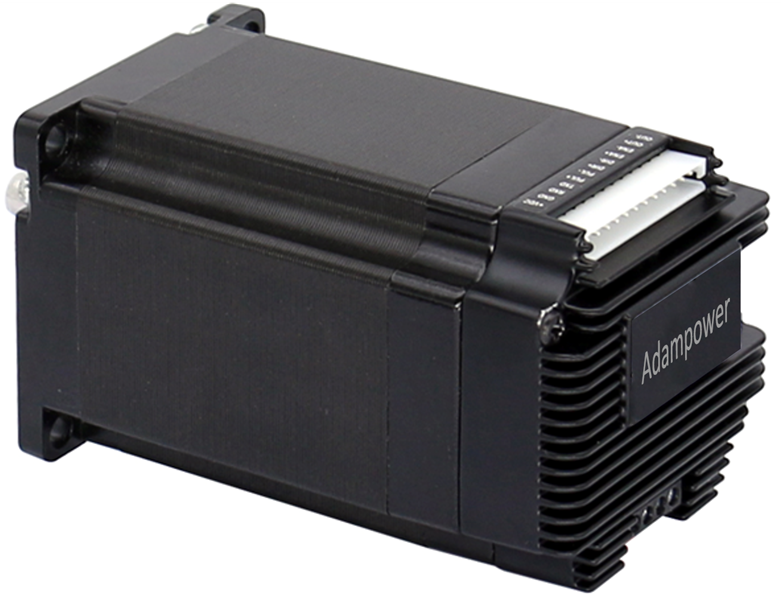
AR57 is a high-integrated and compact size stepper driver. It adopts standard RS485 communication protocol, can be connected with PLC, HMI, industrial computer and other upper computer with only two communication lines.
Up to 32 axes of motion platform networking can be achieved with its built-in motion control commands. AR57 can be set to 1-256 subdivisions and adopts built-in micro-subdivision technology, which can achieve high subdivision effects even under low subdivision conditions, ensuring that the motor operates with uniform step intervals and no large or small step problems. Stable output at 1/12 rpm.
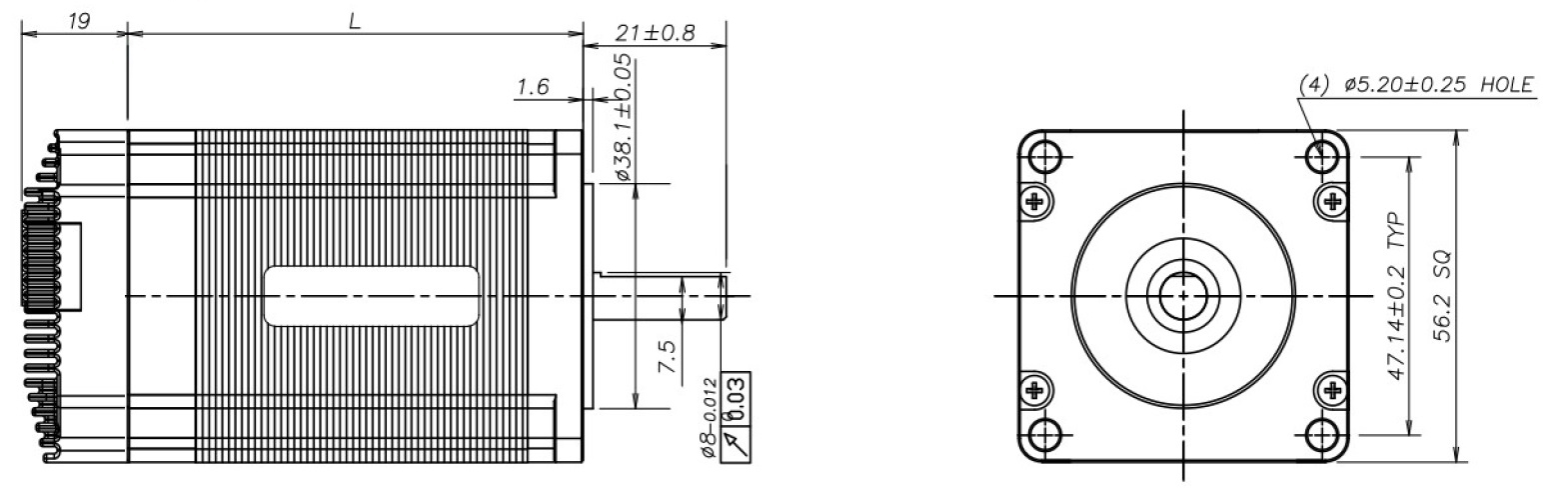
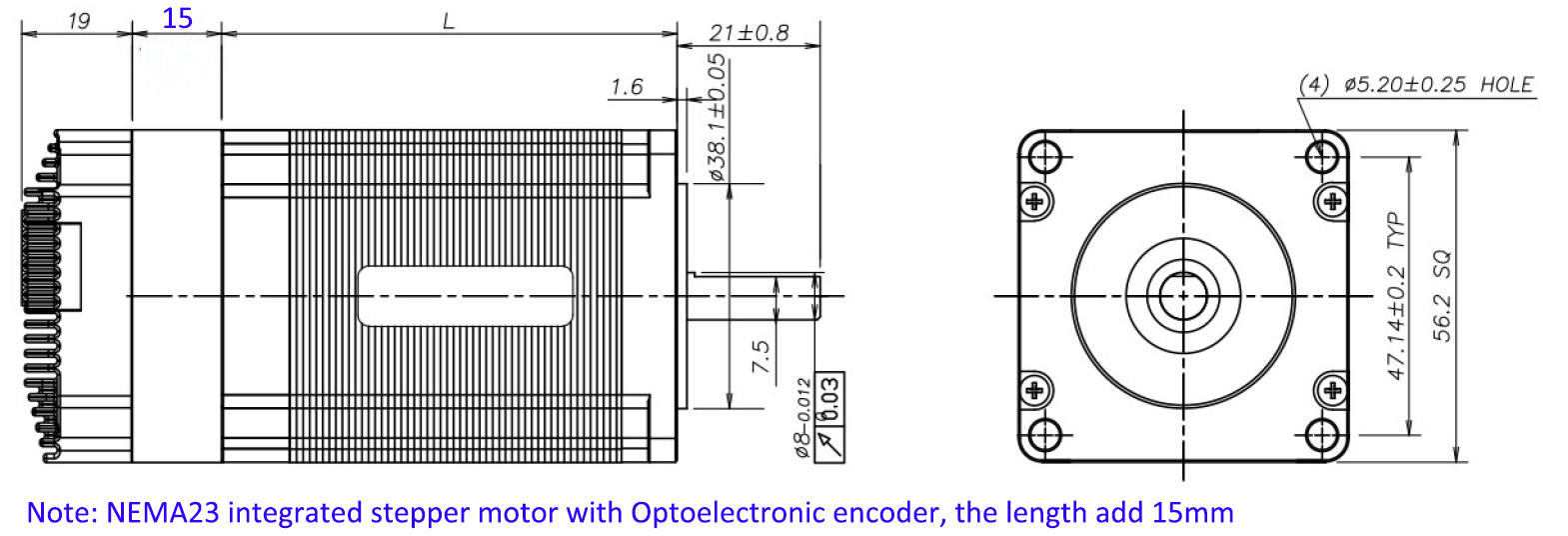
AR57 is designed for NEMA23 stepper motor. The NEMA23 integrated stepper motor with torque 1.0 and 2.0 Nm:
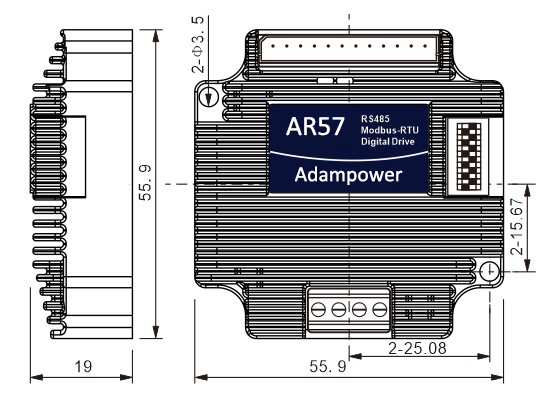
Product Specifications
| Model No. | Holding Torque (N·m) | Motor Length L (mm) | Shaft Diameter (mm) | Encoder Type |
|---|---|---|---|---|
| AR57-10 | 1.0 | 56 | 8 | 1000 line Magnetic Encoder |
| AR57-20 | 2.0 | 76 | 8 | |
| NEMA23 Integrated stepper motor with Optical Encoder, the length will add 15mm | ||||
| AR57-10L | 1.0 | 56 | 8 | 1000 line Optical Encoder |
| AR57-20L | 2.0 | 76 | 8 | |
Port Definition
OUT /OUT- as differential output port. Max receive voltage is DC24V, instantaneous output current is 100mA, continuous output current is 50mA.
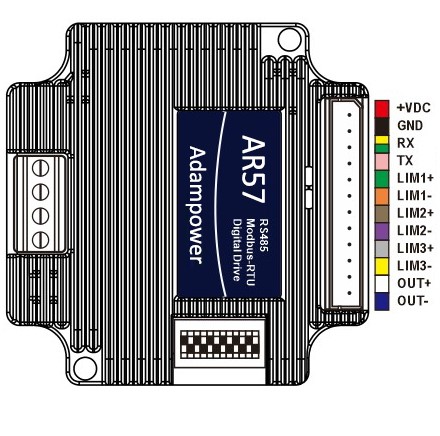
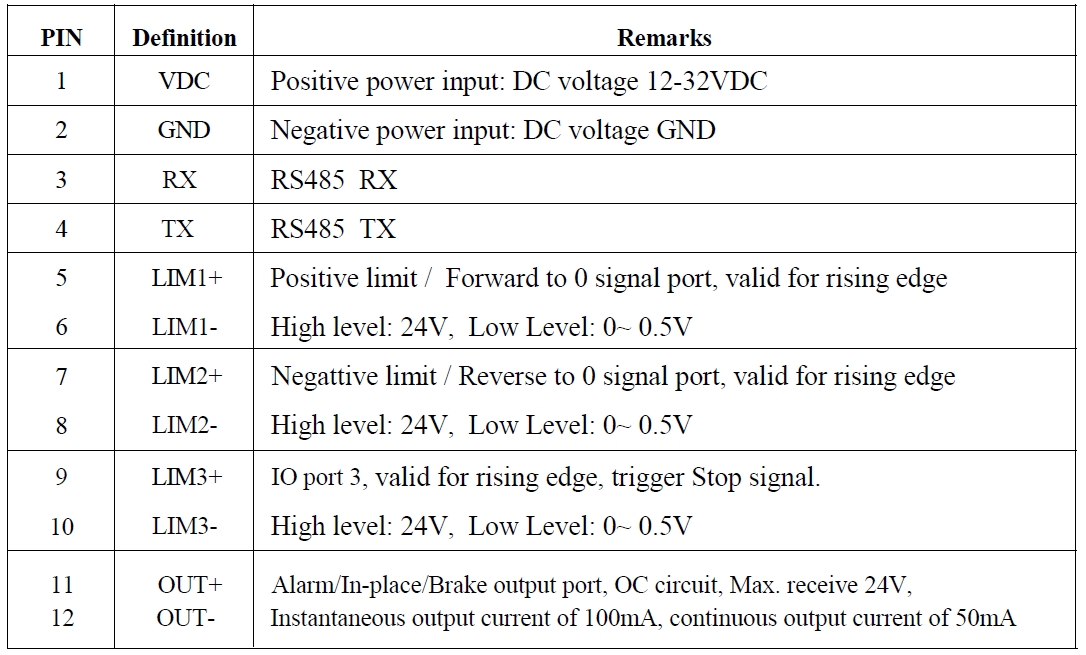
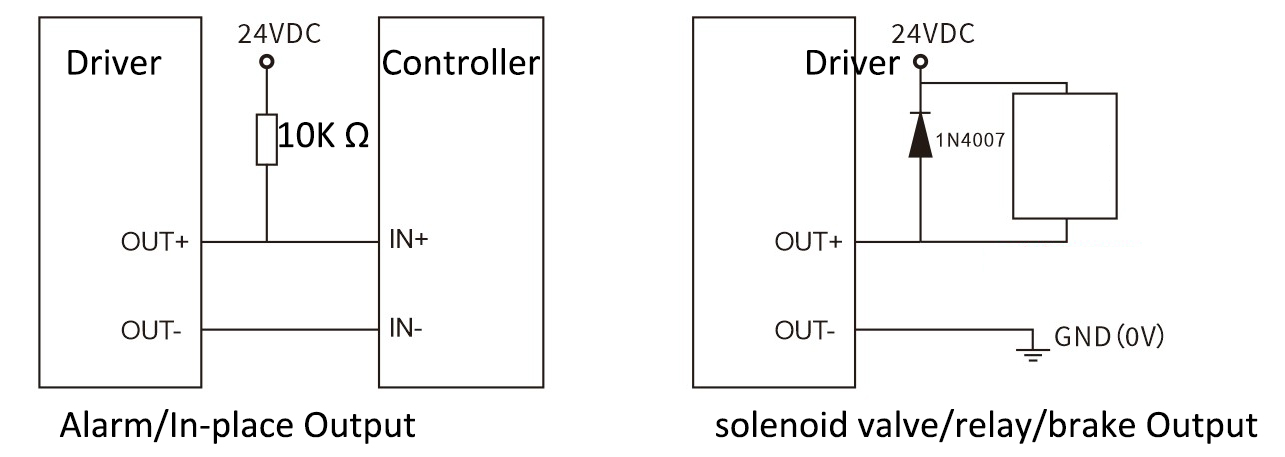
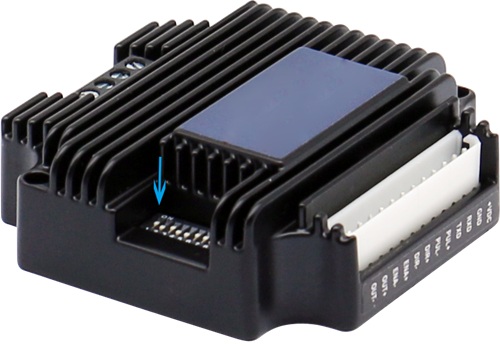
DIP Switch Configuration
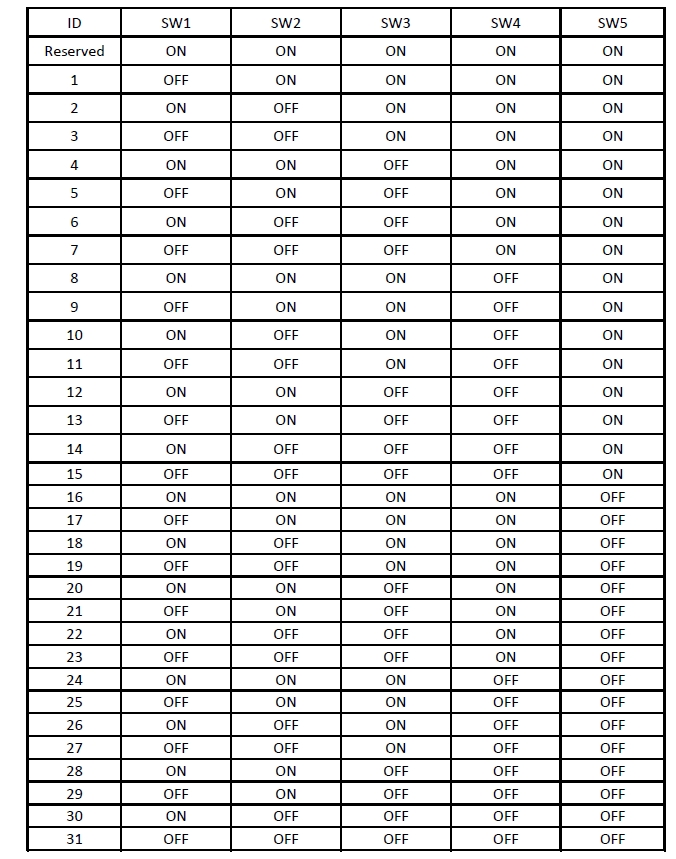
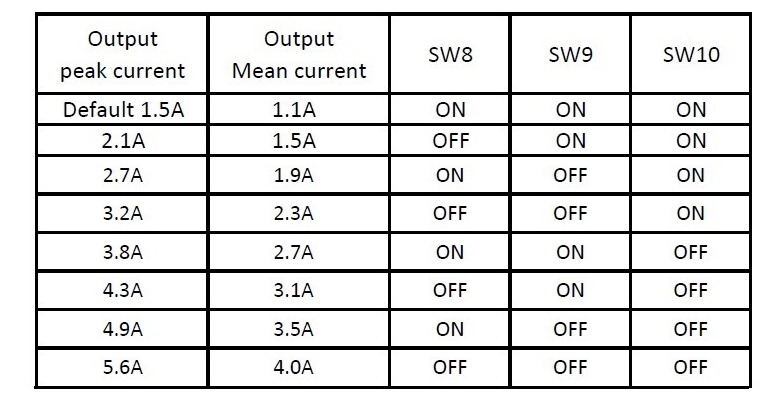
Set ID Address, Baud Rate and Output Current by SW1~SW10

Set ID Address
The formula for calculating the ID table is: ID = 1×SW1 2×SW2 4×SW3 8×SW4 16×SW5. The default ID is 0, 0 means broadcast address for global control.
Set Baud Rate
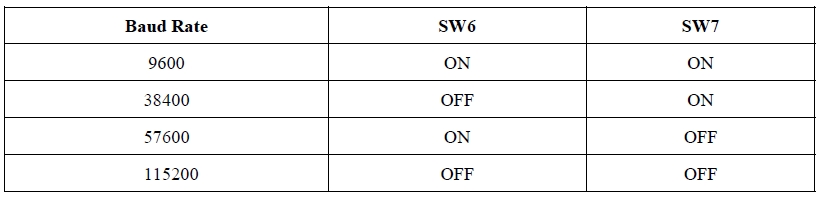
Note: When the communication baud rate in the table cannot meet the usage requirements, the baud rate can be customized by the host computer when SW6 and SW7 are turned ON.
Set Output Current
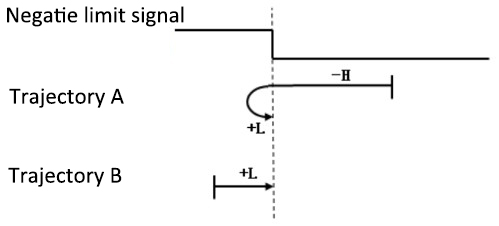
Zero-Return Function
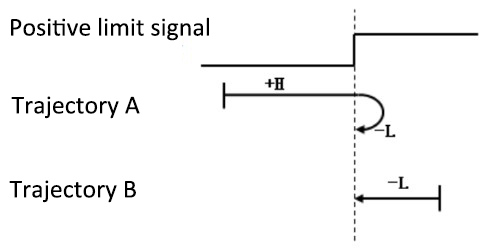
Zero-return function with two trajectory A and when limit signal is triggered and not:
Downloads & Support
- User Manual: AR57 Modbus Stepper Motor Controller User Manual
- Software: Modbus Poll |
AdamPower CloseStep
More Information on detail, please feel free to contact me

IRO23 NEMA23 RS-485 Integrated Stepper Motor
Product Introduction
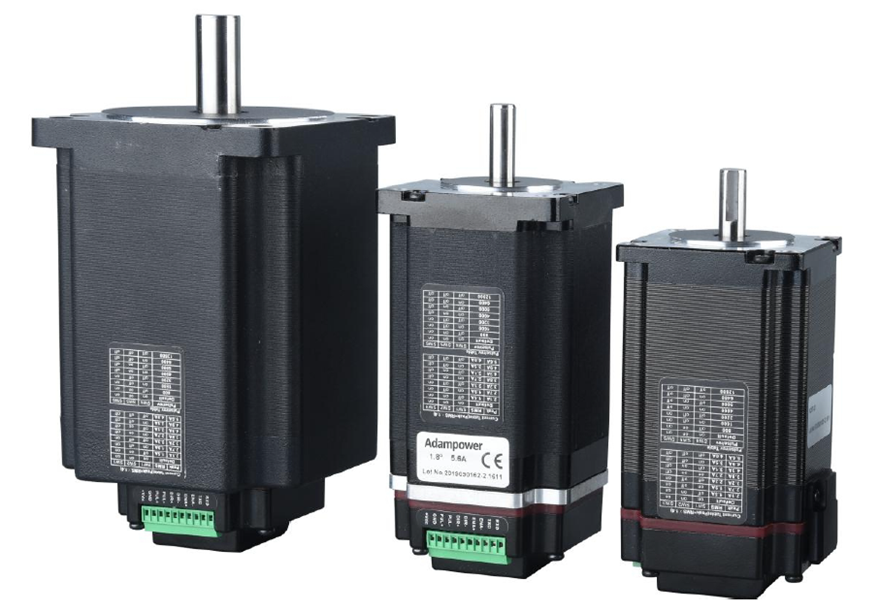
IRO23 is a high-integrated and compact size stepper driver. It adopts standard RS485 communication protocol, can be connected with PLC, HMI, industrial computer and other upper computer with only two communication lines.
Up to 32 axes of motion platform networking can be achieved with its built-in motion control commands. IRO can be set to 1-256 subdivisions and adopts built-in micro-subdivision technology, which can achieve high subdivision effects even under low subdivision conditions, ensuring that the motor operates with uniform step intervals and no large or small step problems.
Electrical Characteristics
| Explanation | Minimum Value | Typical Value | Maximal Value | Unit |
|---|---|---|---|---|
| Continuous output current | 0.5 | - | 5.6 | A |
| Power Supply Voltage (DC) | 15 | 24/36 | 50 | VDC |
| Control signal input current | 6 | 10 | 16 | mA |
| Control signal input Voltage | - | 5 | - | VDC |
| Overvoltage point | 54 | 55 | 56 | VDC |
| Step frequency | 1 | - | 1000 | KHz |
| Insulation Resistance | 100 | - | - | MΩ |
Product Advantages
- High Integration: Compact driver-motor integrated design saves installation space and reduces wiring complexity.
- RS485 Communication: Standard Modbus RTU protocol, compatible with PLC, HMI, and industrial PC with only two communication lines.
- Multi-Axis Networking: Built-in motion control commands support up to 32 axes networking on a single motion platform.
- Advanced Micro-Subdivision: 1-256 subdivisions with built-in micro-subdivision technology ensures smooth operation even at low subdivision settings.
- Wide Voltage Range: DC 15-50V input flexibility for various industrial power supply environments.
Suitable Motor Specifications
The integrated driver can be used for NEMA23 open-loop hybrid stepper motors and linear screw stepper motors of different specifications from major motor manufacturers. The driver can be sold separately.
If you need to purchase our driver and motor complete set of products, we generally recommend the following two standard models. Other models of stepper motors or suitable screw stepper motors can be customized according to customer needs.
Standard Compatible Models
| Model No. | Holding Torque (N·m) | Motor Length (mm) | Driver Thickness (mm) | Weight (kg) |
|---|---|---|---|---|
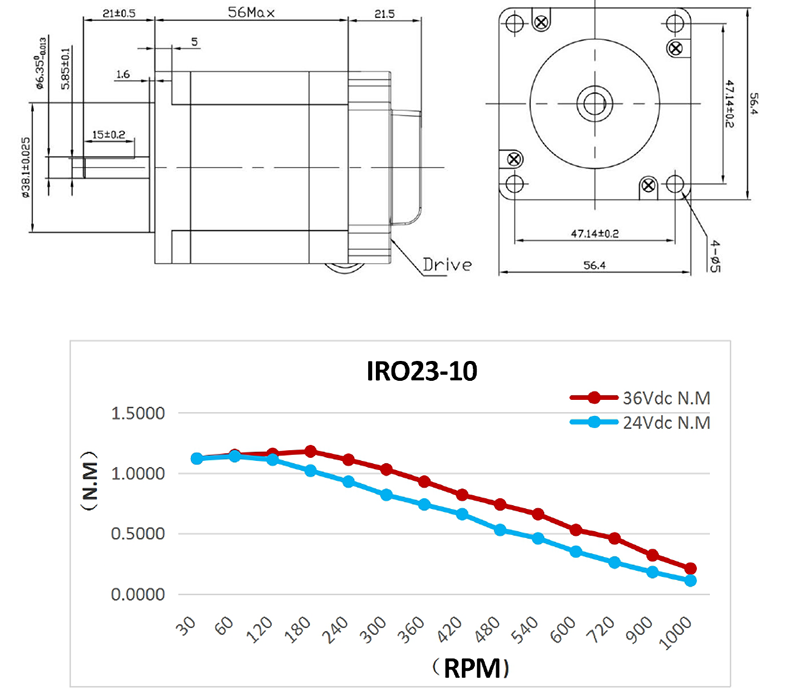
| IRO23-10 | 1.0 | 56±1 | 21.5±1 | 0.9 |
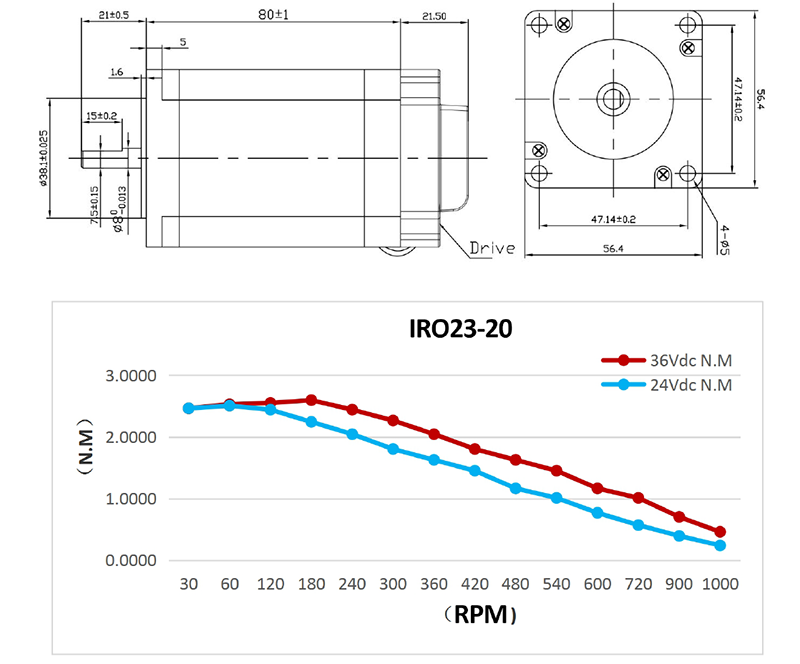
| IRO23-20 | 2.0 | 80±1 | 21.5±1 | 1.2 |
IRO23-10 RS485 integrated stepper motor specifications and motor torque-frequency characteristic curve:
IRO23-20 RS485 integrated stepper motor specifications and motor torque-frequency characteristic curve:
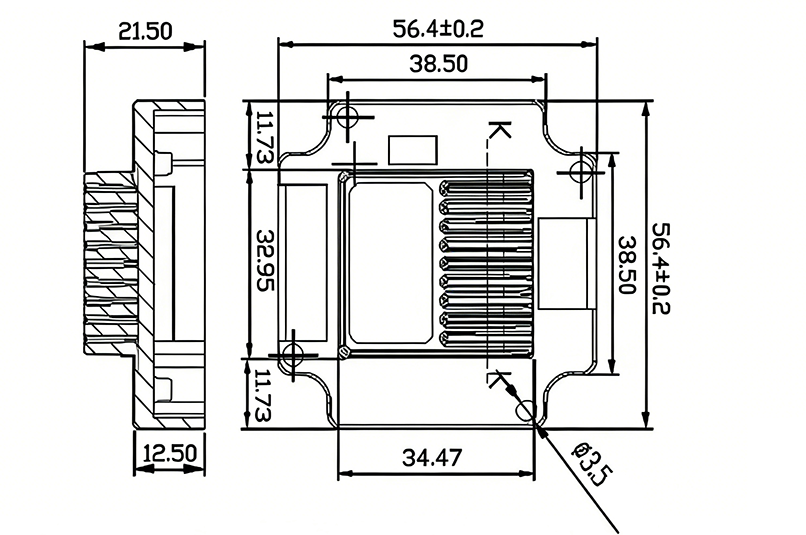
IRO23 RS485 Stepper Motor Driver Dimensions
Application Scenarios
- Industrial Automation: Pick-and-place machines, labeling equipment, assembly lines, and packaging machinery requiring precise motion control.
- CNC Machinery: Small CNC routers, engraving machines, and 3D printers needing multi-axis coordinated control.
- Medical Devices: Medical equipment requiring low-noise, high-precision stepping motion such as syringe pumps and diagnostic instruments.
- Laboratory Equipment: Reliable positioning control for test benches, sampling systems, and automated analysis instruments.
Pin Definition & Interface
The control signal and the power supply input port use the 8Pin 2.0 mm terminal.
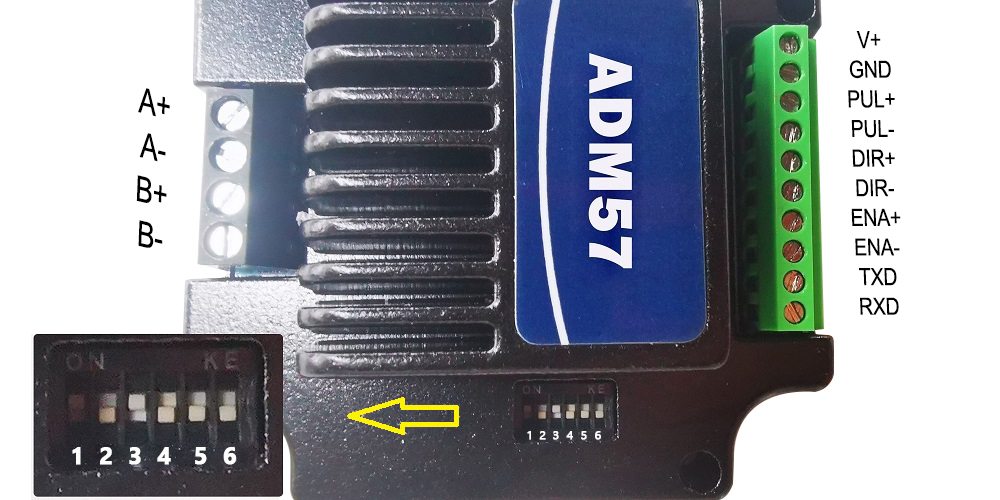
| Pin | Signal Name | Function Description |
|---|---|---|
| 1 | VDC | Power positive input: DC VOLTAGE 15-50VDC |
| 2 | GND | Negative power input: GND of DC voltage |
| 3 | PUL | Receiving level 5VDC, pulse control signal input (negative) (left limit) |
| 4 | PUL- | - |
| 5 | DIR | Receiving level 5VDC, direction control signal input (negative) (back to zero) |
| 6 | DIR- | - |
| 7 | ENA | Receiving level 5VDC, enable control signal input (negative) (right limit) |
| 8 | ENA- | - |
| 9 | TXD | Serial port RS485 TXD |
| 10 | RXD | RXD serial port RS485 |
Operating Environment
| Parameter | Specification |
|---|---|
| Cooling Mode | Natural cooling or forced air cooling |
| Service Environment | Keep away from heating equipment, dust, oil mist, high humidity & strong vibration. No flammable gas or conductive dust. |
| Temperature | -10℃ ~ 50℃ |
| Humidity | 40 ~ 90% RH |
| Vibration | 5.9 m/s² MAX |
| Storage Temperature | -20℃ ~ 60℃ |
| Use Elevation | Below 1000 m |
| Weight | 0.7 kg |
Installation Notes
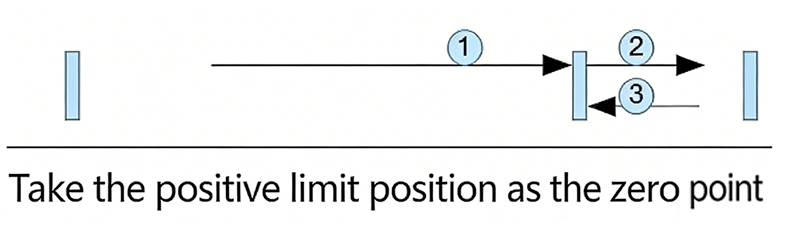
Return to Zero with Positive Limit Signal as Zero
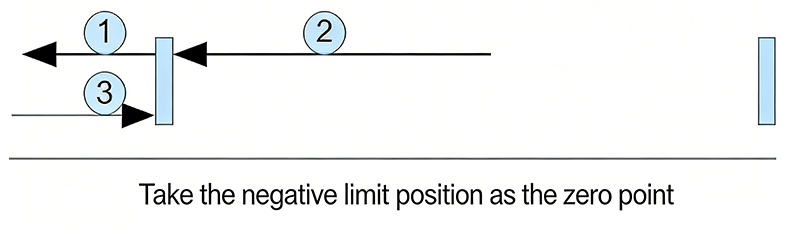
Return to Zero with Negative Limit Signal as Zero
Downloads & Support
- User Manual: IRO23 RS-485 Stepper Motor Controller User Manual
- Software: Modbus Poll | AdamPower
More Information on detail, please feel free to contact me

AR42 is a high-integrated and compact size stepper driver. It adopts standard RS485 communication
protocol, can be connected with PLC, HMI, industrial computer and other upper computer with only two
communication lines. Up to 32 axes of motion platform networking can be achieved with its built-in motion
control commands.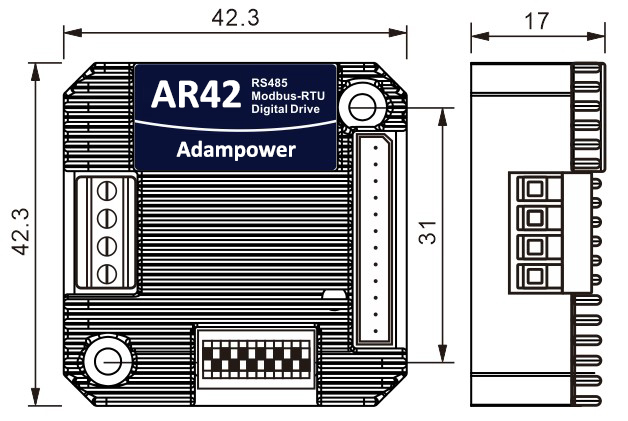
AR42 can be set to 1-256 subdivisions and adopts built-in micro-subdivision technology, which can achieve
high subdivision effects even under low subdivision conditions, ensuring that the motor operates with uniform
step intervals and no large or small step problems.
Can be set between 1-256 subdivisions, with uniform motor step spacing; Stable output at 1/12 rpm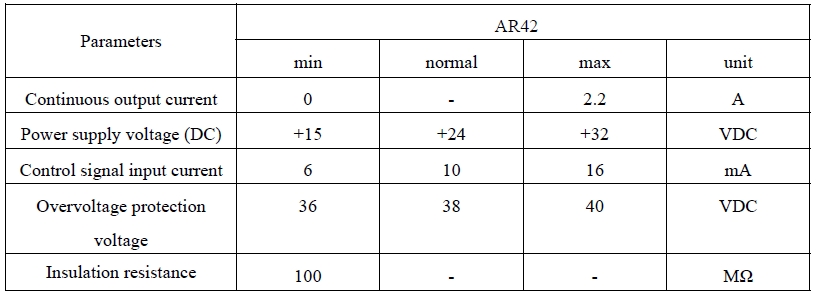
AR42 is designed for NEMA17 stepper motor, The NEMA17 integrated stepper motor with
torque 0.35, 0.50 and 0.7Nm:
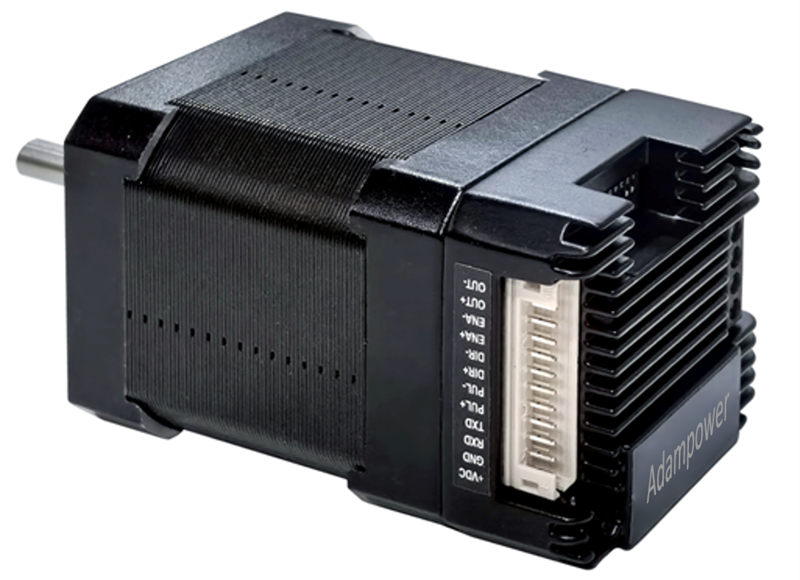
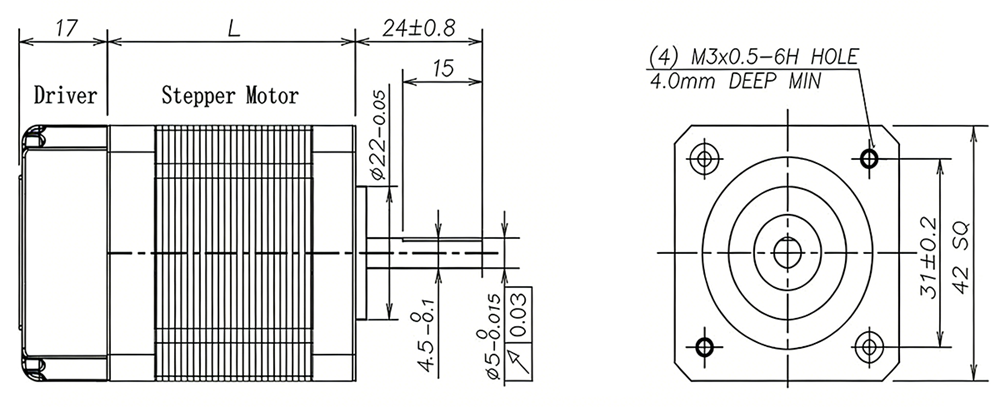
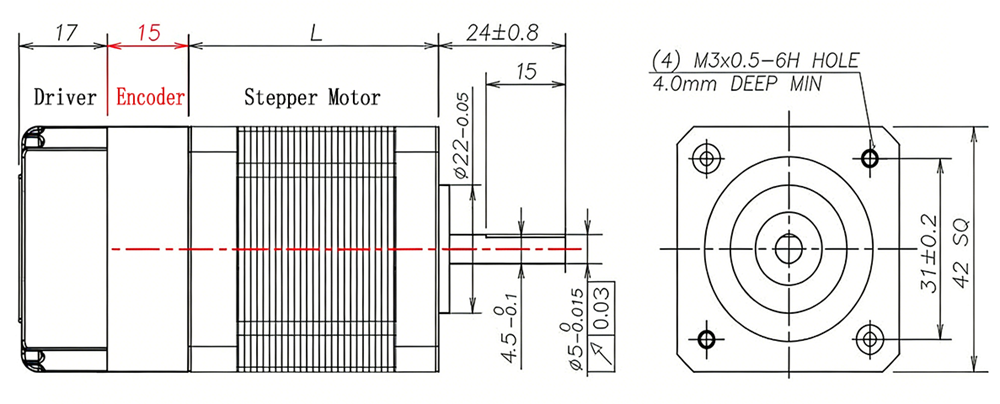
| Model No. | Holding Torque(Nm) | Motor Length L(mm) | Shaft diameter(mm) | Encoder Type |
| AR42-03 | 0.35 | 40mm | 5 | 1000 line Magnetic Encoder |
| AR42-05 | 0.50 | 48mm | 5 | |
| AR42-07 | 0.70 | 60mm | 5 | |
| NEAM23 Integrated stepper motor with Optical Encoder, the length will add 15mm | ||||
| AR42-03L | 0.35 | 40mm | 5 | 1000 line Optical Encoder |
| AR42-05L | 0.50 | 48mm | 5 | |
| AR42-07L | 0.70 | 60mm | 5 | |
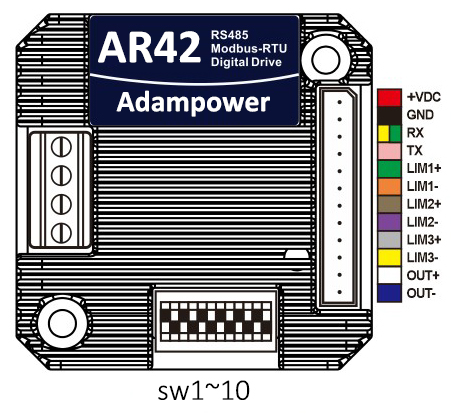
Port Definition
OUT /OUT- as defferential output port, Max.receive voltage is DC24V, and instaneous ouput
current is 100mA, continuous output current is 50mA.
Set ID address, Baud Rate and Ouptut current by SW1~SW10:
Zero-return function with two trajectory A and when limit signal is triggered and not:
AR42 Modbus Stepper Motor Controller User Manual
Software Modbus Poll
AdamPower Software
More Information on detail, please feel free to contact me

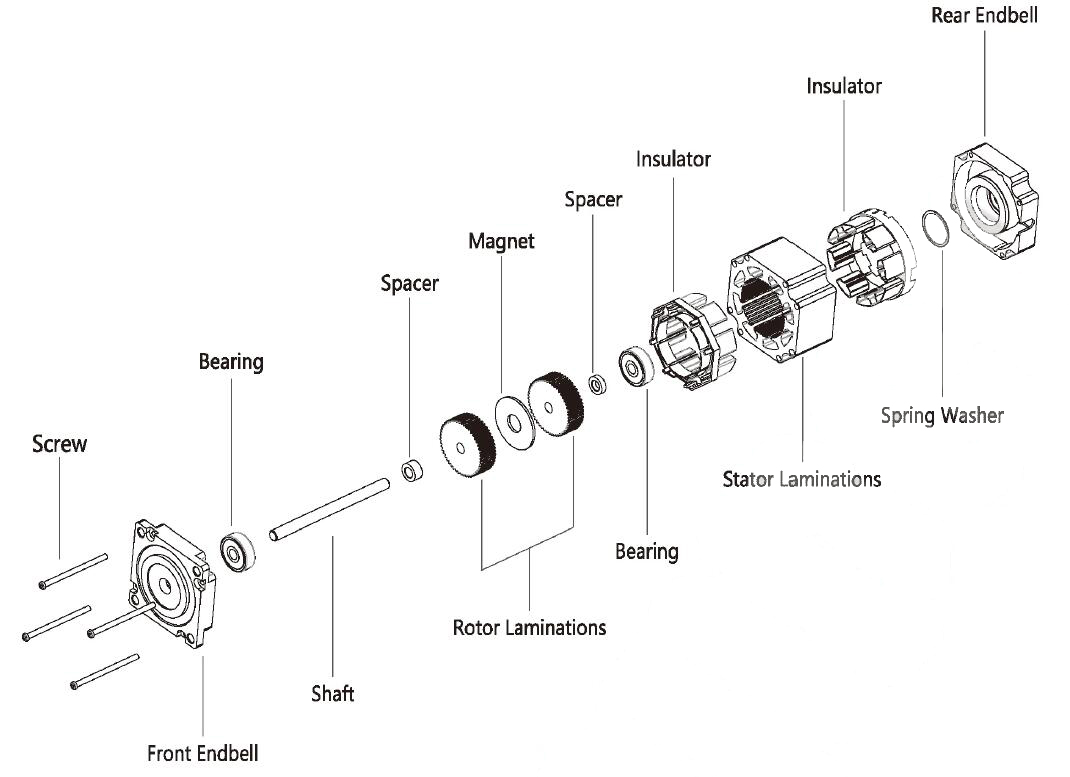
| Step Accuracy: | ±5% | Resistance Accuracy: | ±10% |
|---|---|---|---|
| Inductance Accuracy: | ±20% | Temperature Rise: | 80°C MAX |
| Ambient Temperature Range: | -20°C~ 50°C | Storage Temperature Range: | -30°C~ 60°C |
| Insulation Resistance: | 100M Ω MIN. 500V DC | Dielectric Strength: | 500V AC 1min |
| Radial Play: | 0.02mm MAX. (450g Load) | End Play: | 0.08mm MAX. (450g Load) |
| Max. Radial Force: | 20N | Max. Axial Force: | 2N |
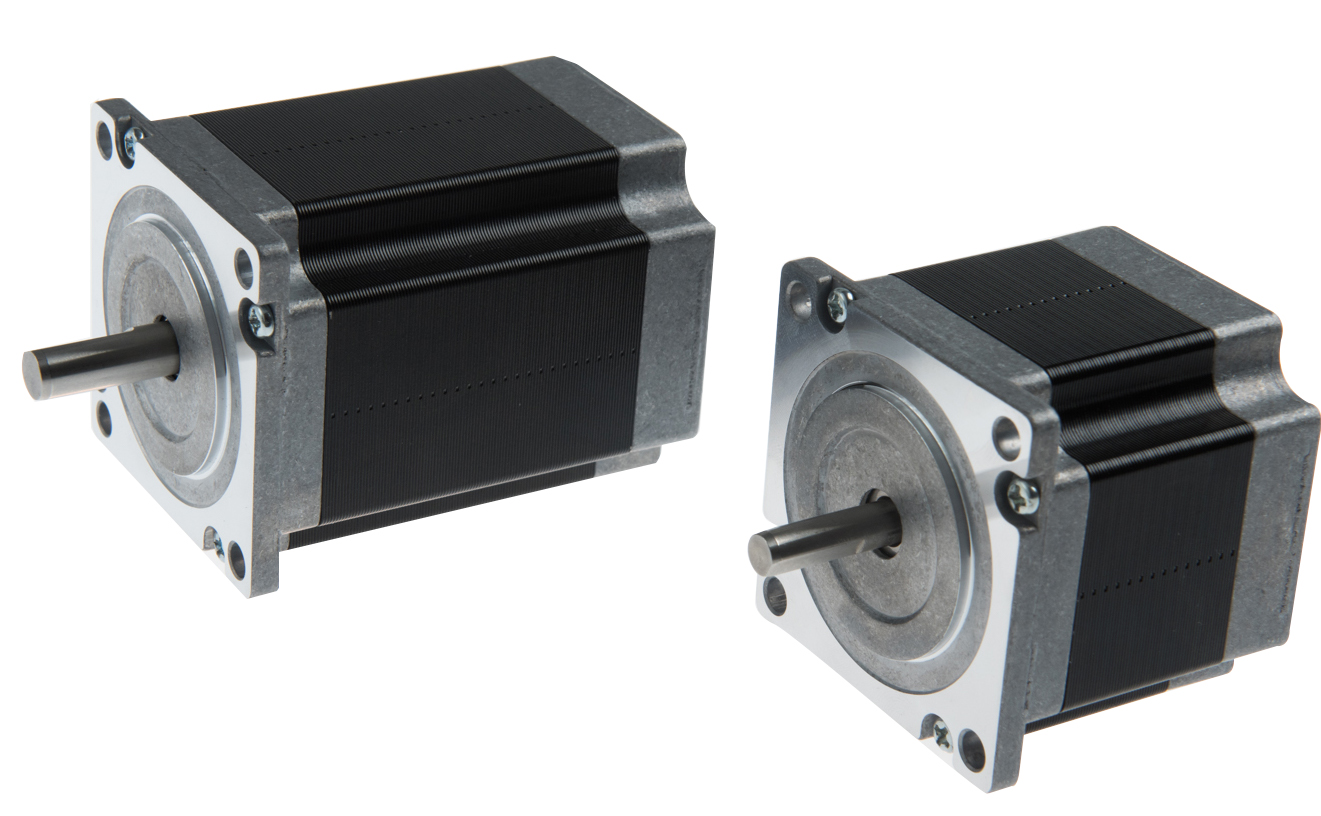
NEMA23 Stepper Motor, 1.8° step angle stepper motor
Electrical Specifications:
| Mode No. | Step Angle | Motor Length mm | Rated Voltage v | Rated Current A | Phase Resistance Ω | Phase Indutance Mh | Holding Torque (MIN) N.cm | Detent Torque (MAX) N.cm | Rotor Torque g.cm2 | Lead Wire | Motor Weight kg | Shaft Dia. mm |
| 23HS4406 | 1.8 | 41 | 7.44 | 0.62 | 12 | 24 | 55 | 2.5 | 150 | 4 | 0.47 | 6.35 |
| 23HS4610 | 1.8 | 41 | 5.2 | 1 | 5.2 | 5.5 | 40 | 2.5 | 15O | 6 | 0.47 | 6.35 |
| 23HS4620 | 1.8 | 41 | 2.8 | 2 | 1.4 | 1.4 | 39 | 2.1 | 120 | 6 | 0.45 | 6.35 |
| 23HS4428 | 1.8 | 41 | 2 | 2.8 | 0.7 | 1.4 | 55 | 2.1 | 120 | 4 | 0.45 | 6.35 |
| 23HS4630 | 1.8 | 41 | 1.9 | 3 | 0.63 | 0.6 | 39 | 2.1 | 120 | 6 | 0.45 | 6.35 |
| 23HS5610 | 1.8 | 51 | 6.6 | 1 | 6.6 | 8.2 | 72 | 3.6 | 275 | 6 | 0.65 | 6.35 |
| 23HS5620 | 1.8 | 51 | 3.3 | 2 | 1.65 | 2.2 | 72 | 3.6 | 275 | 6 | 0.65 | 6.35 |
| 23HS5425 | 1.8 | 51 | 3 | 2.5 | 1.2 | 3.2 | 110 | 2.8 | 190 | 4 | 0.52 | 6.35 |
| 23HS5428 | 1.8 | 51 | 2.3 | 2.8 | 0.83 | 2.2 | 101 | 3.6 | 275 | 4 | 0.65 | 6.35 |
| 23HS5630 | 1.8 | 51 | 2.2 | 3 | 0.74 | 0.9 | 72 | 3.6 | 275 | 6 | 0.65 | 6.35 |
| 23HS6610 | 1.8 | 56 | 7.4 | 1 | 7.4 | 10 | 90 | 4 | 300 | 6 | 0.7 | 6.35 |
| 23HS6620 | 1.8 | 56 | 3.6 | 2 | 1.8 | 2.5 | 90 | 4 | 300 | 6 | 0.7 | 6.35 |
| 23HS6425 | 1.8 | 56 | 3.25 | 2.5 | 1.3 | 4.2 | 110 | 3.5 | 280 | 4 | 0.68 | 6.35 |
| 23HS6430 | 1.8 | 56 | 2.4 | 3 | 0.8 | 2.4 | 110 | 3.5 | 280 | 4 | 0.68 | 6.35 |
| 23HS6630 | 1.8 | 56 | 2.3 | 3 | 0.75 | 1.1 | 90 | 4 | 300 | 6 | 0.7 | 6.35 |
| 23HS6442 | 1.8 | 56 | 1.68 | 4.2 | 0.4 | 1.2 | 110 | 3.5 | 280 | 4 | 0.68 | 6.35 |
| 23HS7410 | 1.8 | 64 | 7.5 | 1 | 7.5 | 20 | 150 | 5 | 380 | 4 | 0.85 | 6.35 |
| 23HS7425 | 1.8 | 64 | 3.75 | 2.5 | 1.5 | 4.5 | 150 | 5 | 380 | 4 | 0.85 | 6.35 |
| 23HS7430 | 1.8 | 64 | 2.4 | 3 | 0.8 | 2.3 | 150 | 5 | 380 | 4 | 0.85 | 6.35 |
| 23HS7442 | 1.8 | 64 | 2.31 | 4.2 | 0.55 | 1.2 | 150 | 5 | 380 | 4 | 0.85 | 6.35 |
| 23HS8610 | 1.8 | 76 | 8.6 | 1 | 8.6 | 14 | 135 | 6.8 | 480 | 6 | 1 | 6.35 |
| 23HS8615 | 1.8 | 76 | 6.75 | 1.5 | 4.5 | 7.8 | 140 | 6 | 440 | 6 | 1.05 | 6.35 |
| 23HS8620 | 1.8 | 76 | 4.5 | 2 | 2.25 | 3.6 | 135 | 6.8 | 480 | 6 | 1 | 6.35 |
| 23HS8425 | 1.8 | 76 | 4.5 | 2.5 | 1.8 | 6.5 | 180 | 6 | 440 | 4 | 1.05 | 6.35 |
| 23HS8630 | 1.8 | 76 | 3 | 3 | 1 | 1.6 | 135 | 6.8 | 480 | 6 | 1 | 6.35 |
| 23HS8421 | 1.8 | 76 | 4.2 | 2.1 | 2 | 6.4 | 180 | 6 | 440 | 4 | 1.05 | 6.35 |
| 23HS8430 | 1.8 | 76 | 3 | 3 | 1 | 3.5 | 190 | 6 | 480 | 4 | 1.05 | 6.35 |
| 23HS8442 | 1.8 | 76 | 2.5 | 4.2 | 0.6 | 1.8 | 180 | 6 | 440 | 4 | 1.05 | 6.35 |
| 23HS1430 | 1.8 | 100 | 4.2 | 3 | 1.4 | 5.5 | 250 | 10 | 680 | 4 | 1.25 | 6.35 |
| 23HS1442 | 1.8 | 100 | 3.36 | 4.2 | 0.8 | 3 | 250 | 10 | 680 | 4 | 1.25 | 6.35 |
| 23HS2430 | 1.8 | 112 | 4.8 | 3 | 1.6 | 6.8 | 280 | 12 | 800 | 4 | 1.4 | 8 |
| 23HS2442 | 1.8 | 112 | 3.78 | 4.2 | 0.9 | 3.8 | 280 | 12 | 800 | 4 | 1.4 | 8 |
Mechanical Dimensions and Wiring Diagram:
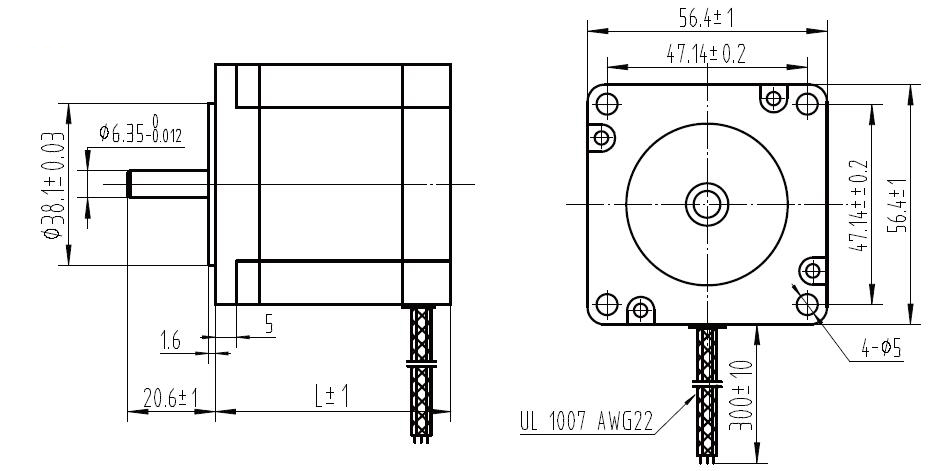
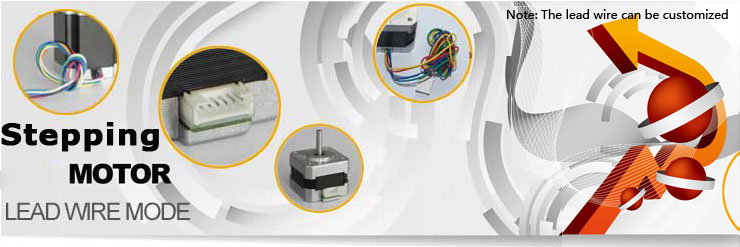
Lead Wire Mode Options:
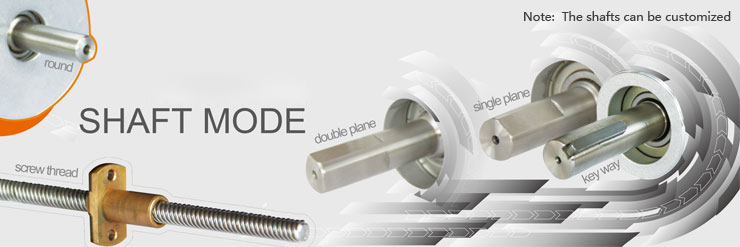
Shaft Mode can be customized as the requirement.
More Information on detail, please feel free to contact me

AR28 is a high-integrated and compact size stepper driver. It adopts standard RS485 communication protocol, can be connected with PLC, HMI, industrial computer and other upper computer with only two communication lines. Up to 32 axes of motion platform networking can be achieved with its built-in motion control commands.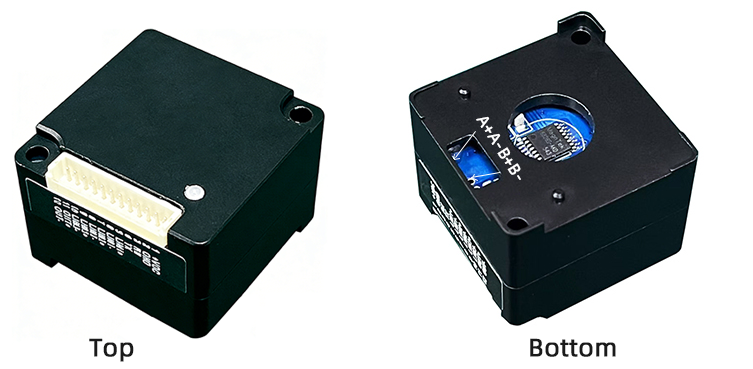
AR28 can be set to 1-256 subdivisions and adopts built-in micro-subdivision technology, which can achieve high subdivision effects even under low subdivision conditions, ensuring that the motor operates with uniform step intervals and no large or small step problems.
Can be set between 1-256 subdivisions, with uniform motor step spacing; Stable output at 1/12 rpm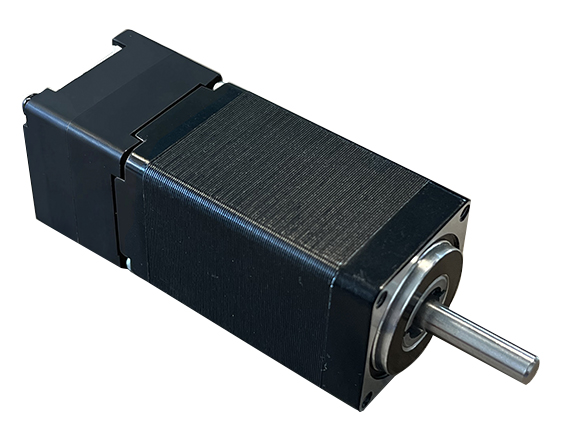
AR28 is designed for NEMA11/NEMA14 stepper motor, The NEMA11/NEMA14 integrated stepper motor with torque 0.06 ~ 0.35Nm:
1. Electrical Specifications
| Parameter | AR28 (5V IO) | Unit | ||
|---|---|---|---|---|
| Min | Typical | Max | ||
| Continuous Output Current | 0 | — | 1.5 | A |
| Power Supply Voltage (DC) | 15 | 24 | 28 | VDC |
| Control Signal Input Current | 6 | 10 | 16 | mA |
| Overvoltage Protection Voltage | — | 32 | — | VDC |
| Insulation Resistance | 100 | — | — | MΩ |
2. Operating Environment and Parameters
| Parameter | Specification |
|---|---|
| Cooling Method | Natural cooling or forced air cooling |
| Operating Environment - Location | Keep away from heating equipment, dust, oil mist, high humidity & strong vibration. No flammable gas or conductive dust. |
| Operating Environment - Temperature | -5℃ ~ 45℃ |
| Operating Environment - Humidity | 40 ~ 90% RH |
| Operating Environment - Vibration | 10 ~ 55Hz/0.15mm |
| Storage Temperature | -20℃ ~ 65℃ |
| Operating Altitude | ≤1000m |
| Weight | Driver section approx. 50g (excluding motor) |
3. Product Dimensions and Motor Matching
AR28 series closed-loop integrated motor basic parameters:
| Product Model | Motor Holding Torque | Shaft Length L | Motor Length L | Motor Specification |
|---|---|---|---|---|
| AR28-006IE | 0.06 Nm | 20mm | 32mm | NEMA11 |
| AR28-012IE | 0.12 Nm | 20mm | 51mm | NEMA11 |
| AR28-015IE | 0.15 Nm | 24mm | 34mm | NEMA14 |
| AR28-025IE | 0.25 Nm | 24mm | 47mm | NEMA14 |
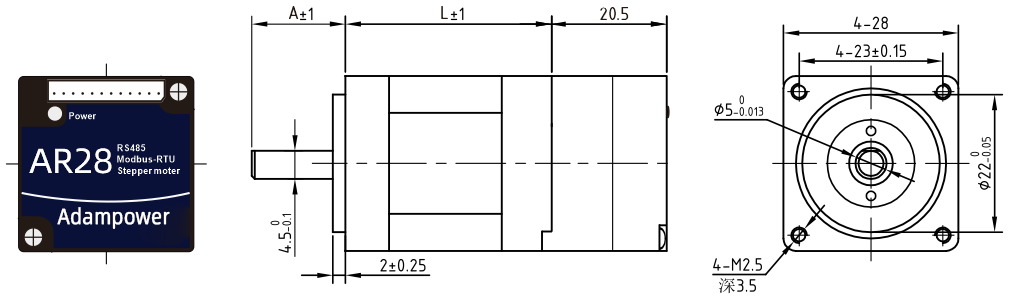
AR28-006IE / AR28-012IE Dimension Drawing (Refer to NEMA11 diagrams)
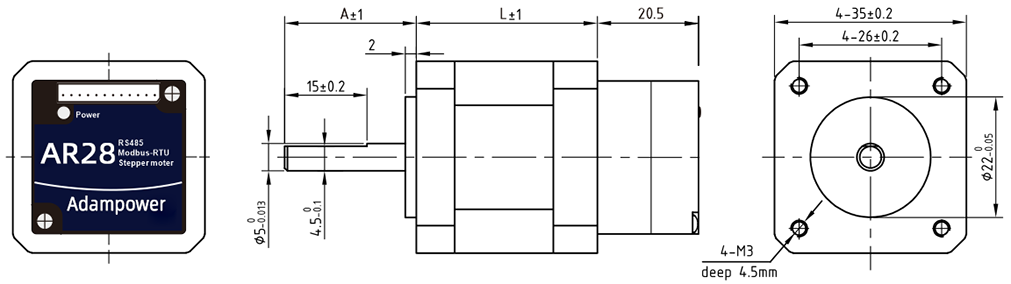
AR28-015IE / AR28-025IE Dimension Drawing (Refer to NEMA14 diagrams)
4. Heat Dissipation Precautions
The reliable operating ambient temperature for closed-loop integrated motors is typically within -5℃ ~ 45℃. Normal operating temperature is 50-80℃. If exceeding 80℃, it is necessary to evaluate whether the operating conditions and integrated motor selection are appropriate. If necessary, install a fan near the driver for forced cooling to ensure the driver operates within the reliable working temperature range.
5. LED Status Indicator
The red LED serves as both power indicator and fault display. When the driver is powered on, the LED is constantly on; when the driver is powered off, the LED is off. When a fault occurs, the indicator flashes in a 5-second cycle; when the fault is cleared by the user, the LED remains constantly on. The number of flashes within 5 seconds represents different fault information, as shown in the following table:
| No. | Flash Count | Fault Description |
|---|---|---|
| 1 | 1 | Overcurrent or inter-phase short circuit fault |
| 2 | 2 | Overvoltage fault |
| 3 | 3 | Undervoltage alarm |
| 4 | 7 | Position deviation alarm (excessive error) |
| 5 | 9 | Driver error, requires maintenance |
| 6 | 4 | Network congestion fault, requires power cycle (flashes 4 times, does not cycle) |
When a fault occurs, the driver will stop and display the corresponding fault code (item 3 network congestion has no code). The user must re-enable the driver or power cycle to clear the fault. When the driver detects a fault, it saves the latest fault to the EEPROM in a queue format. The driver can save up to 10 latest historical faults.
6. OUT Output Port Wiring Diagram
OUT /OUT- ports are differential output ports, allowing maximum voltage of 24V. Port instantaneous output current is 100mA, continuous output current is 50mA. To protect the port, when connecting external brakes, solenoid valves, relays, etc., freewheeling diodes must be connected across the devices to prevent port damage.
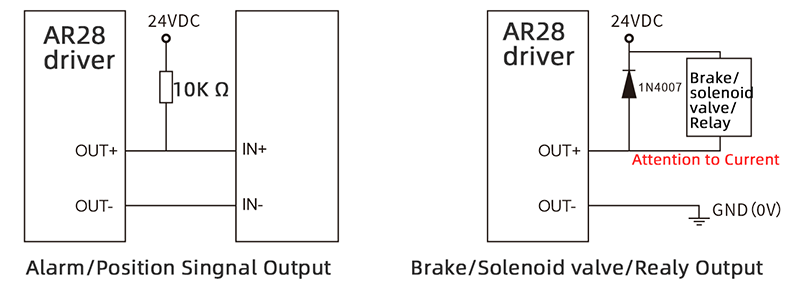
7. Zero-return Function
Zero-return function with two trajectory A and when limit signal is triggered and not:
8. Communication Protocol
Communication uses standard MODBUS protocol, supporting 0x03 (read register), 0x06 (write single register), 0x10 (16) (write multiple registers). Serial communication format: baud rate 9600~115200, 8 data bits, no parity, 1 stop bit.
AR28 Modbus Stepper Motor Controller User Manual
Software Modbus Poll
AdamPower Software
More Information on detail, please feel free to contact me

Pulse & direction stepper motor driver, support to connect magnetic encoder and photoelectric encoder.
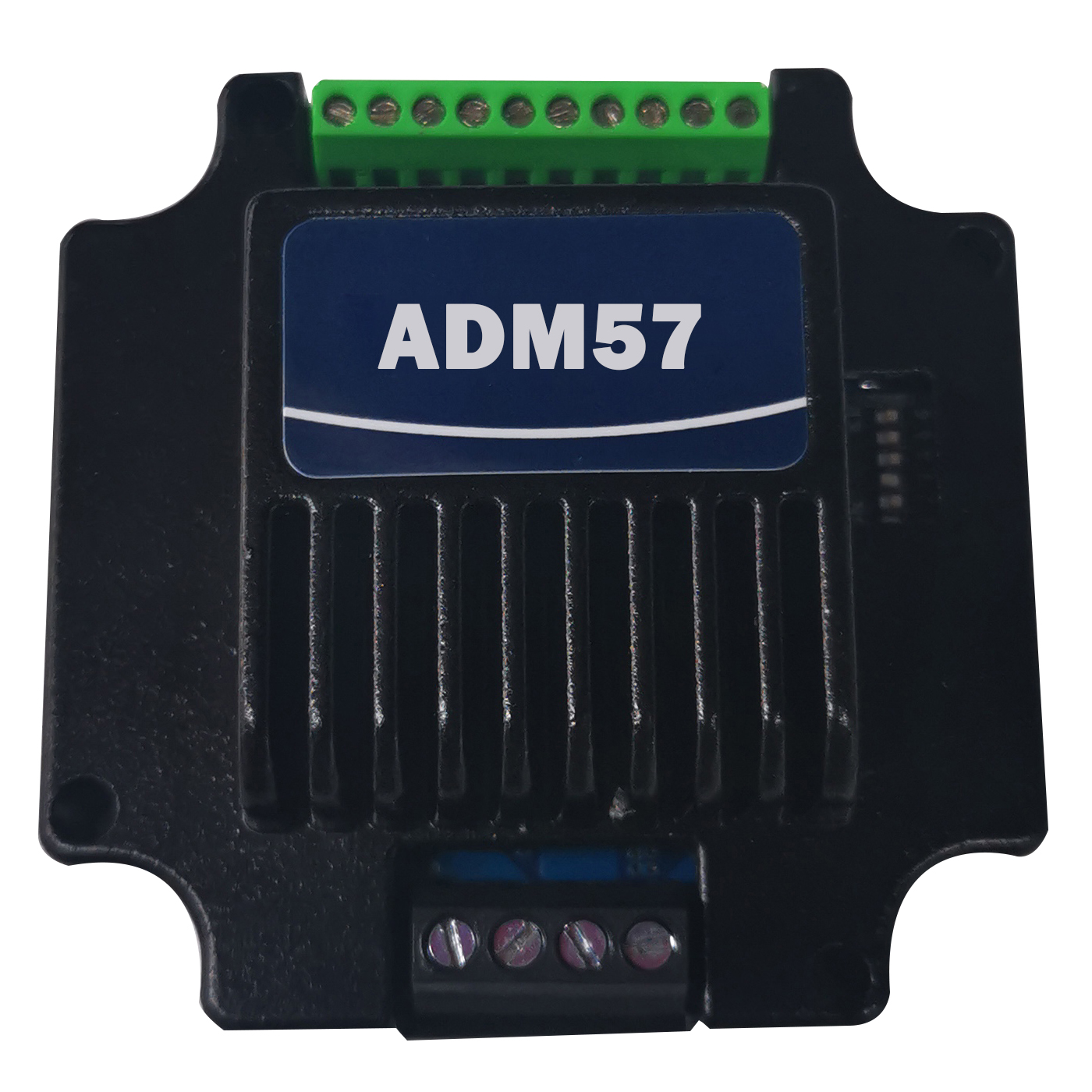
RS232 SERIAL STEPPER MOTOR CONTROLLER, PULSE AND DIRECTION STEPPER DRIVER,
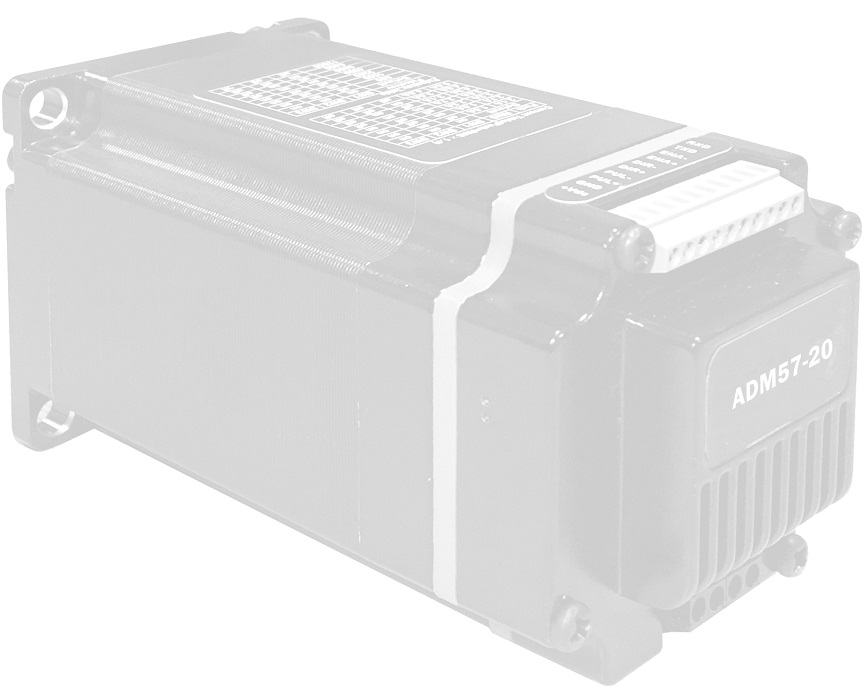
ADM57 IS DESIGN FOR NEMA23 INTEGRATED STEPPER MOTORS.
| Pin No. | Name | Description |
| 1 | VDC | Supply voltage: 12-50VDC |
| 2 | GND | Supply Voltage Ground: GND/0V |
| 3 | PUL | Pulse Control Signal Input: Rising Edge effective, PUL high level: 4~5V,, Low level : 0~5V . Make sure pulse signal effective, pulse width ≥ 1.2μs Add the resistance for power supply. |
| 4 | PUL- | |
| 5 | DIR | Direction Signal: high/low level signal:pulse width>5μs , High level: 4~5V,Low level: 0~0.5V |
| 6 | DIR- | |
| 7 | ENA | Enable Signal:enable/disable. If ENA connect 5V & ENA- connect low level(or Internal optocoupler on), stepper controller will turn off the current, motor in free state, no feedback even send pulses. |
| 8 | ENA- | |
| 9 | TXD | To the TX pin on user device (not for communication, set parameter only) |
| 10 | RXD | To the RX pin on user device (not for communication, set parameter only) |

Set working current:
| Output Peak Current | Mean Current | S1 | S2 | S3 |
| Default 1.5A | 1.1A | ON | ON | ON |
| 2.1A | 1.5A | OFF | ON | ON |
| 2.7A | 1.9A | ON | OFF | ON |
| 3.2A | 2.3A | OFF | OFF | ON |
| 3.8A | 2.7A | ON | ON | OFF |
| 4.3A | 3.1A | OFF | ON | OFF |
| 4.9A | 3.5A | ON | OFF | OFF |
| 5.6A | 4.0A | OFF | OFF | OFF |
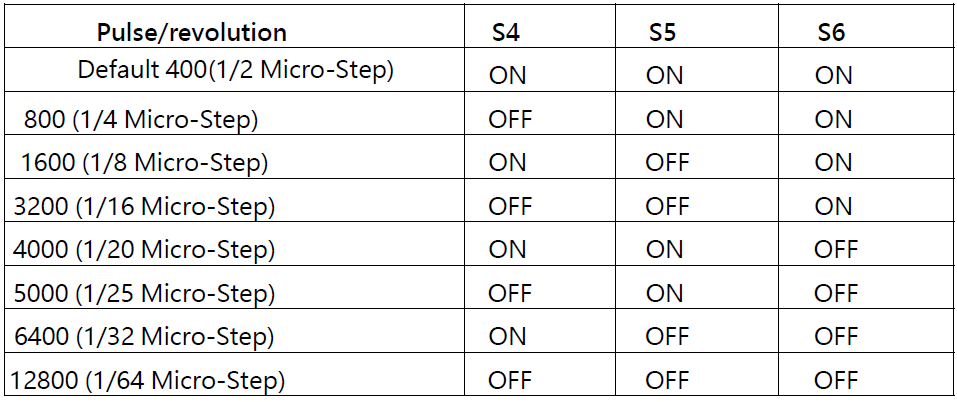
Set Micro-step:
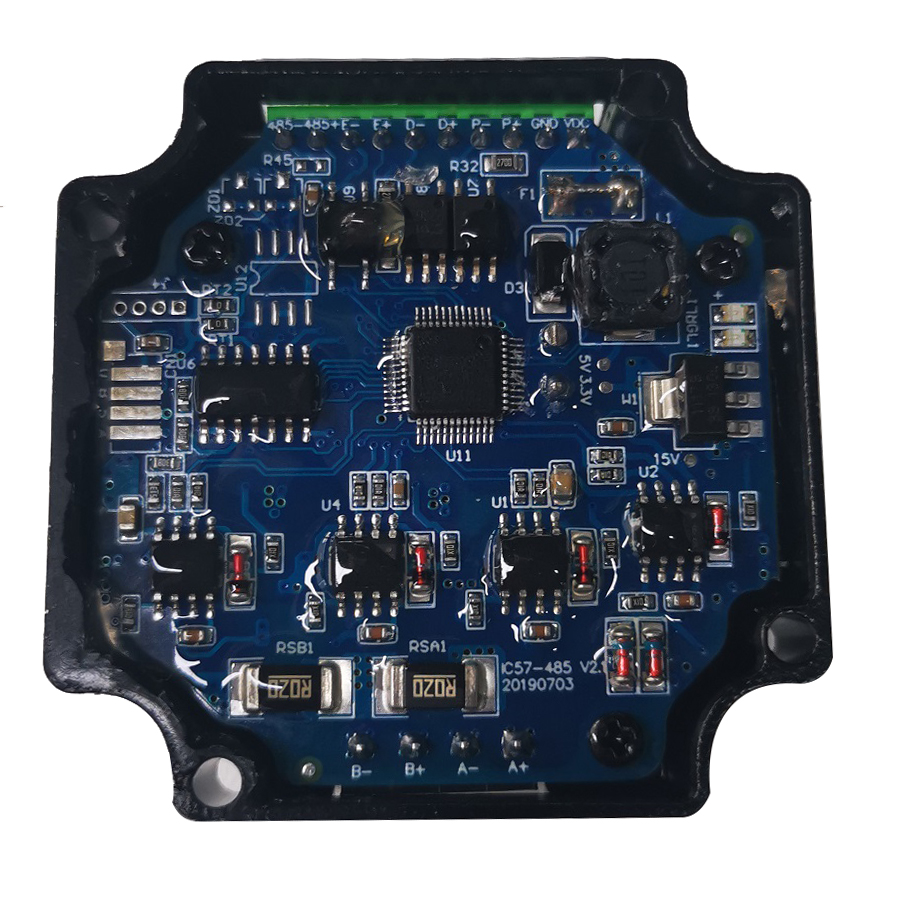
With same size as nema23 stepper motor, built-in 32-bit DSP digital chip.
Using new control algorithms such for vibration suppression and low heat-generation
Ensure the motor runs smoothly, with low noise and temperature controllable.
Adm57 stepper driver with maximum output current: 5.6a, meet all of NEMA23 stepper motor application requirement.
Achieve high subdivision effects through internal algorithms, even in the low micro-step condition, which widely applied in laser wire solutions.
Integrated automatic matching function for motor parameters, optimize the operating parameters, make sure the motors in good performance.
Adm57 stepper controller can be assembled as nema23 integrated stepper motor.
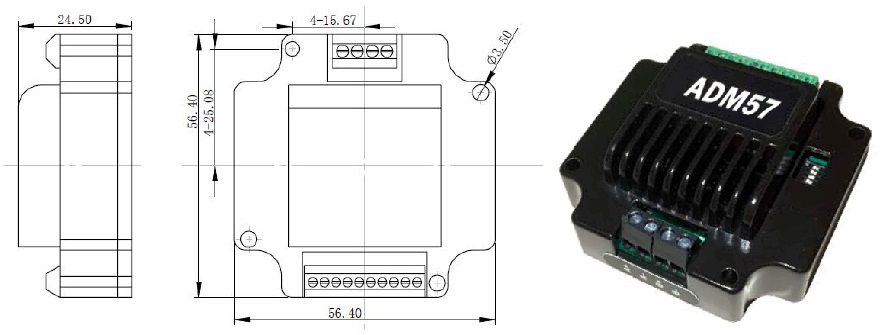
Make the integrated NEMA23 stepper motor directly via simple screw:
Input signal Single ended cathode connection: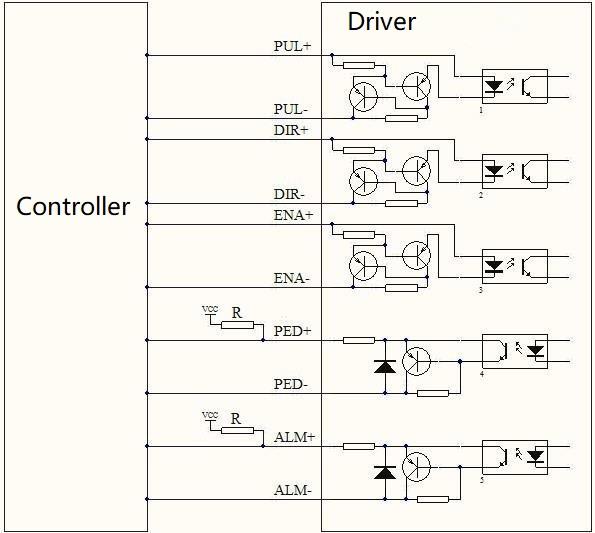
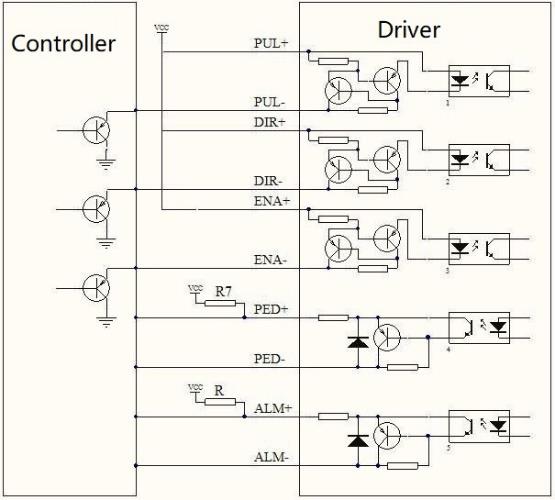
Input signal Single ended common anode connection:
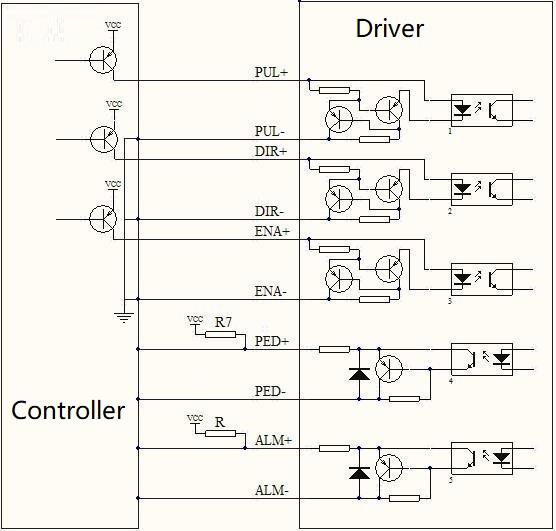
Input signal Single ended cathode connection:
ADM57 Pulse & Dircetion type stepper motor driver User Manual
More Information on detail, please feel free to contact me

Pulse & direction stepper motor driver, support to connect magnetic encoder and photoelectric encoder.
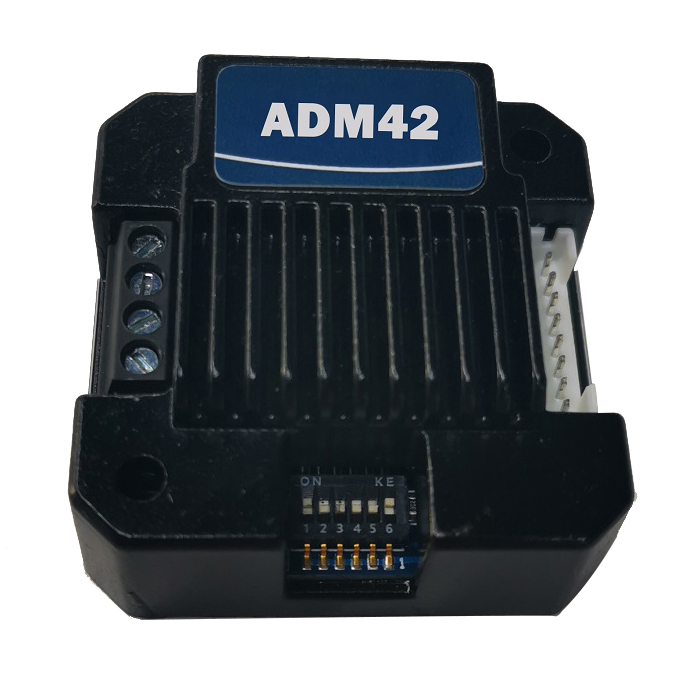
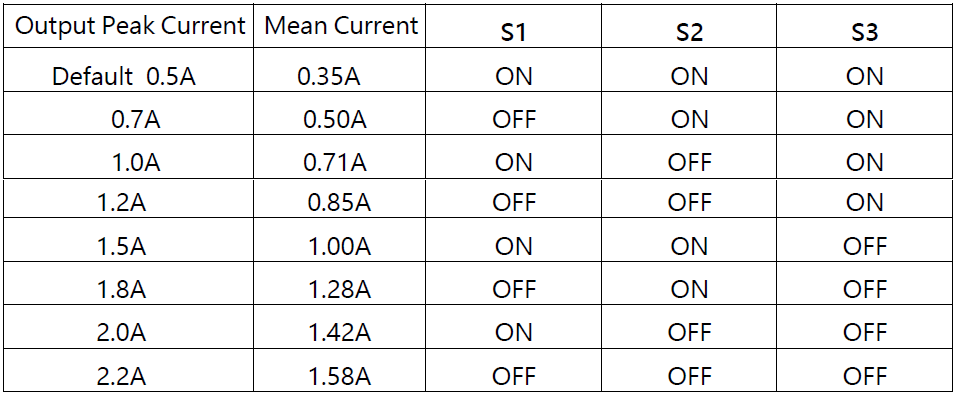
Set working current:
Set Micro-step:
● Miniature size 42.3mmx42.3mm x21mm
● Pulse & direction stepper driver also support the standard RS232 serial command, and built-in 32bit digital chip.
● Using new control algorithms such for vibration suppression and low heat generation
● DC input voltage 12~32VDC, recommended working voltage 24VDC.
● Continuous output current 1.58A max, max peak current 2.2A.
● Integrated design, mounted with 42/39mm stepper motor.
● Low vibration, low noise, stable operation, low motor heating.
● Any micro-step can be set .
● Protection functions such as overvoltage, undervoltage and overcurrent.
● Built-in automatic matching function of motor parameter.
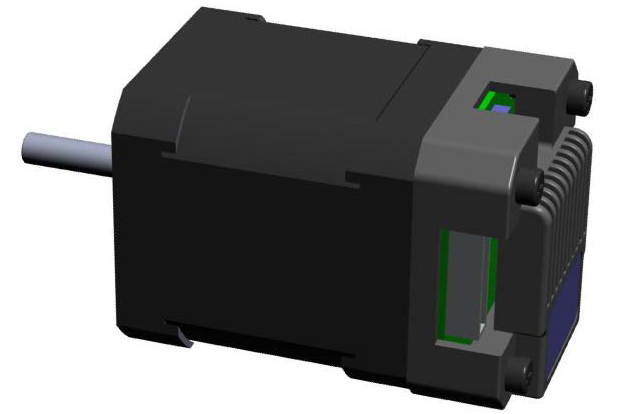
● ADM42 stepper driver can be assembled for NEMA17 Integrated Stepper Motors
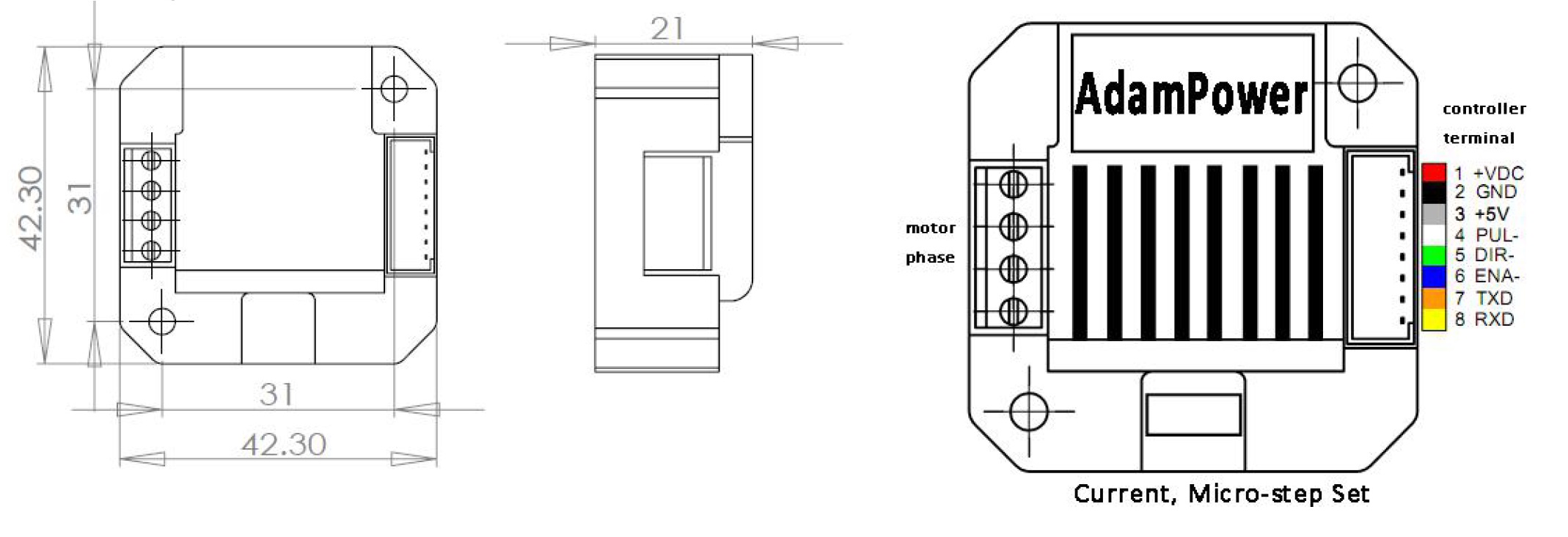
1.VDC: Positive power input: DC voltage 12-32VDC
2.GND: Negative power input: DC voltage GND
3.OPTO: Pules Direction, Enable common anode Input: 5V DC,
4.PUL-: Pulse Control Signal Input, Rising Edge effective
5.DIR-: Direction Control Signal Input, Rising Edge effective
6.ENA-: Enable Signal Input, Rising Edge effective
7.TXD: To the TX pin on user device
8.RXD: To the RX pin on user device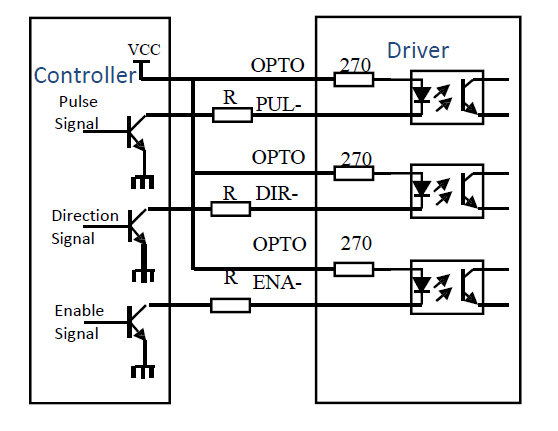
Make the integrated NEMA17 stepper motor directly via simple screw: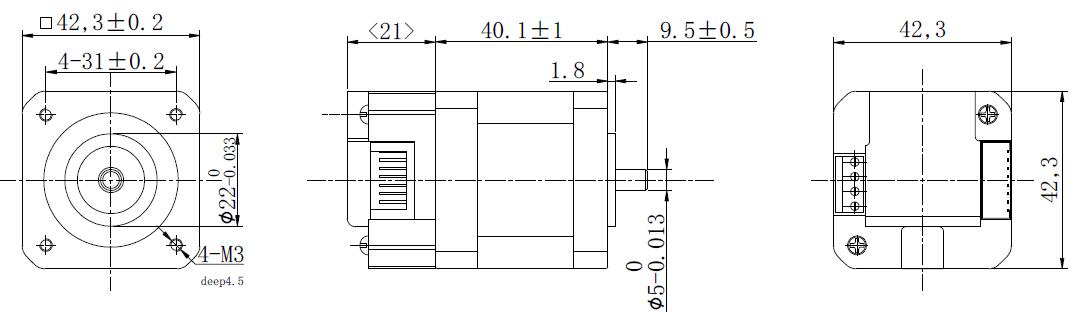
ADM42 Pulse & Dircetion type stepper motor driver User Manual
For ADM57 Pulse & Direction Stepper Motor Driver, please click below photo ↓
More Information on detail, please feel free to contact me

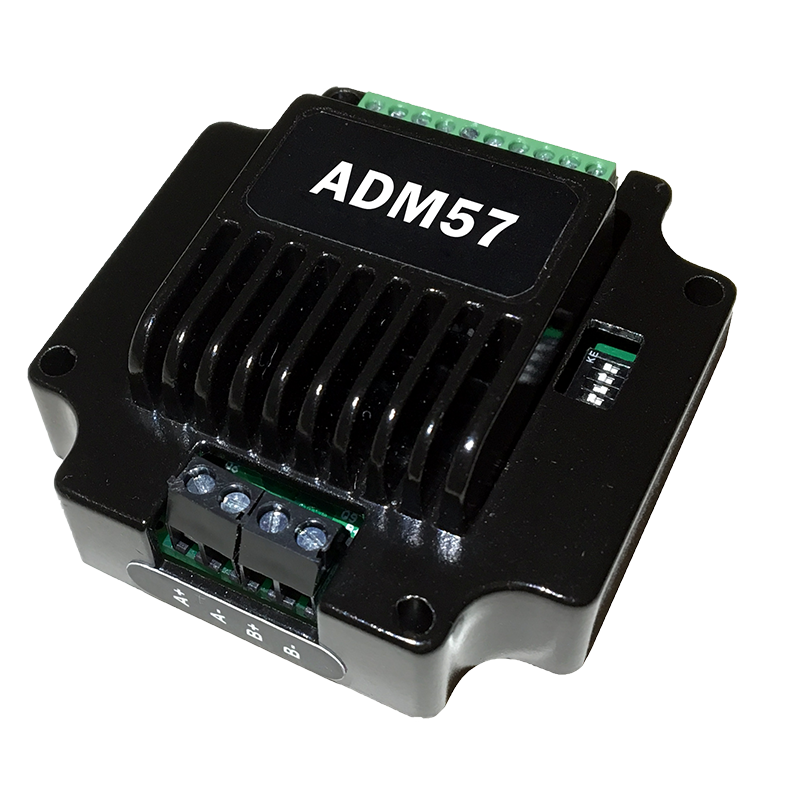
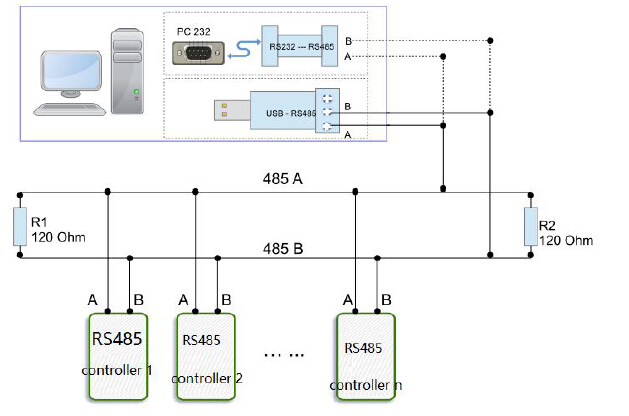
RS485 Serial Stepper Motor Controller, Design for NEMA23 Stepper Motors.
● Standard RS485 communication protocol and built-in motion control instructions.
● Multi-axes control, extending up to 32 axes for simultaneous control.
● DC input voltage 15~50VDC, recommended working voltage 36VDC.
● Continuous output current 4.0A max, max peak current 5.6A.
● Integrated design, mounted with NEMA23/NEMA34 stepper motor.
● Low vibration, low noise, stable operation, low motor heating.
● Any micro-step can be set .
● Protection functions such as overvoltage, undervoltage and overcurrent.
● Built-in automatic matching function of motor parameter.
● Serial port RS232/RS485 debugging function.
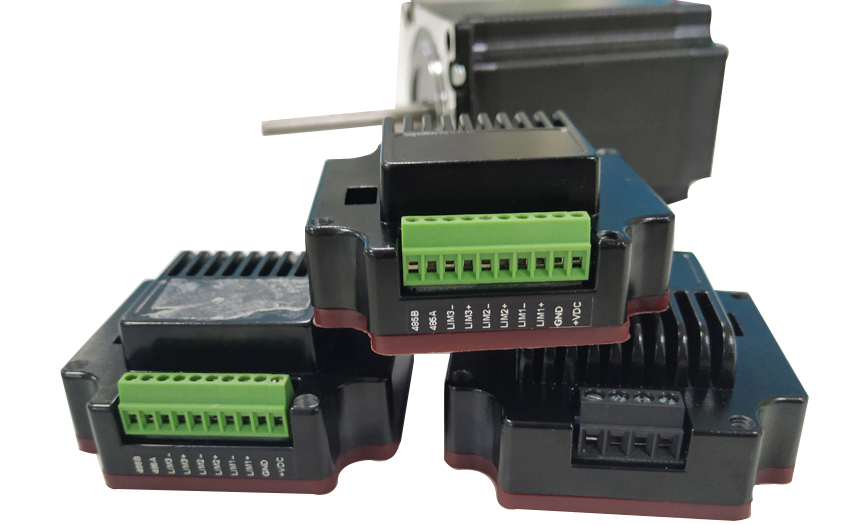
1.VDC: Positive power input: DC voltage 15-50VDC
2.GND: Negative power input: DC voltage GND
3.COM IO signal level common anode common terminal, amplitude 5VDC,
4.LIM1- Reverse limit signal port, valid for rising edge
5.LIM2- Reverse limit signal port, valid for rising edge
6.STA: Start and stop signal port, valid on rising edge
7.RSA: RS485 group A signal
8.RSB: RS485 group B signal
Working Principle:
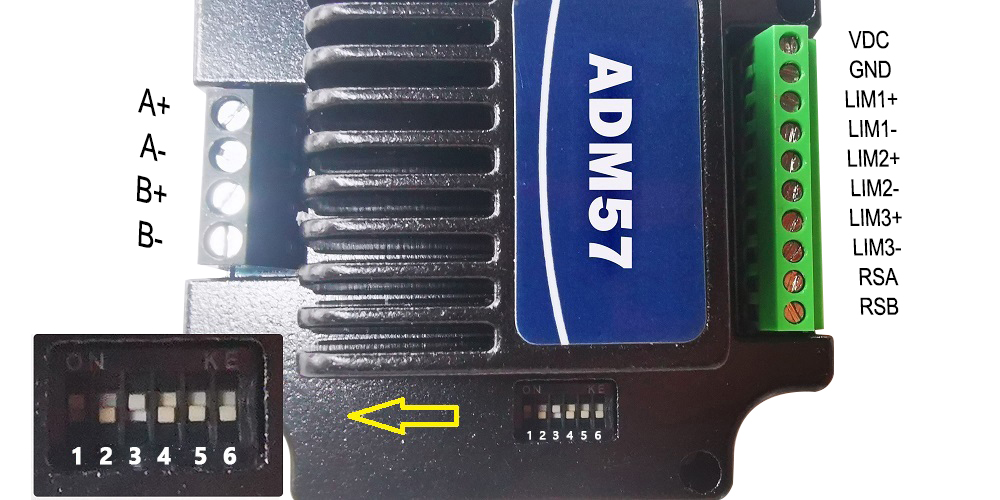
ADM57 stepper motor driver, using 6 DIP switch for set the communication baud rate and drive site:

Device ID | SW1 | SW2 | SW3 | SW4 |
Broadcast | ON | ON | ON | ON |
1 | OFF | ON | ON | ON |
2 | ON | OFF | ON | ON |
3 | OFF | OFF | ON | ON |
4 | ON | ON | OFF | ON |
5 | OFF | ON | OFF | ON |
6 | ON | OFF | OFF | ON |
7 | OFF | OFF | OFF | ON |
8 | ON | ON | ON | OFF |
9 | OFF | ON | ON | OFF |
10 | ON | OFF | ON | OFF |
11 | OFF | OFF | ON | OFF |
12 | ON | ON | OFF | OFF |
13 | OFF | ON | OFF | OFF |
14 | ON | OFF | OFF | OFF |
15 | OFF | OFF | OFF | OFF |
Note: The formula for calculating the ID: ID=1*SW1 2*SW2 4*SW3 8*SW4.
The default ID value is 0. broadcast mode accept data but not return data.
Communication baud rate setting:
Baud Rate | SW5 | SW6 |
9600 | ON | ON |
19200 | OFF | ON |
38400 | ON | OFF |
57600 | OFF | OFF |
ADM57S Series RS485 Serial Stepper Motor Controller, NEMA23 Integrated Stepper Motor.
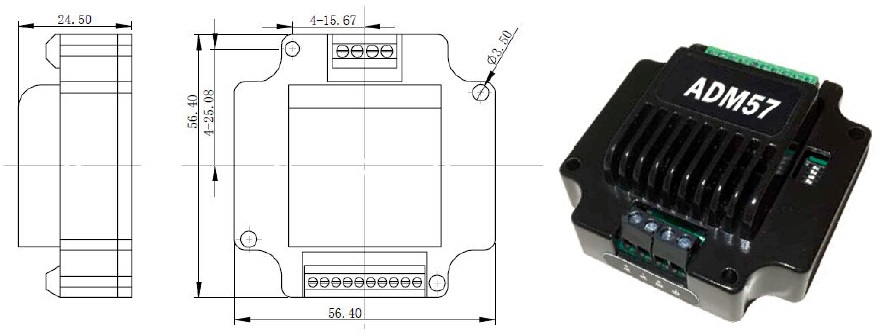
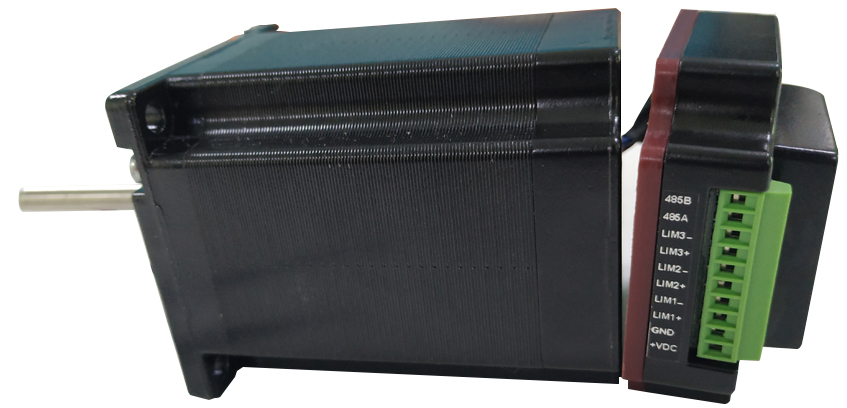
ADM57S RS485 Serial Stepper Motor Controller Manual 
More Information on detail, please feel free to contact me
CRC Check routine by C# :
Uint16 Funct_CRC16(unsigned char * puchMsg, Uint16 DataLen)
{
Uint16 i,j,tmp;
Uint16 crcdata=0xFFFF;
for(i=0;i<DataLen;i )
{
crcdata=(*puchMsg)^crcdata;
puchMsg ;
for(j=0;j<8;j )
{
tmp=crcdata&0x0001;
crcdata=crcdata>>1;
if(tmp){
crcdata=crcdata^0xA001;
}
}
}
returncrcdata;
}
Software Modbus Poll 
AdamPower Software

Pulse & direction stepper motor driver, support to Spontaneous pulses.
Spontaneous pulses Stepper Motor Driver with fixed working speed range.
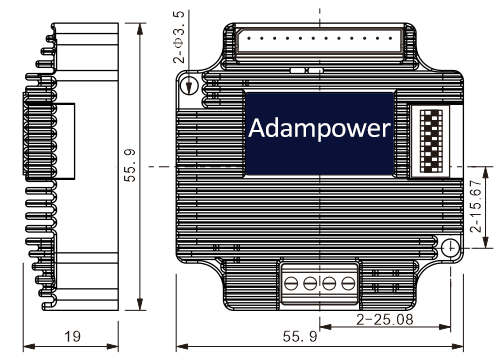
● Miniature size 55.9mm x 55.9mm x 19mm
● Pulse & direction stepper driver also support the standard RS232 serial command, and built-in 32bit digital chip.
● Using new control algorithms such for vibration suppression and low heat generation
● DC input voltage 20~50VDC, recommended working voltage 36VDC.
● Continuous output current 4.0A max, max peak current 5.6A.
● Integrated design, mounted with NEMA23/NEMA24 stepper motor.
● Low vibration, low noise, stable operation, low motor heating.
● Any micro-step can be set.
● Protection functions such as overvoltage, undervoltage and overcurrent.
● Built-in automatic matching function of motor parameter.
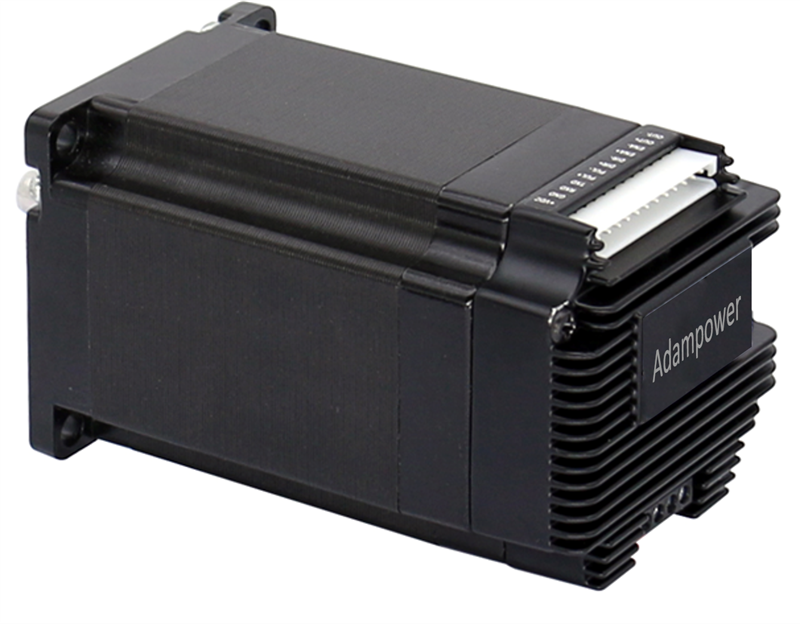
● AP57 stepper driver can be assembled for NEMA23 Integrated Stepper Motors
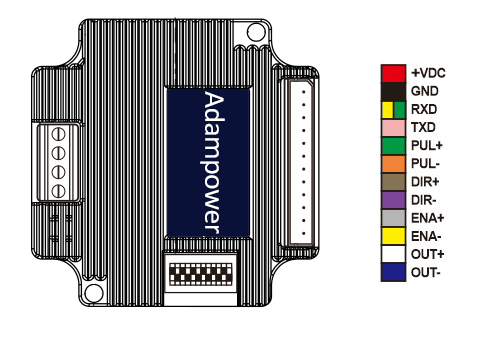
| Pin No. | Name | Description |
| 1 | VDC | Supply voltage: 20-50VDC, Recommend DC36V |
| 2 | GND | Supply Voltage Ground: GND/0V |
| 3 | RXD | To the RX pin on user device (not for communication, set parameter only) |
| 4 | TXD | To the TX pin on user device (not for communication, set parameter only) |
| 5 | PUL | Differential PULSE signal input, Allow receiving 5V signals, Rising edge is Effective |
| 6 | PUL- | |
| 7 | DIR | Differential DIRECTION signal input, Allow receiving 5V signals, Rising edge is Effective |
| 8 | DIR- | |
| 9 | ENA | Differential ENABLE signal input, Allow receiving 5V signals, Rising edge is Effective |
| 10 | ENA- | |
| 11 | OUT | Alarm signal output, OC circuit, can receive up voltage up to 24V |
| 12 | OUT- |
Note: Pulse signals, directional signals, and enable signals can receive up to 5V signals,
If the control signal is 12V, a 1K resistor needs to be connected.
If the control signal is 24V, it is necessary to connect 2.2K resistors.
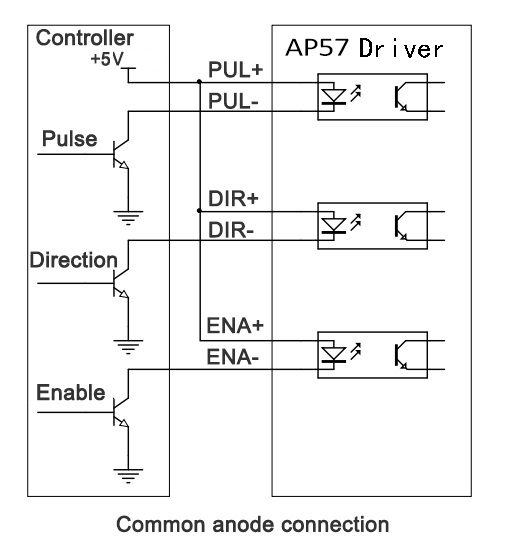
In addition to Differential wiring, AP57 Driver also supports common anode connection and common cathode connection:
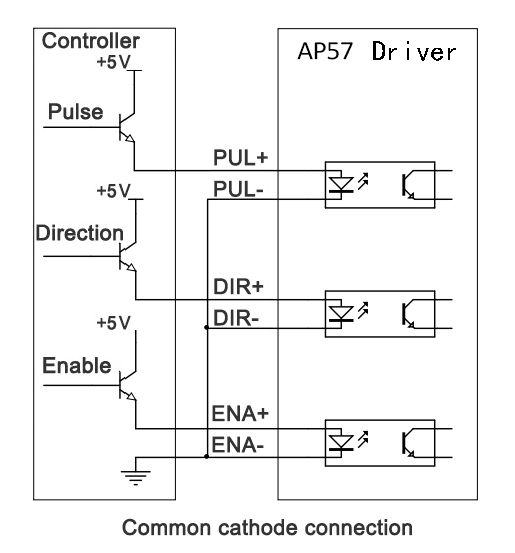
Dip Switch Settings: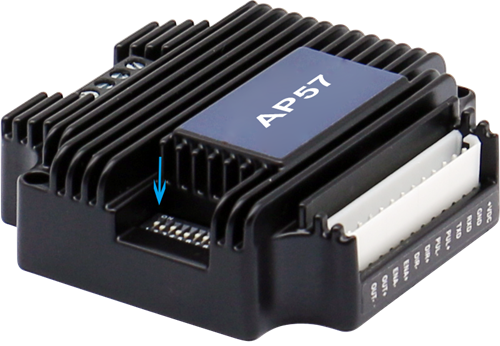
SW1 SW2 SW3 set Current,
SW4 SW5 SW6 Set Micro-Step,
SW8 Set direction CW/CCW.
SW9 SW10, Choose Working Mode
1. Set working current by SW1, SW2, SW3:
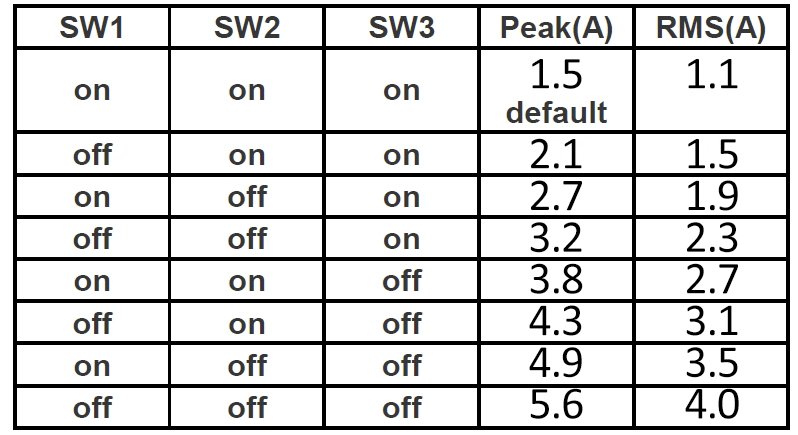
The default peak current at the factory is 1.5A, can be set through the serial port before sale,
The adjustable current range is any value between 0.1A and 5.6A (peak).
Set Stepper Motor's default rotation direction
SW8=on, CW
SW8=off, CCW
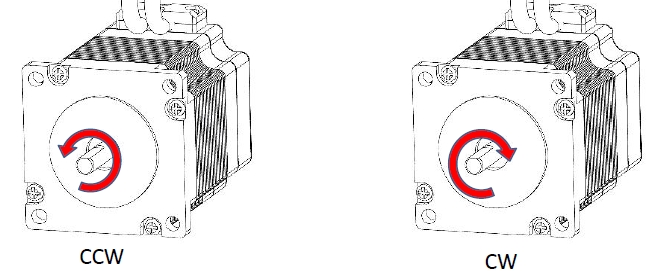
Note: the default rotation direction according to the wiring,
Swap wiring phase A A-(or B B-) will change the rotation direction.
Set Working Mode by SW9, SW10:
| SW9 | SW10 | Working Mode |
| on | on | Spontaneous pulses |
| on | off | self-test |
| off | on | double pulse |
| off | off | Pulse & Direction |
Set Micro-Step and working speed by SW4,SW5,SW6 SW7:
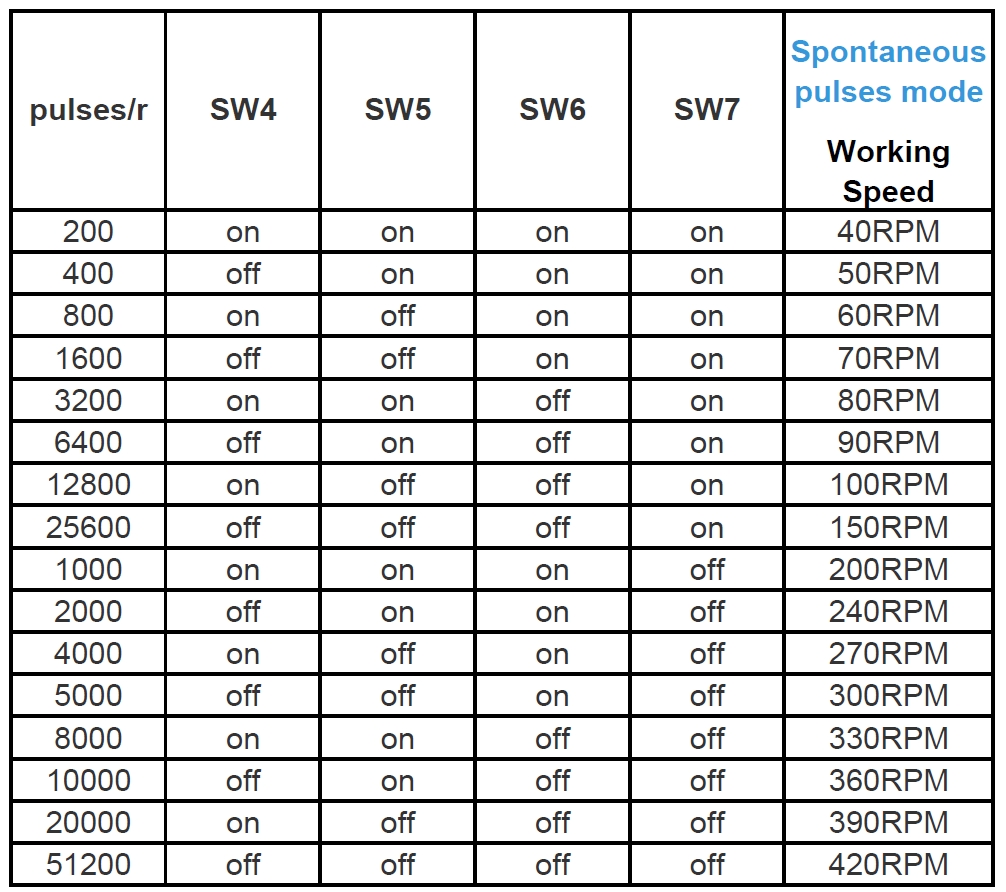
Note: set SW9,SW10 for Spontaneous pulses mode, working speed will be effective when connect the 5V pulse signal.
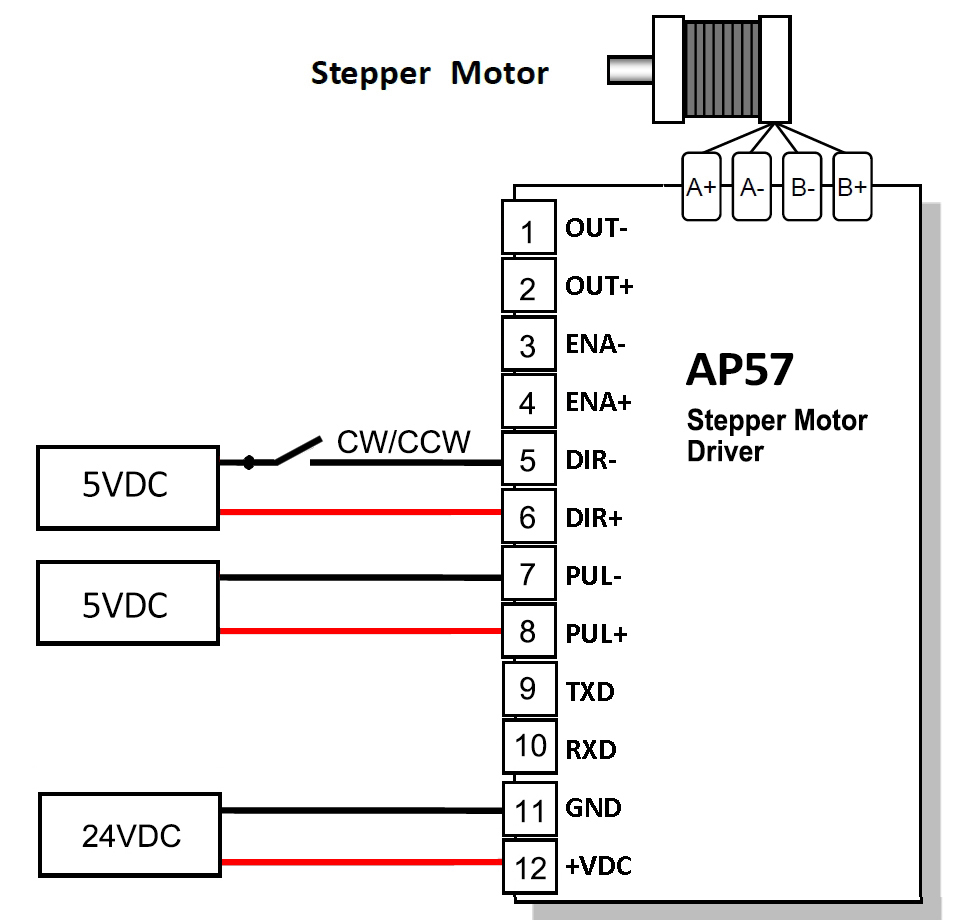
More Information on detail, please feel free to contact me
AP57 Stepper Motor Driver User Manual

Pulse & direction stepper motor driver, support to Spontaneous pulses.
Spontaneous pulses Stepper Motor Driver with fixed working speed range.
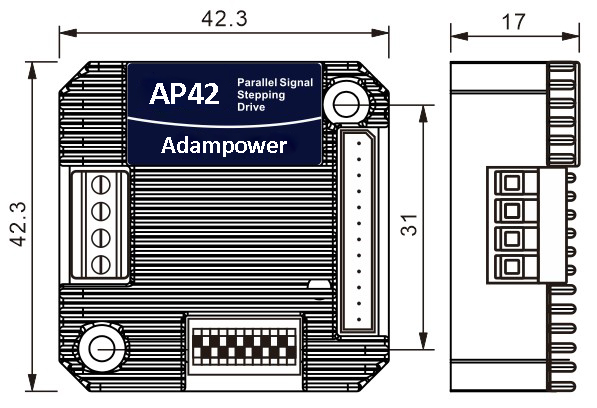
● Miniature size 42.3mmx42.3mm x17mm
● Pulse & direction stepper driver also support the standard RS232 serial command, and built-in 32bit digital chip.
● Using new control algorithms such for vibration suppression and low heat generation
● DC input voltage 12~40VDC, recommended working voltage 24VDC.
● Continuous output current 1.4A max, max peak current 2.2A.
● Integrated design, mounted with NEMA17/NEMA16 stepper motor.
● Low vibration, low noise, stable operation, low motor heating.
● Any micro-step can be set.
● Protection functions such as overvoltage, undervoltage and overcurrent.
● Built-in automatic matching function of motor parameter.
● AP42 stepper driver can be assembled for NEMA17 Integrated Stepper Motors
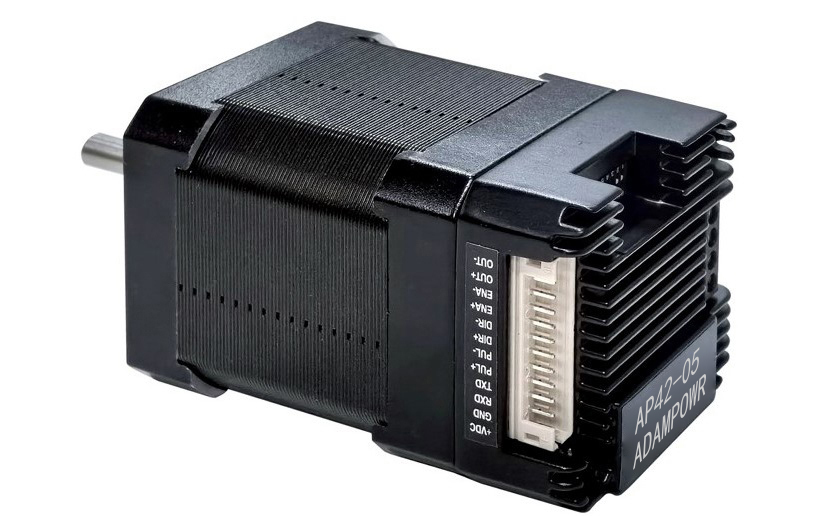
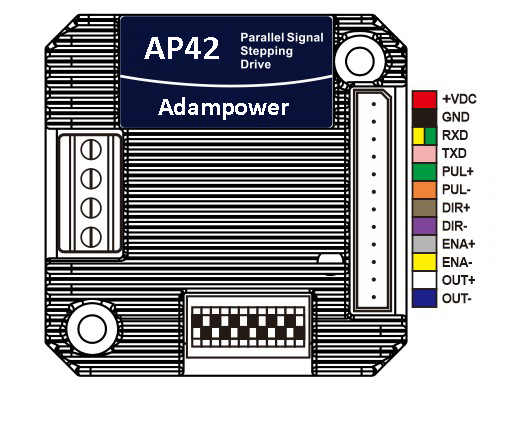
| Pin No. | Name | Description |
| 1 | VDC | Supply voltage: 12-32VDC, Recommend DC24V |
| 2 | GND | Supply Voltage Ground: GND/0V |
| 3 | RXD | To the RX pin on user device (not for communication, set parameter only) |
| 4 | TXD | To the TX pin on user device (not for communication, set parameter only) |
| 5 | PUL | Differential PULSE signal input, Allow receiving 5V signals, Rising edge is Effective |
| 6 | PUL- | |
| 7 | DIR | Differential DIRECTION signal input, Allow receiving 5V signals, Rising edge is Effective |
| 8 | DIR- | |
| 9 | ENA | Differential ENABLE signal input, Allow receiving 5V signals, Rising edge is Effective |
| 10 | ENA- | |
| 11 | OUT | Alarm signal output, OC circuit, can receive up voltage up to 24V |
| 12 | OUT- |
Note: Pulse signals, directional signals, and enable signals can receive up to 5V signals,
If the control signal is 12V, a 1K resistor needs to be connected.
If the control signal is 24V, it is necessary to connect 2.2K resistors.
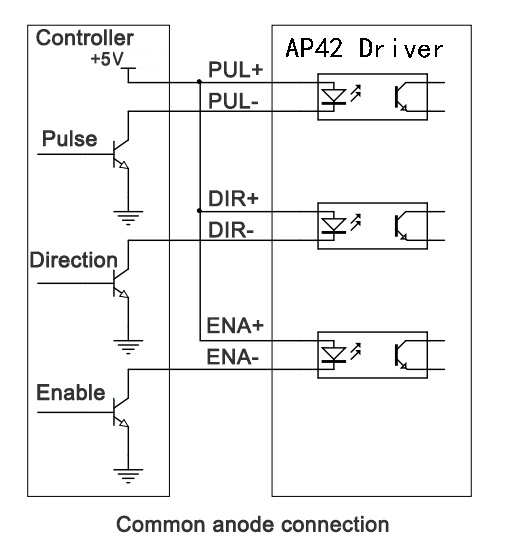
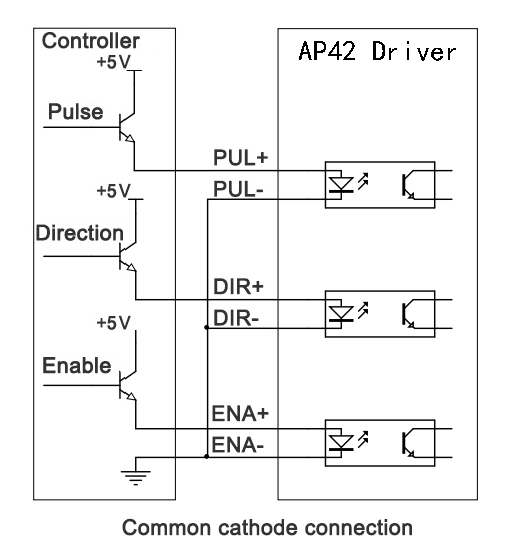
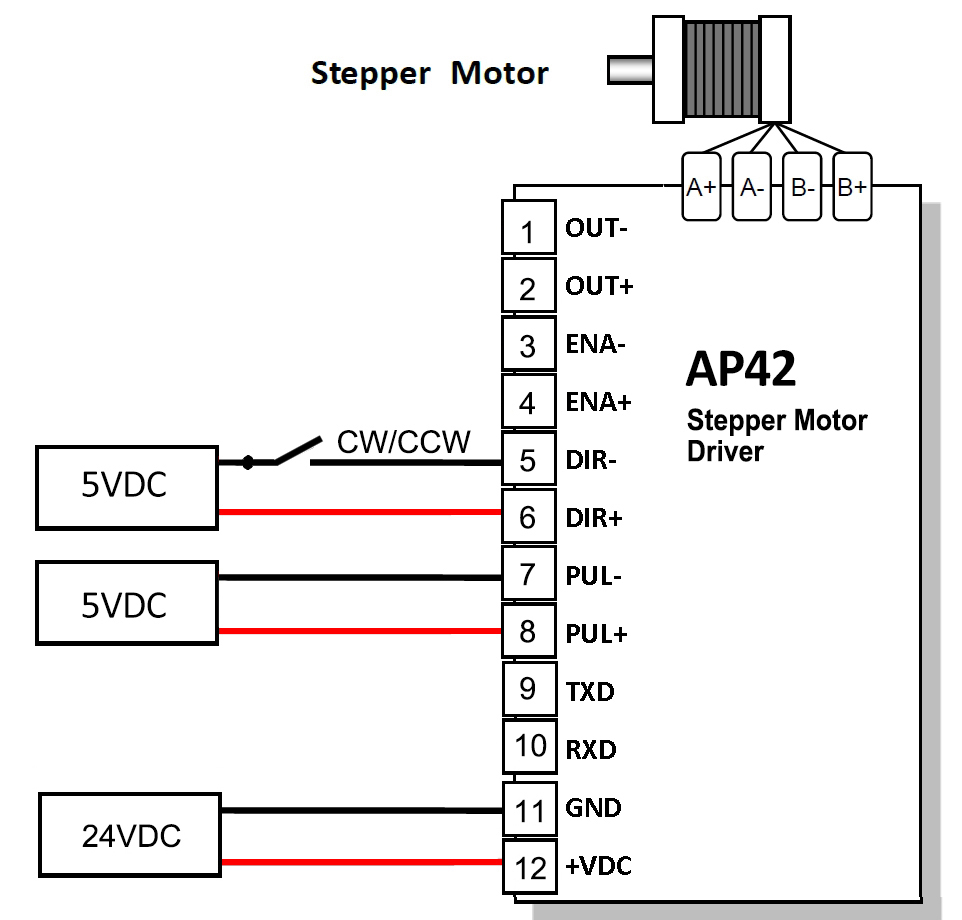
In addition to Differential wiring, AP42 Driver also supports common anode connection and common cathode connection:
Dip Switch Settings:
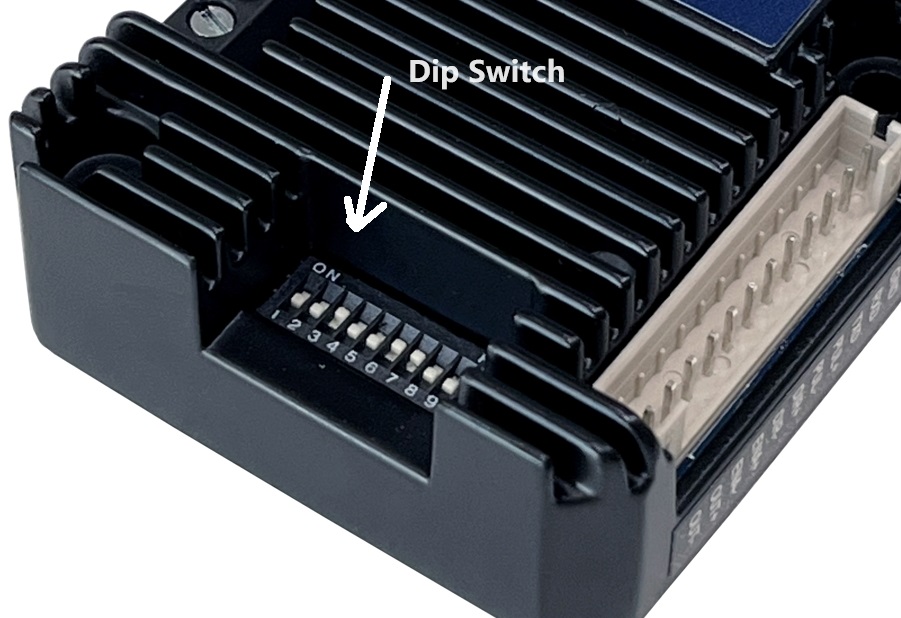
SW1 SW2 SW3 set Current,
SW4 SW5 SW6 Set Micro-Step,
SW8 Set direction CW/CCW.
SW9 SW10, Choose Working Mode
1. Set working current by SW1, SW2, SW3:
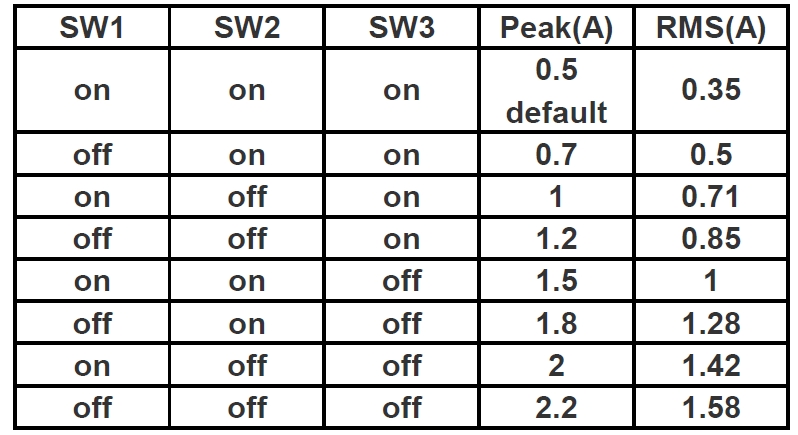
The default peak current at the factory is 0.5A, can be set through the serial port before sale,
The adjustable current range is any value between 0.1A and 2.2A (peak).
Set Stepper Motor's default rotation direction
SW8=on, CW
SW8=off, CCW
Note: the default rotation direction according to the wiring,
Swap wiring phase A A-(or B B-) will change the rotation direction.
Set Working Mode by SW9, SW10:
| SW9 | SW10 | Working Mode |
| on | on | Spontaneous pulses |
| on | off | self-test |
| off | on | double pulse |
| off | off | Pulse & Direction |
Set Micro-Step and working speed by SW4,SW5,SW6 SW7:
Note: set SW9,SW10 for Spontaneous pulses mode, working speed will be effective when connect the 5V pulse signal.
More Information on detail, please feel free to contact me
AP57 Stepper Motor Driver User Manual

The IM24ET Series Integrated Motors represent a perfect integration of stepper drivers and stepper motors, combining the technologies of both in a single unit.
They are fully compatible with 1599-revolution mechanical absolute encoders, which not only save installation space but also streamline wiring connections.
By reducing your design and production costs, they stand as the premier choice for your stepper system solutions.
Frame Size: NEMA24
Holding Torque: 1.1–3.5 N·m
Supply Voltage: 24–60 VDC
Supported Protocols: Modbus/RTU, RS485
Built-in Programmable Multi-Turn Feedback: 1599 revolutions; supports user-defined home position with memory, no sensor required
Software Limit Function Supported: More reliable than mechanical limit switches
Closed-Loop Control: 4096-line (16384 counts) encoder feedback
Torque Modes Supported: Homing on collision, constant torque, object gripping
Input Compatibility: 5–24 VDC; Output: Open-collector (OC) output, withstanding voltage up to 30 VDC
Comprehensive Protection Features: Over-voltage, under-voltage, over-current, winding open-circuit, and position deviation protection
Non-Volatile Memory: Configuration parameters stored in the on-chip FLASH of the MCU
Wide Filter Frequency Range: 50 kHz–5 MHz adjustable, factory default at 300 kHz
User-friendly PC interface with full-featured functionality
Motor Parameters (two type flange size and hole spacing)
| Model No. | Total Length L (mm) | Length L1 (mm) | Shaft Dia. (mm) | Flange Size. (mm) | Phase Current (A) | Resistance (Ω) | Inductance (mH) | Holding Torque (N.m) | Inertia (g.cm²) | Weight (g) |
|---|---|---|---|---|---|---|---|---|---|---|
| IM24ET22S | 92.8 | 21 | 8 | 38.1/36 | 5 | 0.45 | 1.4 | 2.2 | 490 | 1100 |
| IM24ET30S | 109.8 | 21 | 8 | 38.1/36 | 5 | 0.58 | 2.4 | 3.0 | 690 | 1400 |
| IM24ET22B | 92.8 | 30 | 8 | 38.1/36 | 5 | 0.45 | 1.4 | 2.2 | 490 | 1100 |
| IM24ET30B | 109.9 | 30 | 8 | 38.1/36 | 5 | 0.58 | 2.4 | 3.0 | 690 | 1400 |
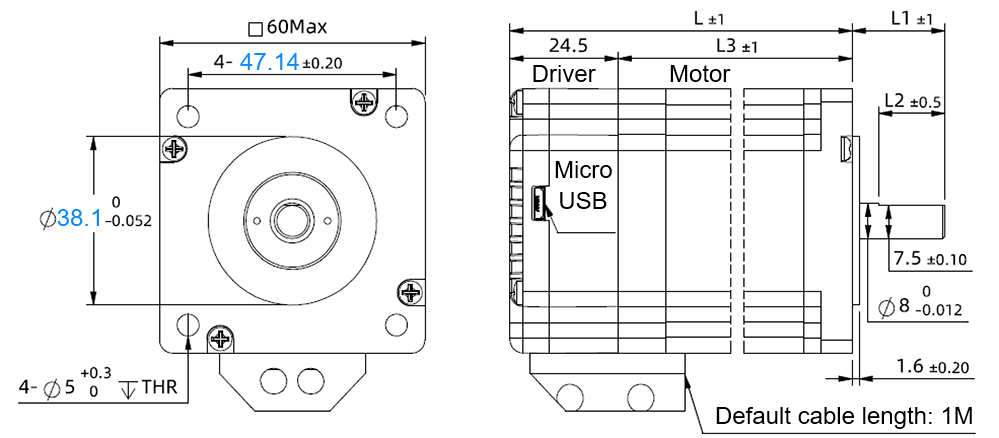
Flange Size: 38.1 mm; Mounting Hole Spacing: 47.14 mm, drawing as below:
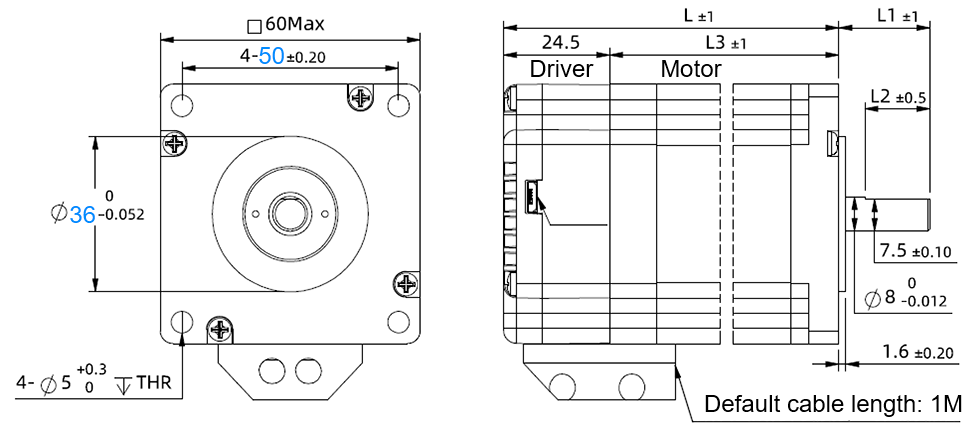
Flange Size: 36 mm; Mounting Hole Spacing: 50 mm, drawing as below:
Block Diagram:
RS485 Multi-turn Absolute Encoder type Integrated Stepper Motor
Terminal Definition
| Terminal | Color | Name | Description |
|---|---|---|---|
| 1 | Red | V | 24~60VDC |
| 2 | Black | V- | GND |
| 3 | Yellow | X com | INPUT COM, compatible with NPN and PNP |
| 4 | Yel/BLK | X0 | 3 Programmable Inputs (Active Low) Port functions configurable via commands or host computer. Pulse Mode: X0 = Pulse, X1 = Direction |
| 5 | Blue | X1 | |
| 6 | Blu/BLK | X2 | |
| 7 | Green | Y2 | Y0: Default alarm output, Normally Closed (NC), Y1: Default position reached output, Normally Closed (NC) Y2: Undefined,Users may configure or redefine the functions of the corresponding ports via commands. Y2 can be customized to input X3 upon request before delivery; it defaults to an output port. |
| 8 | Gre/BLK | Y1 | |
| 9 | Purple | Y0 | |
| 10 | Pur/BLK | Y com | OUTPUT COM, COM GND |
| 11 | Orange | 485A | RS485 Communication port, default baud rate is 115200 |
| 12 | Ora/BLK | 485B |
3-channel isolated digital signal input, the function of each input channel can be configured via software or commands, with the correspondence between input signals and functions as follows:
| Signal | Interface | Function |
|---|---|---|
| X0 | X0,Xcom | • General Input (Default) • Pulse / Limit / Home / Emergency Stop / Speed Switch / Interrupt Positioning / Forward Rotation |
| X1 | X1,Xcom | • General Input (Default) • Pulse / Direction / Limit / Home / Emergency Stop / Speed Switch / Interrupt Positioning / Reverse Rotation |
| X2 | X2,Xcom | • General Input (Default) • Limit / Home / Emergency Stop / Speed Switch / Interrupt Positioning |
XCOM is the common positive terminal for single-ended input signals and shall be connected to the positive pole of the power supply.
It only accepts sinking NPN signals.
The figure below illustrates the typical wiring configurations for the X0–X2 input ports.
3-channel isolated digital signal output, the function of each output channel can be configured via software or commands, with the correspondence between output signals and functions as follows:
| Signal | Interface | Function |
|---|---|---|
| Y0 | Y0, Ycom | • Alarm Output (Default) • Alarm / Position Reached / Running Status |
| Y1 | Y1, Ycom | • Position Reached Output (Closed Loop Default) • Running Status Output (Open Loop Default) • Alarm / Position Reached / Running Status |
| Y2 | Y2, Ycom | • General Purpose Output (Default) • Alarm / Position Reached / Running Status |
The figure below illustrates the typical wiring configurations for the Y0–Y2 output ports.
Warning: Output terminal → DC voltage < 30V, Inflow current ≤ 50mA.
CRC Check Routine (C#)
UInt16 Funct_CRC16(unsigned char * puchMsg, UInt16 DataLen)
{
UInt16 i,j,tmp;
UInt16 crcdata=0xFFFF;
for(i=0;i<DataLen;i )
{
crcdata=(*puchMsg)^crcdata;
puchMsg ;
for(j=0;j<8;j )
{
tmp=crcdata&0x0001;
crcdata=crcdata>>1;
if(tmp){
crcdata=crcdata^0xA001;
}
}
}
return crcdata;
}
RS485 Integrated Stepper Motor Commissioning and Control Software:
Modbus Poll
Adampower
Quick Start Guide – Follow the steps below:
1. Extract the zip file, open CommFile folder and Click Step-Config.exe or Adampower.exe
2. Open Project.
3. Click Browse
4. Select the Project.prj in the Project folder, in the same path as CommFile.
5. Double Click the Project.prj path
6. Right Click Modbus_485, and Click Property:
7. Click Property ComNN, Choose COM port, Baud rate and click Save and OK.
8. Start to use software control the RS485 Integrated stepper motor by below buttons:
Optional: USB-TTL debugging cable
LED indicator and status:
more Information on detail, please feel free to contact me

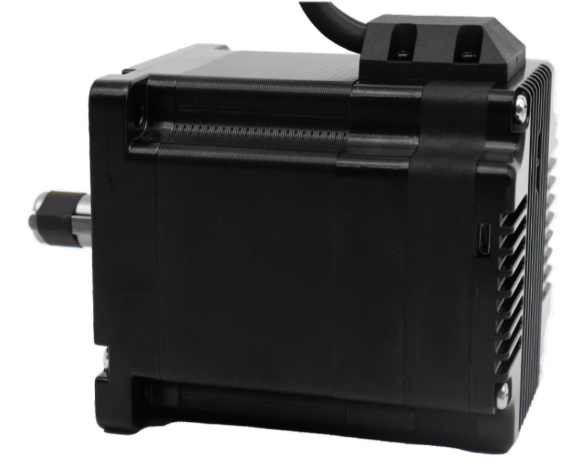
The IM34ET Series Integrated Motors represent a perfect integration of stepper drivers and stepper motors, combining the technologies of both in a single unit. They are fully compatible with 1599-revolution mechanical absolute encoders, which not only save installation space but also streamline wiring connections. By reducing your design and production costs, they stand as the premier choice for your stepper system solutions.
Frame Size: NEMA34
Holding Torque: 4.5–12.5 N·m
Supply Voltage: 18–70 VAC
Supported Protocols: Modbus/RTU, RS485
Built-in Programmable Multi-Turn Feedback: 1599 revolutions; supports user-defined home position with memory, no sensor required
Software Limit Function Supported: More reliable than mechanical limit switches
Closed-Loop Control: 4096-line (16384 counts) encoder feedback
Torque Modes Supported: Homing on collision, constant torque, object gripping
Input Compatibility: 5–24 VDC; Output: Open-collector (OC) output, withstanding voltage up to 30 VDC
Comprehensive Protection Features: Over-voltage, under-voltage, over-current, winding open-circuit, and position deviation protection
Non-Volatile Memory: Configuration parameters stored in the on-chip FLASH of the MCU
Wide Filter Frequency Range: 50 kHz–5 MHz adjustable, factory default at 300 kHz
User-friendly PC interface with full-featured functionality
Motor Parameters
| Model No. | Length L (mm) | Total Length (mm) | Shaft Length (mm) | Shaft Dia. (mm) | Phase Current (A) | Resistance (Ω) | Inductance (mH) | Holding Torque (N.m) | Inertia (g.cm²) | Weight (g) |
|---|---|---|---|---|---|---|---|---|---|---|
| IM3445 | 78.1 | 102.6 | 32 | 14 | 6 | 0.37 | 2.8 | 4.5 | 1800 | 2200 |
| IM3465 | 98.6 | 122.1 | 32 | 14 | 6 | 0.45 | 4.0 | 6.5 | 2800 | 3000 |
| IM3485 | 117.6 | 142.1 | 32 | 14 | 6 | 0.59 | 5.5 | 8.5 | 3600 | 3700 |
| IM34125 | 156.1 | 180.6 | 32 | 14 | 6 | 0.679 | 8.2 | 12.5 | 5400 | 5500 |
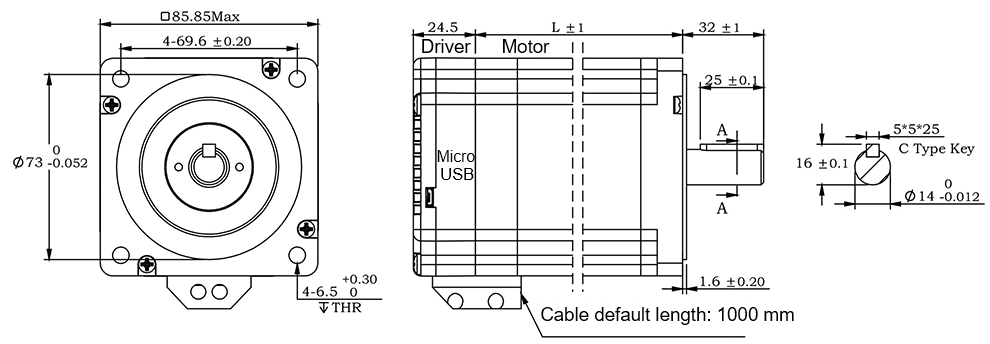
RS485 Multi-turn Absolute Encoder type Integrated Stepper Motor
Terminal Definition
| Terminal | Color | Name | Description |
|---|---|---|---|
| 1 | Red | V | 24~100VDC(or 18-70VAC) |
| 2 | Black | V- | GND |
| 3 | Yellow | X com | COM /VCC COM, compatible with 5–24 VDC |
| 4 | Yel/BLK | X0 | 3 Programmable Inputs (Active Low) Port functions configurable via commands or host computer. Pulse Mode: X0 = Pulse, X1 = Direction |
| 5 | Blue | X1 | |
| 6 | Blu/BLK | X2 | |
| 7 | Green | Y2 | Y0: Default alarm output, Normally Closed (NC), Y1: Default position reached output, Normally Closed (NC) Y2: Undefined,Users may configure or redefine the functions of the corresponding ports via commands. Y2 can be customized to input X3 upon request before delivery; it defaults to an output port. |
| 8 | Gre/BLK | Y1 | |
| 9 | Purple | Y0 | |
| 10 | Pur/BLK | Y com | COM GND |
| 11 | Orange | 485A | RS485 Communication port, default baud rate is 115200 |
| 12 | Ora/BLK | 485B |
3-channel isolated digital signal input, the function of each input channel can be configured via software or commands, with the correspondence between input signals and functions as follows:
| Signal | Interface | Function |
|---|---|---|
| X0 | X0,Xcom | • General Input (Default) • Pulse / Limit / Home / Emergency Stop / Speed Switch / Interrupt Positioning / Forward Rotation |
| X1 | X1,Xcom | • General Input (Default) • Pulse / Direction / Limit / Home / Emergency Stop / Speed Switch / Interrupt Positioning / Reverse Rotation |
| X2 | X2,Xcom | • General Input (Default) • Limit / Home / Emergency Stop / Speed Switch / Interrupt Positioning |
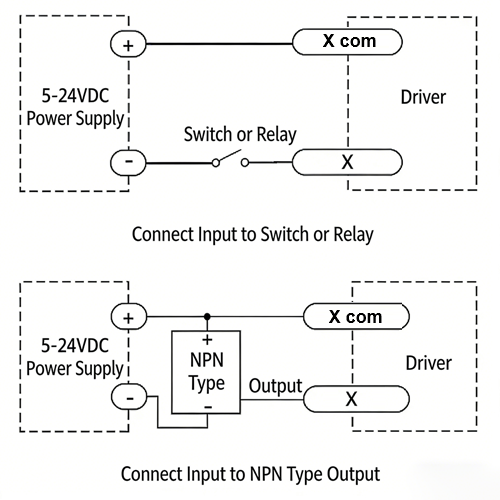
XCOM is the common positive terminal for single-ended input signals and shall be connected to the positive pole of the power supply.
It only accepts sinking NPN signals.
The figure below illustrates the typical wiring configurations for the X0–X2 input ports.
3-channel isolated digital signal output, the function of each output channel can be configured via software or commands, with the correspondence between output signals and functions as follows:
| Signal | Interface | Function |
|---|---|---|
| Y0 | Y0, Ycom | • Alarm Output (Default) • Alarm / Position Reached / Running Status |
| Y1 | Y1, Ycom | • Position Reached Output (Closed Loop Default) • Running Status Output (Open Loop Default) • Alarm / Position Reached / Running Status |
| Y2 | Y2, Ycom | • General Purpose Output (Default) • Alarm / Position Reached / Running Status |
The figure below illustrates the typical wiring configurations for the Y0–Y2 output ports.
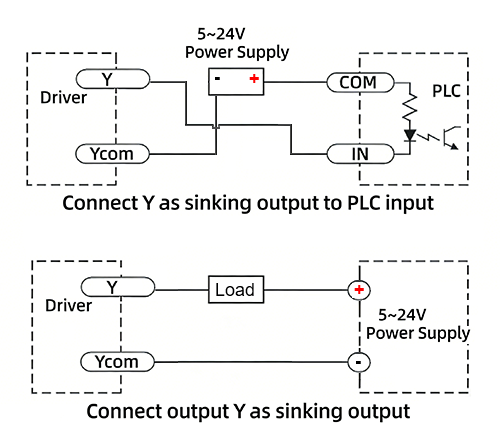
Warning: Output terminal → DC voltage < 30V, Inflow current ≤ 50mA.
CRC Check Routine (C#)
UInt16 Funct_CRC16(unsigned char * puchMsg, UInt16 DataLen)
{
UInt16 i,j,tmp;
UInt16 crcdata=0xFFFF;
for(i=0;i<DataLen;i )
{
crcdata=(*puchMsg)^crcdata;
puchMsg ;
for(j=0;j<8;j )
{
tmp=crcdata&0x0001;
crcdata=crcdata>>1;
if(tmp){
crcdata=crcdata^0xA001;
}
}
}
return crcdata;
}
RS485 Integrated Stepper Motor Commissioning and Control Software:
Modbus Poll
Adampower
Quick Start Guide – Follow the steps below:
1. Extract the zip file, open CommFile folder and Click Step-Config.exe or Adampower.exe
2. Open Project.
3. Click Browse
4. Select the Project.prj in the Project folder, in the same path as CommFile.
5. Double Click the Project.prj path
6. Right Click Modbus_485, and Click Property:
7. Click Property ComNN, Choose COM port, Baud rate and click Save and OK.
8. Start to use software control the RS485 Integrated stepper motor by below buttons:
Optional: USB-TTL debugging cable
RS485 Stepper Motor Controller Commands Manual
LED indicator and status:
more Information on detail, please feel free to contact me

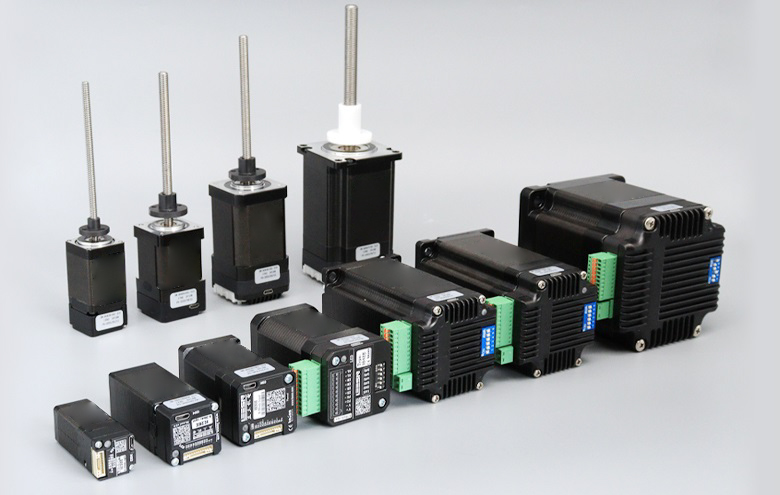
The IG34 series integrated motor is the perfect combination of drive and stepper motor,
which perfectly integrates stepper motor and drive technology, also built in 1000 line encoder,
it can save installation space, Simultaneously saving design and production costs,
supporting RS485 and TTL communication.
| Item | Specifications |
| Stepper Motor Size | NEMA34 |
| Encoder type | 1000 line encoder |
| Working voltage | 24~80VDC, 18~60VAC |
| Driver Current | 0.5-6.5A |
| Velocity range | Up to 3000RPM |
| Control Method | RS485, Pulse& Direction, Twin-Pulse, I/O, Built-in Program |
| Torque value | 3.5 -12.5Nm |
| Nonvolatile storage | Configuration parameters are stored in FLASH inside the MCU |
| DI and DO | 2 DI, 1 DO |
| Protection | Overvoltage, undervoltage, overcurrent, open winding, position deviation |
| Digital Input (2/3) | Receive 3.3-24VDC | ||
| Digital Output(1) | Maximum withstand voltage of 30V, | ||
| Maximum input or output current 30mA | |||
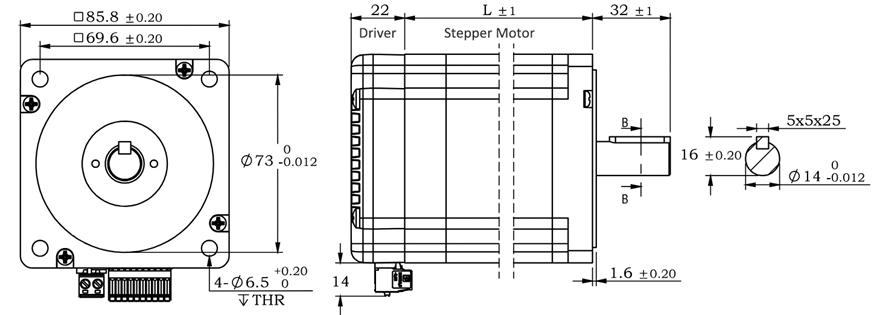
Motor Parameters
| Model No. | length mm L | Shaft length mm | Shaft dia. mm | Phase current A | Resistance Ω | inductance mH | Hold torque N.m | Inertia g.cm² | Weight g |
| IG3445 | 80 | 32 | 14 | 6 | 0.5 | 3.6 | 4.5 | 1950 | 2900 |
| IG23465 | 98 | 32 | 14 | 6 | 0.63 | 4.5 | 6.5 | 2500 | 3400 |
| IG3485 | 118 | 32 | 14 | 6 | 0.5 | 4.2 | 8.5 | 2800 | 4100 |
| IG34125 | 151 | 32 | 14 | 6 | 0.63 | 4.7 | 12.5 | 4950 | 5600 |
Wiring Diagram:
1. Pulse Type Integrated Stepper Motor, Terminal Definition
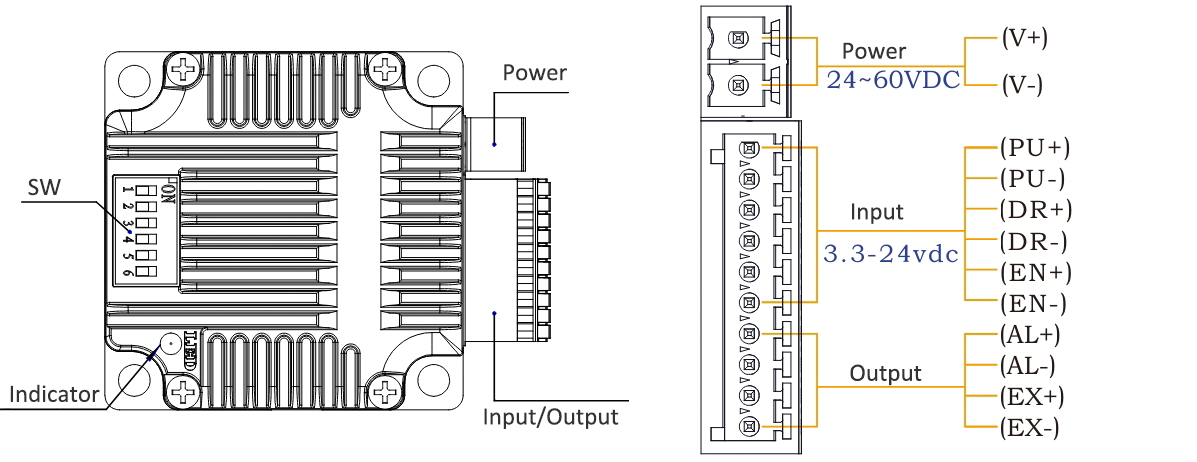
Terminal Definition
| Terminal | Name | Description | |
| 1 | V | 24~60VDC | |
| 2 | V- | GND | |
| 3 | X0 (PU ) | Optoelectronic isolation, differential, High level can directly receive 3.3-24VDC, with a minimum pulse width of 2us, The maximum pulse frequency is 400KHz, which can be used as a universal input port for Pulse/Direction | |
| 4 | X0-(PU-) | ||
| 5 | X1 (DR ) | ||
| 6 | X1-(DR-) | ||
| 7 | X2(EN ) | Optoelectronic isolation, differential, High level can directly receive 3.3-24VDC, with a minimum pulse width of 100us, The maximum pulse frequency is 10KHz, which can be used as a universal input port for Enable | |
| 8 | X2(EN-) | ||
| 9 | Y0 (AL ) | The default alarm output port can detect the driver alarm status and provide feedback to the main station. Other functions can be set through communication | |
| 10 | Y0-(AL-) | ||
| 11 | Y1(EX ) | The default In-place output , Other functions can be set through communication | |
| 12 | Y1(EX-) | ||
Set Micro-step by SW1, SW2, SW3 and SW4: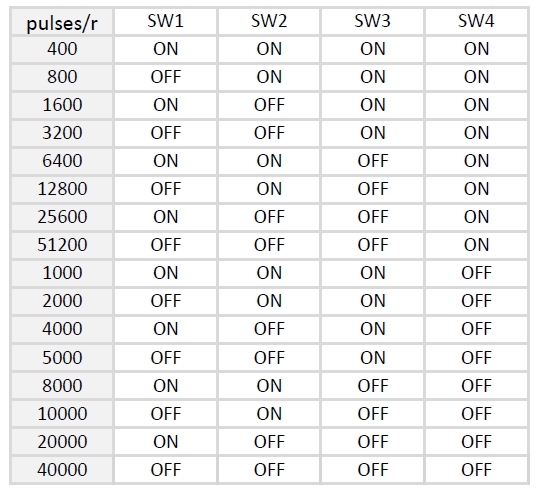
SW5=OFF: Pulse & Direction; SW=ON: Twin Pulse mode.
SW6=OFF: CW direction; SW6=ON: CCW direction.
2. RS485 Type Integrated Stepper Motor, Terminal Definition
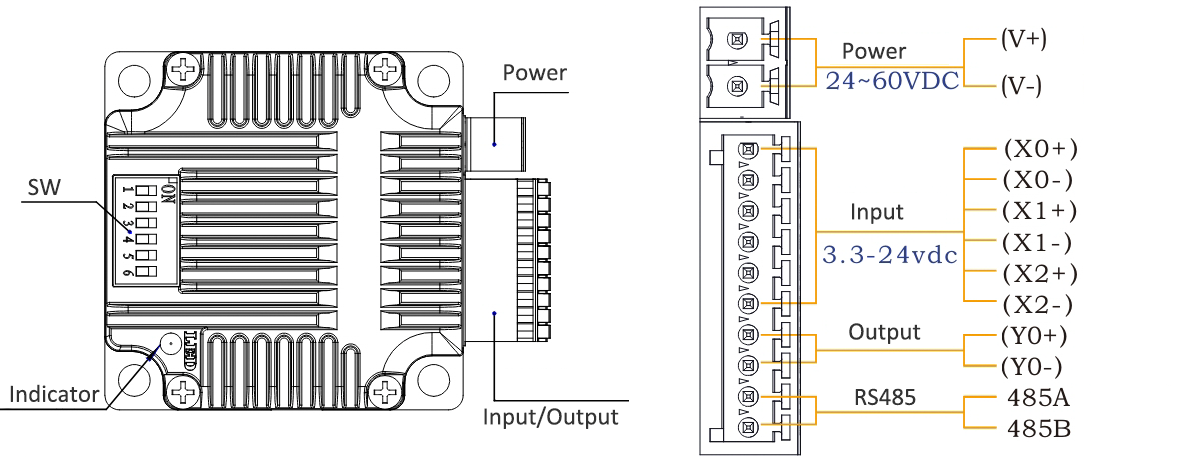
Terminal Definition
| Terminal | Name | Description | |
| 1 | V | 24~60VDC | |
| 2 | V- | GND | |
| 3 | X0 (PU ) | Optoelectronic isolation, differential, High level can directly receive 3.3-24VDC, with a minimum pulse width of 2us, The maximum pulse frequency is 400KHz, which can be used as a universal input port for Pulse/Direction | |
| 4 | X0-(PU-) | ||
| 5 | X1 (DR ) | ||
| 6 | X1-(DR-) | ||
| 7 | X2 (EN ) | ||
| 8 | X2-(EN-) | ||
| 9 | Y0 (AL ) | The default alarm output port can detect the driver alarm status and provide feedback to the main station. Other functions can be set through communication | |
| 10 | Y0-(AL-) | ||
| 11 | 485A | RS485 Communication port, default baud rate is 115200 | |
| 12 | 485B | ||
Set Device ID for RS485 integrated Stepper Motor by SW1 ~ SW5:
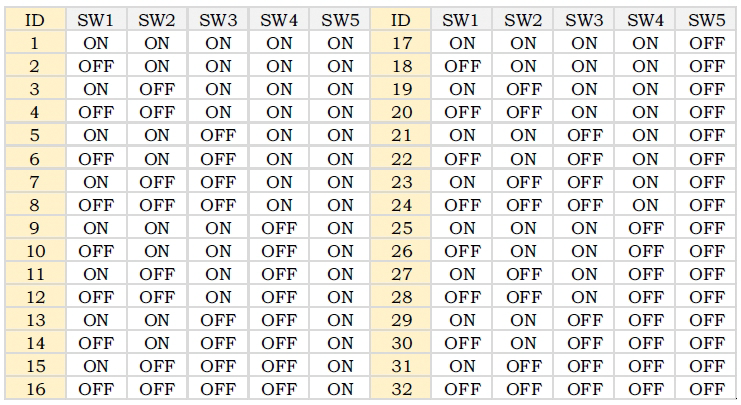
SW6 is used to set the terminal resistance; OFF=0 ohms; ON=120 ohms
CRC Check Routine (C#)
UInt16 Funct_CRC16(unsigned char * puchMsg, UInt16 DataLen)
{
UInt16 i,j,tmp;
UInt16 crcdata=0xFFFF;
for(i=0;i<DataLen;i )
{
crcdata=(*puchMsg)^crcdata;
puchMsg ;
for(j=0;j<8;j )
{
tmp=crcdata&0x0001;
crcdata=crcdata>>1;
if(tmp){
crcdata=crcdata^0xA001;
}
}
}
return crcdata;
}
Software Tools for RS485 Control
Modbus Poll
Step-Config
1. Extract the zip file, open CommFile folder and Click Step-Config.exe or Adampower.exe
2. Open Project.
3. Click Browse
4. Select the Project.prj in the Project folder, in the same path as CommFile.
5. Double Click the Project.prj path
6. Right Click Modbus_485, and Click Property:
7. Click Property ComNN, Choose COM port, Baud rate and click Save and OK.
8. Start to use software control the RS485 Integrated stepper motor by below buttons:
RS485 Stepper Motor Controller Manual
Block Diagram: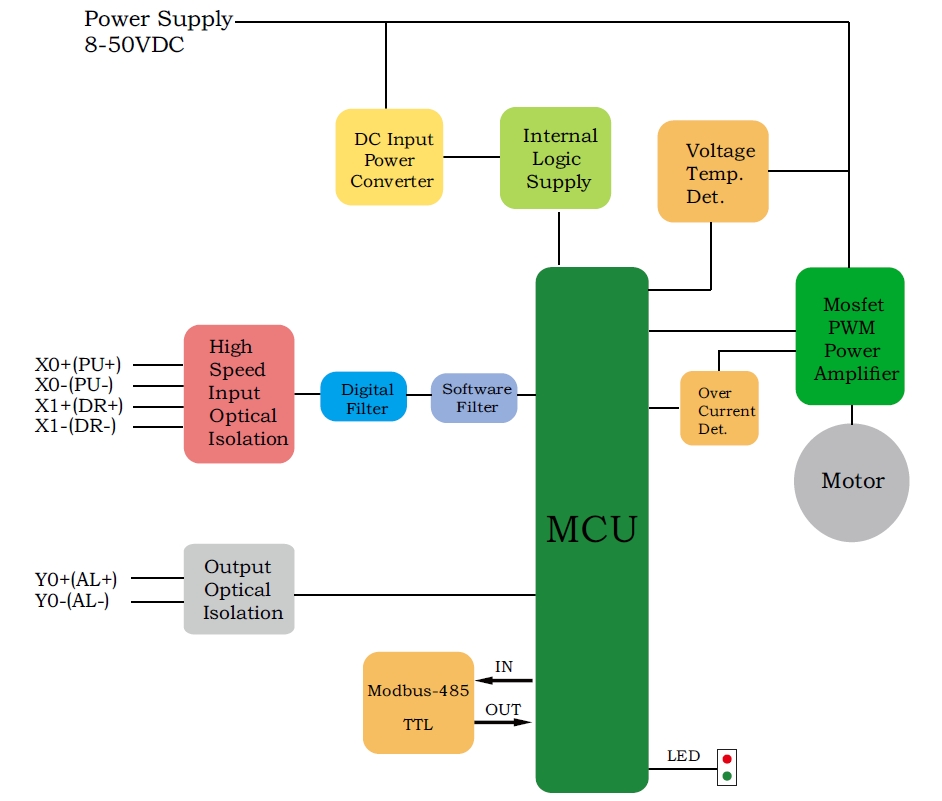
2 Input signals can directly receive 3.3-24V DC levels at high levels, Max. frequency of 400KHZ.
X0: pulse input, IO start/stop, limit, direction, universal input.
X1 pulse input, IO start/stop, limit, direction, universal input.
...
1 Output signal, maximum withstand voltage 30V, maximum input or output current 30mA
Y0 : alarm output, universal output, and factory default alarm output.
LED indicator and status: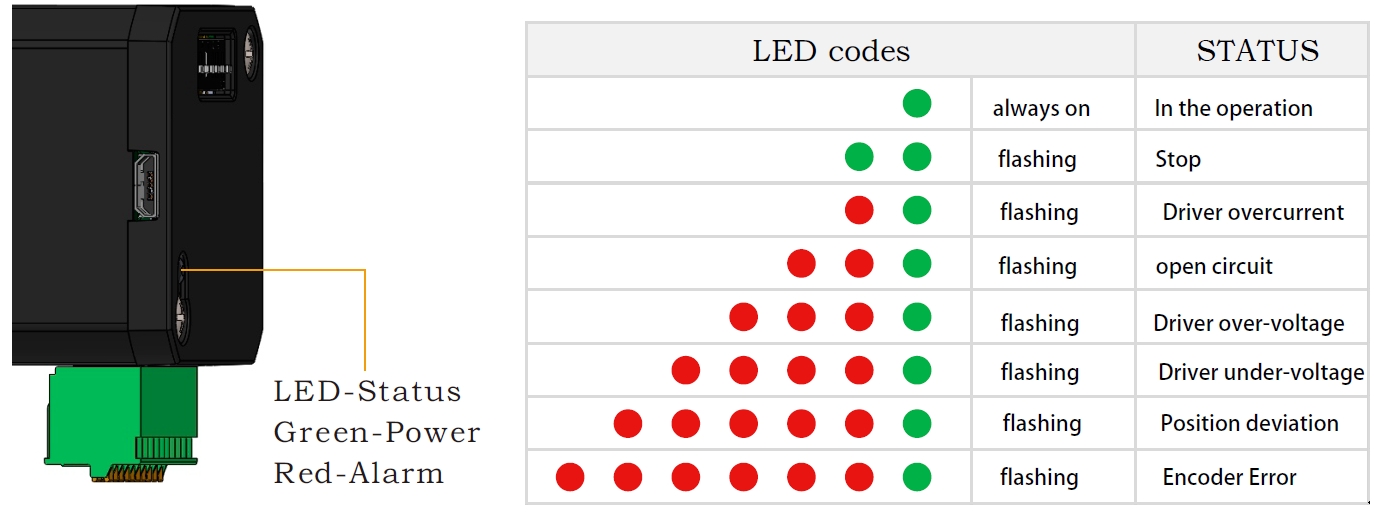

AR57 is a high-integrated and compact size stepper driver. It adopts standard RS485 communication
protocol, can be connected with PLC, HMI, industrial computer and other upper computer with only two
communication lines. Up to 32 axes of motion platform networking can be achieved with its built-in motion
control commands.
AR57 can be set to 1-256 subdivisions and adopts built-in micro-subdivision technology, which can achieve
high subdivision effects even under low subdivision conditions, ensuring that the motor operates with uniform
step intervals and no large or small step problems.
Can be set between 1-256 subdivisions, with uniform motor step spacing; Stable output at 1/12 rpm
AR57 is designed for NEMA23/NEMA24 stepper motor, The NEMA23/NEMA24 integrated stepper motor with
torque 1.0, 2.0 and 3.0Nm:
| Model No. | Holding Torque(Nm) | Motor Length(mm) | Encoder Type |
| AR57-10 | 1.0 | 57-56 | 1000 line Encoder, Magnetic or Optoelectronic |
| AR57-20 | 2.0 | 57-76 | |
| AR57-30 | 3.0 | 60-90 |
Port Definition
OUT /OUT- as defferential output port, Max.receive voltage is DC24V, and instaneous ouput
current is 100mA, continuous output current is 50mA.
DIP Switch Settings
Set ID address, Baud Rate and Ouptut current by SW1~SW10:
Set ID address:
Note: The formula for calculating the ID table is: ID=1*SW1 2*SW2 4*SW3 8*SW4 16*SW5.
The default ID is 0, 0 means broadcast address for global control
Set Baud Rate:
Note: When the communication baud rate in the table cannot meet the usage requirements, the baud rate can be
customized by the host computer when SW6 and SW7 are turned ON.
Set Output Current:
Zero-return function with two trajectory A and when limit signal is triggered and not:
AR57 Modbus Stepper Motor Controller User Manual
Software Modbus Poll
AdamPower Software
More Information on detail, please feel free to contact me

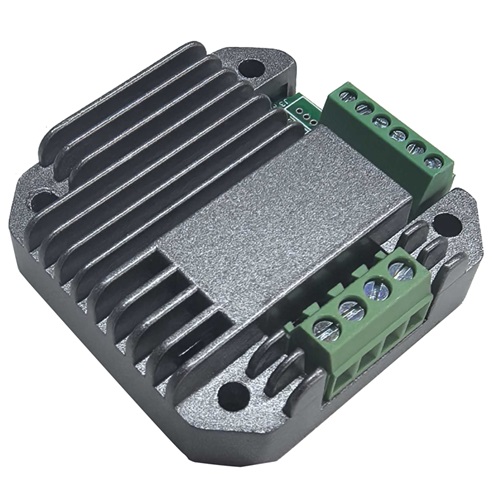
4~20 mA current-adjustable stepping motor driver
 | 420MA | |||
minimum value | Typical value | Maximum value | Unit | |
Supply Voltage (DC) | 12 | 24 | 24 | VDC |
Control Signal | 4 | 10 | 20 | mA |
● Miniature size 42.2mmx42.2mm x14.5mm
● DC input voltage 12~40VDC, recommended working voltage 24VDC.
● Continuous output current 1.4A max, max peak current 2.0A.
● Integrated design, mounted with NEMA17, NEMA23 stepper motor.
● Low vibration, low noise, stable operation, low motor heating.
● Working Speed Range can be customized as requirement.
● Adjusting current: 4~20mA corrsponding Speed: 0~300RPM(default setting for peristaltic pumps).
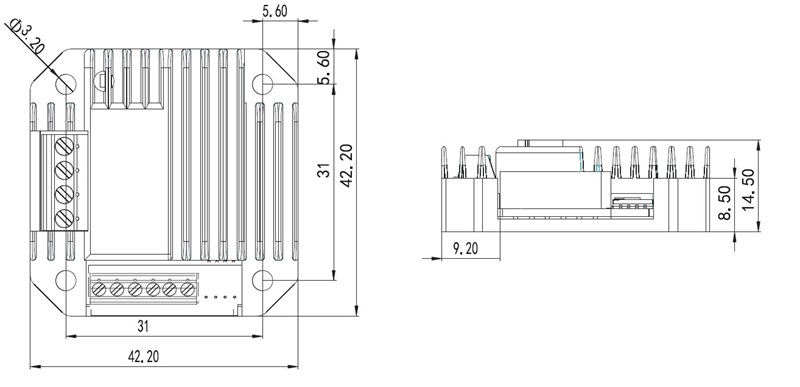
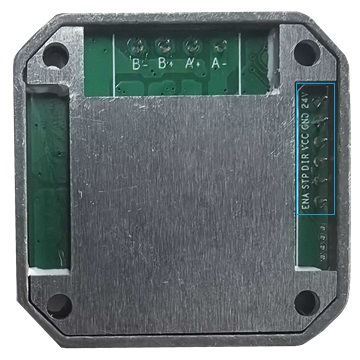
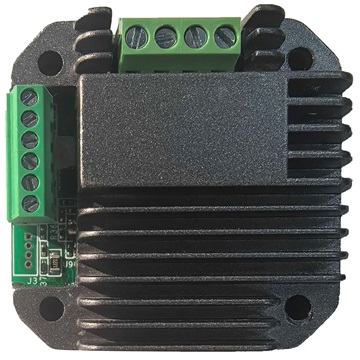
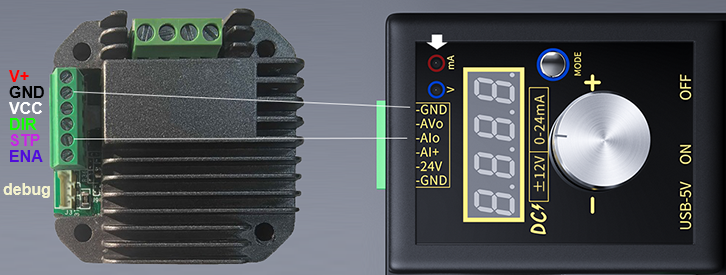
| Pin No. | Name | Description |
| 1 | 24V | Supply voltage: 12-40VDC, Recommend DC24V |
| 2 | GND | Supply Voltage Ground: GND/0V |
| 3 | VCC | Reserved; H/L Speed Option or other Customized requirement |
| 4 | DIR | The rotation direction of the motor, CW/CCW |
| 5 | STP | The positive pole of the speed-regulating current |
| 6 | ENA | Enable the Stepper Motor |
| 7 | DEBUG | Debug port |
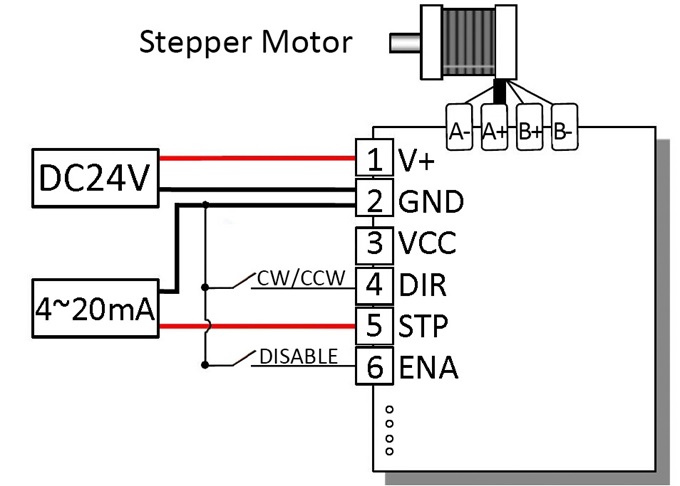
- Wiring Diagram:
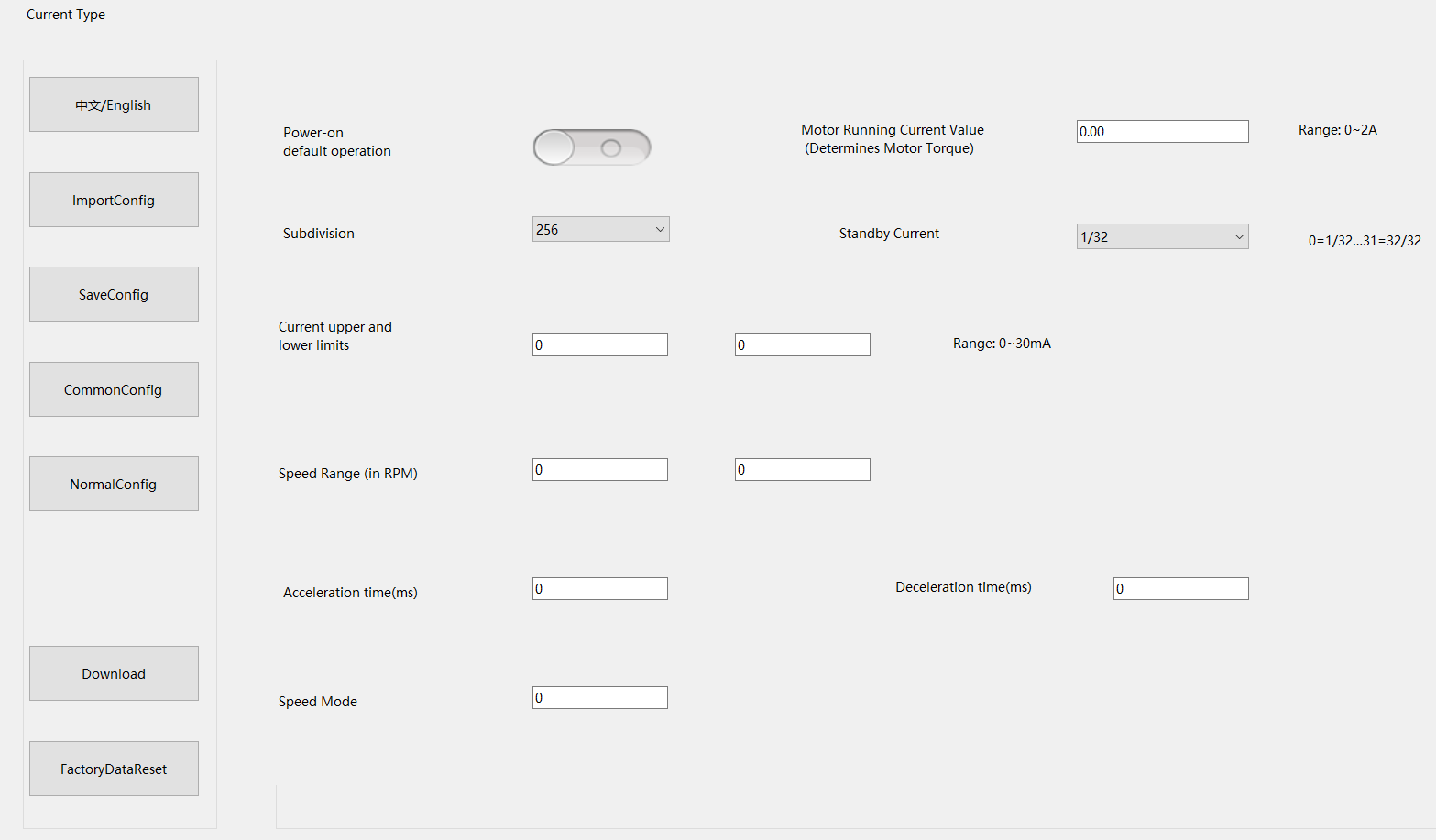
Debug cable:
Demo Video:
Customized Working Speed Range 0-300RPM for peristaltic pumps requirement.
Adjusting current: 4~20mA corresponding to Speed: 0~300RPM:
When this NEMA17 Sized Driver assembled with NEMA23 motor via a flange,
an Integrated Stepper Motor is formed: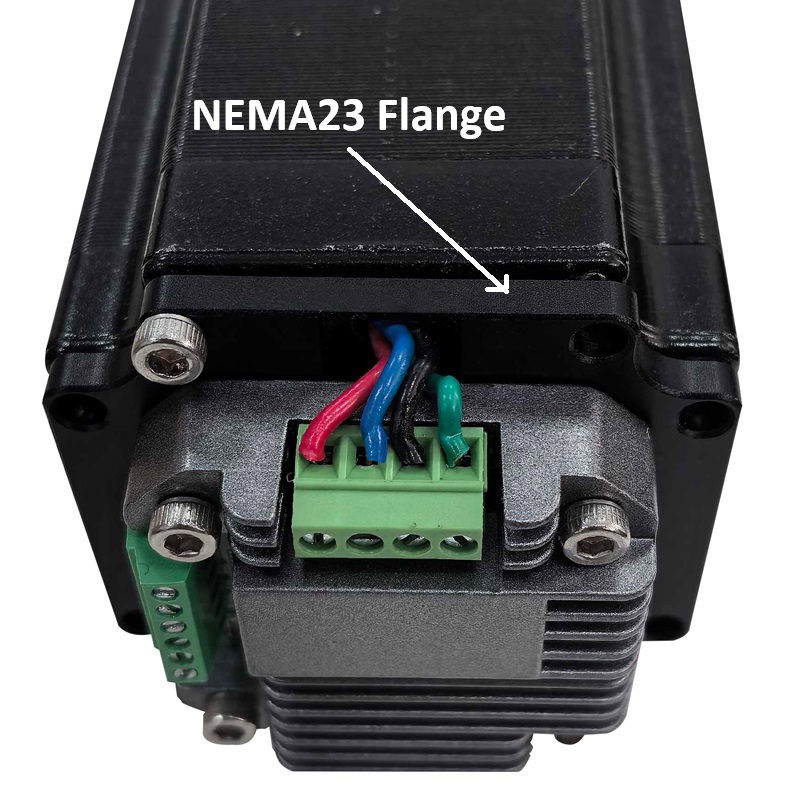
- More Information on detail, please feel free to contact me
- Current Stepper Motor Driver User Manual
0~5V, 0~10v Analog Voltage type stepper motor driver
| 510V | |||
minimum value | Typical value | Maximum value | Unit | |
Supply Voltage (DC) | 12 | 24 | 24 | VDC |
| Analog Signal Voltage | 0-5 | 0-5 | 0-10 | V |
● Miniature size 42.2mmx42.2mm x14.5mm
● DC input voltage 12~40VDC, recommended working voltage 24VDC.
● Continuous output current 1.4A max, max peak current 2.0A.
● Integrated design, mounted with NEMA17, NEMA23 stepper motor.
● Low vibration, low noise, stable operation, low motor heating.
● Working Speed Range and Analog Signal Voltage can be customized as requirement.
● Adjusting voltage: 0~5V(or 0~10V), corresponding to Speed range, High Speed Range: 0~1000RPM; Low Speed Range: 0~500RPM.
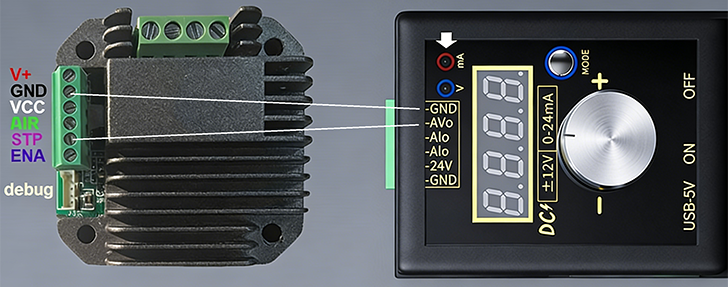
| Pin No. | Name | Description |
| 1 | 24V | Supply voltage: 12-40VDC, Recommend DC24V |
| 2 | GND | Supply Voltage Ground: GND/0V |
| 3 | H/L | Default High Speed Range; Connect GND to Low Speed Range |
| 4 | DIR | The rotation direction of the motor, CW/CCW |
| 5 | STP | The positive pole of the analog voltage current |
| 6 | ENA | Enable the Stepper Motor |
| 7 | DEBUG | Debug port |
- Wiring Diagram:
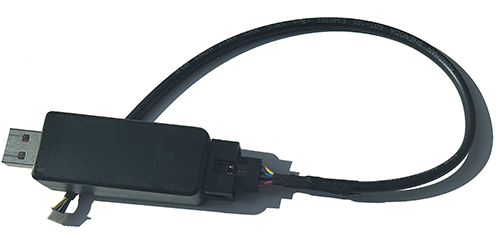
Debug cable:
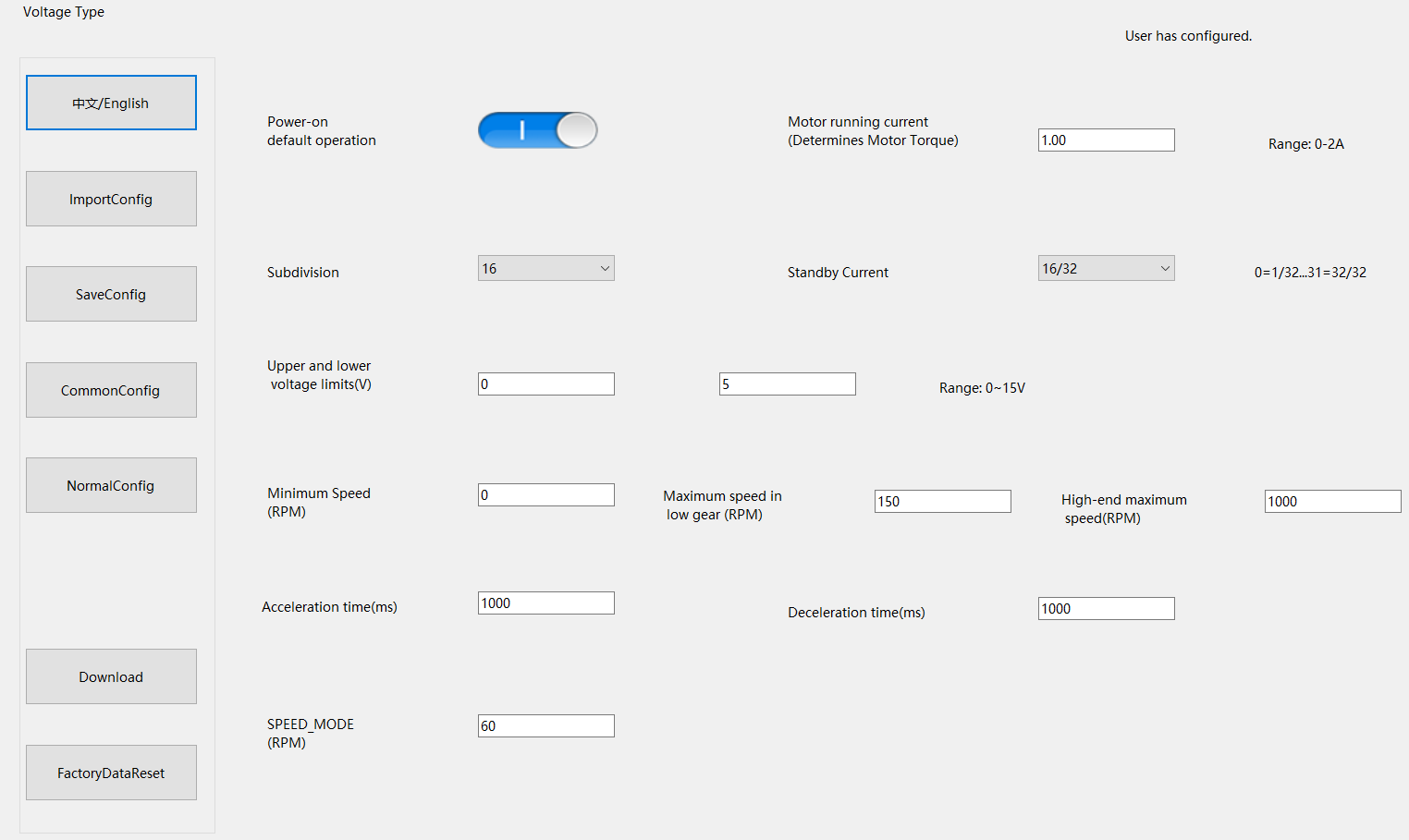
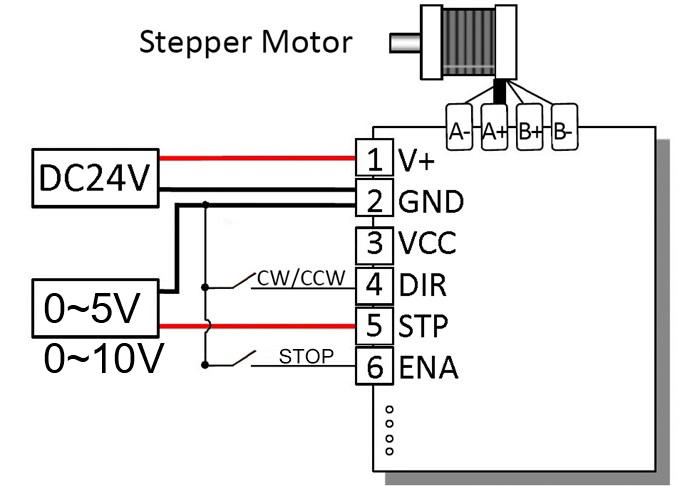
Analog Voltage Signal 0-5V or 0- 10V, Customized Working Speed Range 0-1000RPM for peristaltic pumps requirement.
Both of the two Speed Range for Customized, High Speed Range and Low Speed Range.
Default Adjusting Analog voltage: 0~5V corresponding to Speed range, High: 0~1000RPM; Low: 0~500RPM.
When this NEMA17 Sized Driver assembled with NEMA23 motor via a flange,
an Integrated Stepper Motor is formed:

4~20 mA current-adjustable stepping motor driver
| 420MA | |||
minimum value | Typical value | Maximum value | Unit | |
Supply Voltage (DC) | 12 | 24 | 24 | VDC |
Control Signal | 4 | 10 | 20 | mA |
● Miniature size 42.2mmx42.2mm x14.5mm
● DC input voltage 12~40VDC, recommended working voltage 24VDC.
● Continuous output current 1.4A max, max peak current 2.0A.
● Integrated design, mounted with NEMA17, NEMA23 stepper motor.
● Low vibration, low noise, stable operation, low motor heating.
● Working Speed Range can be customized as requirement.
● Adjusting current: 4~20mA corrsponding Speed: 0~300RPM(default setting for peristaltic pumps).
| Pin No. | Name | Description |
| 1 | 24V | Supply voltage: 12-40VDC, Recommend DC24V |
| 2 | GND | Supply Voltage Ground: GND/0V |
| 3 | VCC | Reserved; H/L Speed Option or other Customized requirement |
| 4 | DIR | The rotation direction of the motor, CW/CCW |
| 5 | STP | The positive pole of the speed-regulating current |
| 6 | ENA | Enable the Stepper Motor |
| 7 | DEBUG | Debug port |
- Wiring Diagram:
Debug cable:
Demo Video:
Customized Working Speed Range 0-300RPM for peristaltic pumps requirement.
Adjusting current: 4~20mA corresponding to Speed: 0~300RPM:
When this NEMA17 Sized Driver assembled with NEMA23 motor via a flange,
an Integrated Stepper Motor is formed:
- More Information on detail, please feel free to contact me
- Current Stepper Motor Driver User Manual

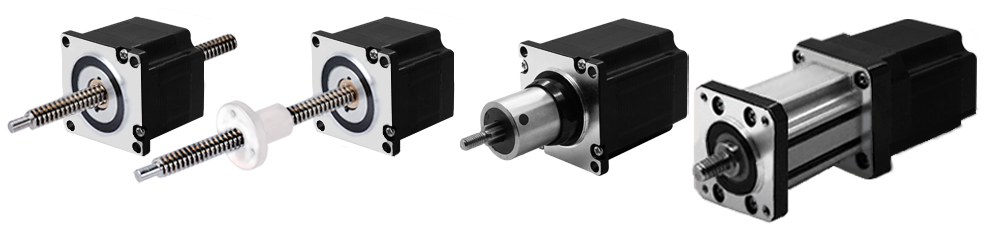
NEMA23 Stepper Lead Screw Linear Actuators
The NEMA 6 is our smallest hybrid linear actuators.
This compact unit can be integrated into various
Applications to provide precise linear positioning while
occupying less than 1 in2 of mounting footprint and
providing up to 44.5N of continuous thrust.
The Working Type for the Different Application Demand:
E: External Linear
N: Non-captive
C: Captive
K: Kaptive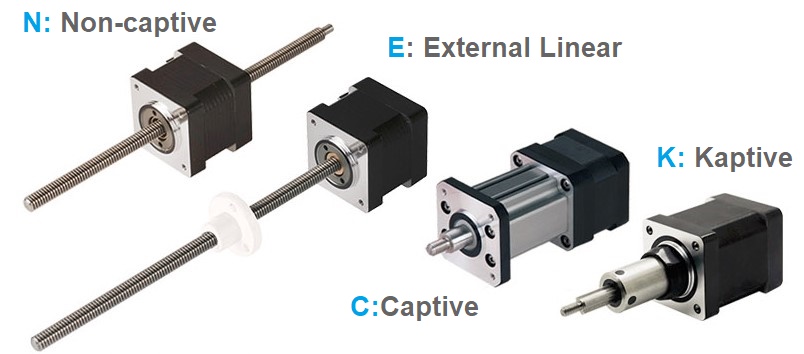
Motor Characteristics:
| Motor | Voltage[V] | Current[A] | Resistance[Ω] | Inductance[mH] | Weight[g] | Lead Wire No. | Motor Length[mm] |
|---|---|---|---|---|---|---|---|
| 23-2110 | 6.4 | 1 | 6.4 | 16.4 | 585 | 4 | 45 |
| 23-2120 | 3.5 | 2 | 1.75 | 4.1 | 585 | 4 | 45 |
| 23-2130 | 2.4 | 3 | 0.8 | 1.7 | 585 | 4 | 45 |
| 23-2210 | 11.5 | 1 | 11.5 | 32 | 880 | 4 | 65 |
| 23-2225 | 5 | 2.5 | 2 | 5.2 | 880 | 4 | 65 |
| 23-2240 | 2.8 | 4 | 0.7 | 2 | 880 | 4 | 65 |
Available Lead Screw and Travel per Step:
| Screw Dia.[inch] | Screw Dia.[mm] | Lead[inch] | Lead[mm] | Lead Code | Travel Per Step @ 1.8° [mm]* | Travel Per Step @ 0.9° [mm]* |
|---|---|---|---|---|---|---|
| 0.394 | 10 | 0.079 | 2 | G | 0.01 | 0.005 |
| 0.375 | 9.525 | 0.025 | 0.635 | A | 0.0032 | 0.0016 |
| 0.375 | 9.525 | 0.05 | 1.27 | D | 0.0064 | 0.0032 |
| 0.375 | 9.525 | 0.0625 | 1.5875 | F | 0.0079 | 0.004 |
| 0.375 | 9.525 | 0.083 | 2.1167 | H | 0.0106 | 0.0053 |
| 0.375 | 9.525 | 0.1 | 2.54 | K | 0.0127 | 0.0064 |
| 0.375 | 9.525 | 0.125 | 3.175 | L | 0.0159 | 0.0079 |
| 0.375 | 9.525 | 0.167 | 4.2333 | P | 0.0212 | 0.0106 |
| 0.375 | 9.525 | 0.2 | 5.08 | R | 0.0254 | 0.0127 |
| 0.375 | 9.525 | 0.25 | 6.35 | S | 0.0318 | 0.0159 |
| 0.375 | 9.525 | 0.375 | 9.525 | V | 0.0476 | 0.0238 |
| 0.375 | 9.525 | 0.384 | 9.7536 | W | 0.0488 | 0.0244 |
| 0.375 | 9.525 | 0.4 | 10.16 | X | 0.0508 | 0.0254 |
| 0.375 | 9.525 | 0.5 | 12.7 | Y | 0.0635 | 0.0318 |
| 0.375 | 9.525 | 1 | 25.4 | Z | 0.127 | 0.0635 |
NEMA 23 Stepper Lead Screw Linear Actuators (External Type):
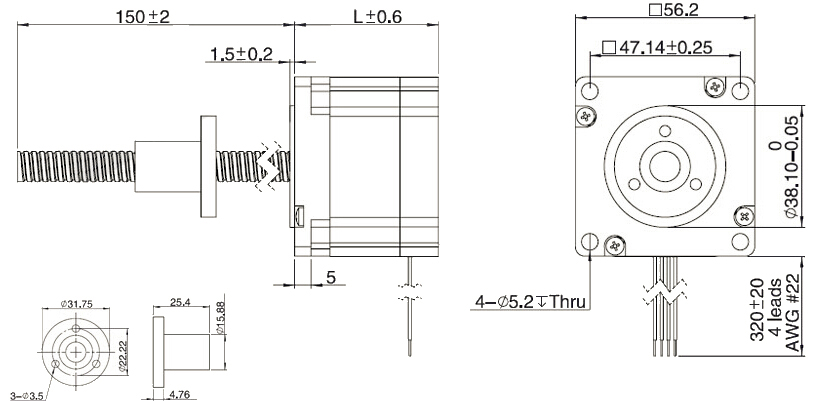
NEMA 23 Stepper Lead Screw Linear Actuators (Non-Captive Type):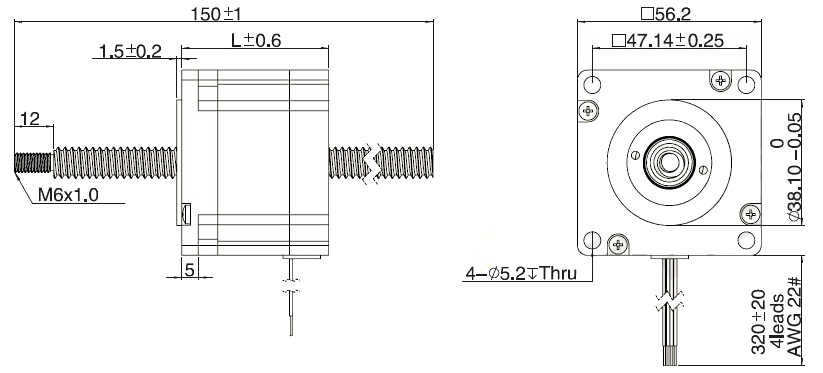
NEMA 23 Stepper Lead Screw Linear Actuators (Captive Type):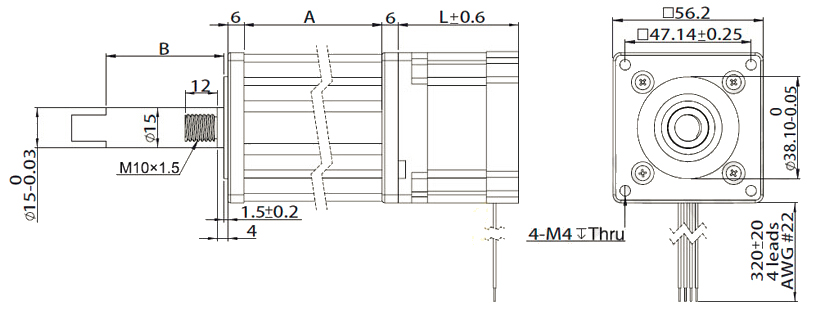
Stroke Specification of Captive Actuactor:
| A(mm) | Stroke B (mm) | L(mm) | |
| SingleStack | DoubleStack | ||
| 45.70 | 12.70 | 45 | 65 |
| 52.05 | 19.05 | 45 | 65 |
| 58.40 | 25.40 | 45 | 65 |
| 64.80 | 31.80 | 45 | 65 |
| 71.10 | 38.10 | 45 | 65 |
| 83.80 | 50.80 | 45 | 65 |
| 96.50 | 63.50 | 45 | 65 |
NEMA 23 Stepper Lead Screw Linear Actuators (Kaptive Type):
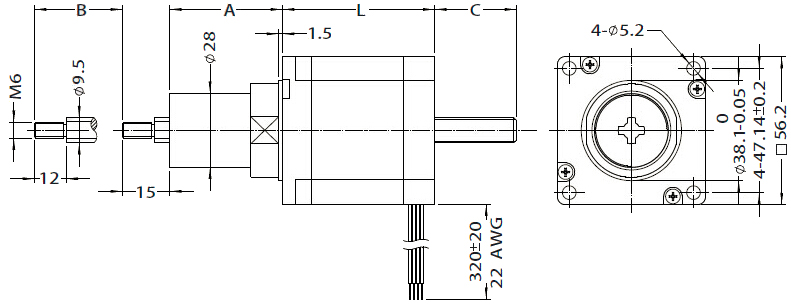
Stroke Specification of Kaptive Actuactor:
| Size A (mm) | Stroke B (mm) | C (mm) | |
|---|---|---|---|
| Single Stack L=45 | Double Stack L=65 | ||
| 24.20 | 12.70 | 5.80 | 0.00 |
| 30.55 | 19.05 | 12.15 | 2.15 |
| 36.90 | 25.40 | 18.50 | 8.50 |
| 43.25 | 31.75 | 24.85 | 14.85 |
| 49.60 | 38.10 | 31.20 | 21.20 |
| 62.30 | 50.80 | 43.90 | 33.90 |
| 75.00 | 63.50 | 56.60 | 46.60 |
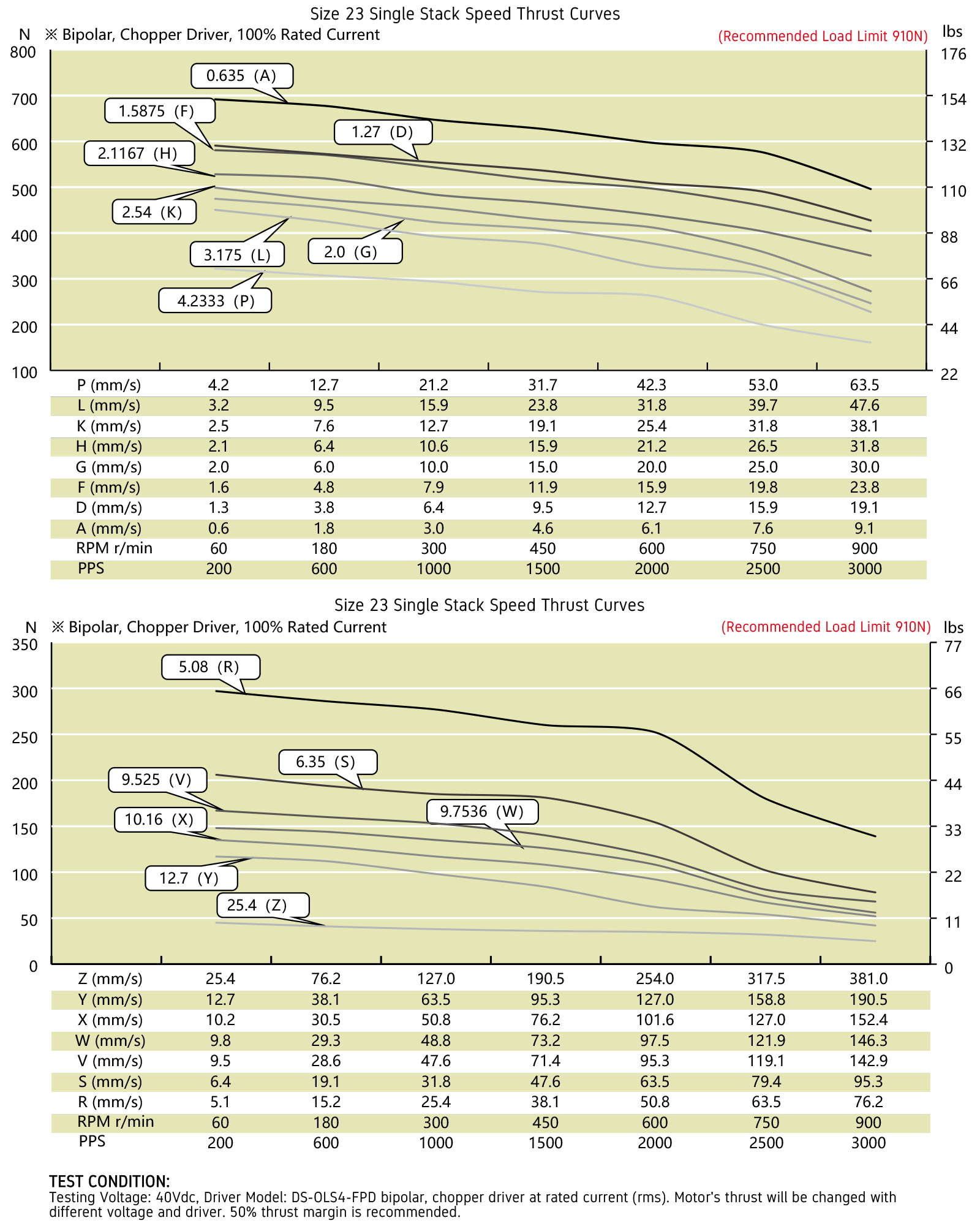
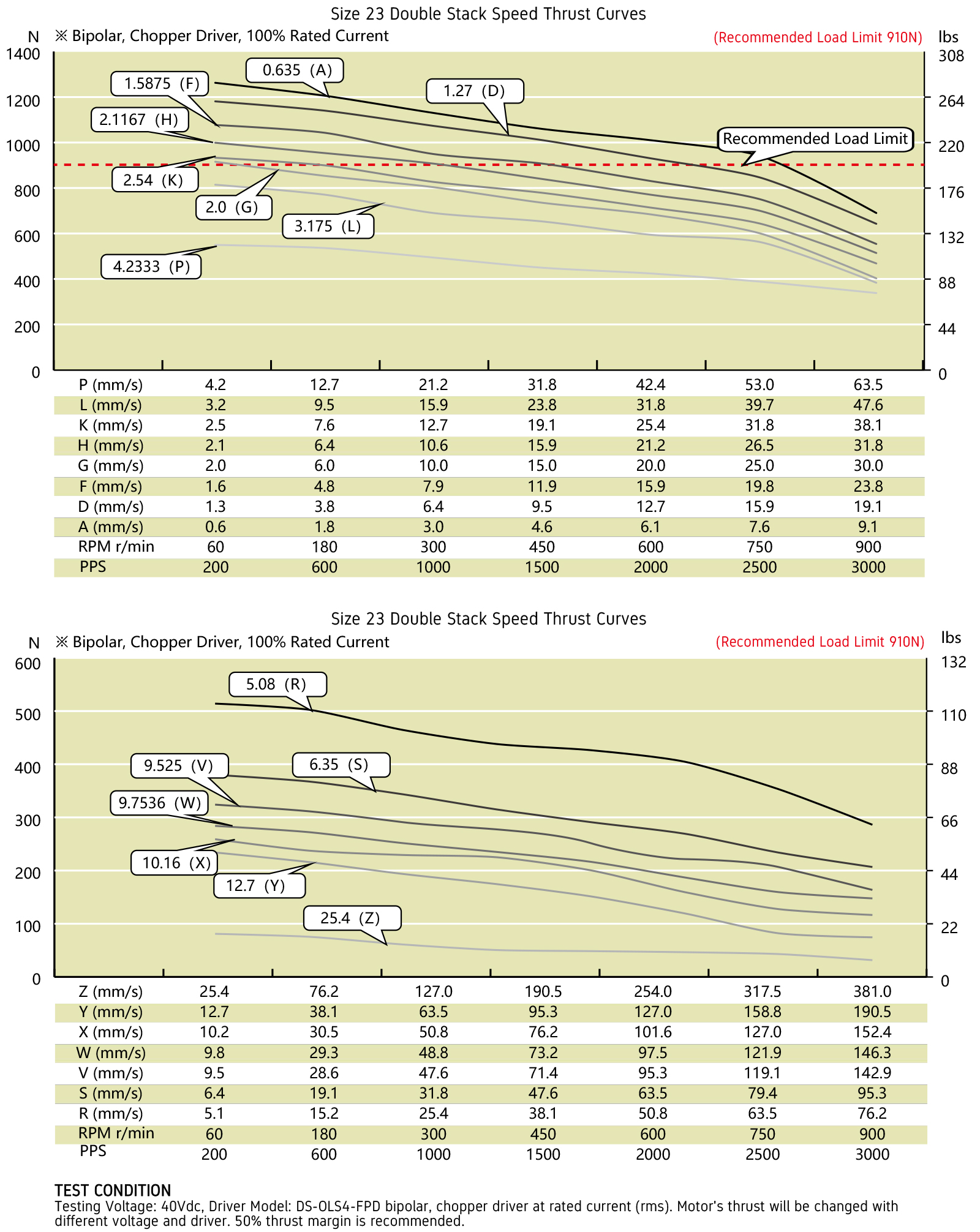
Speed Thrust Curves:
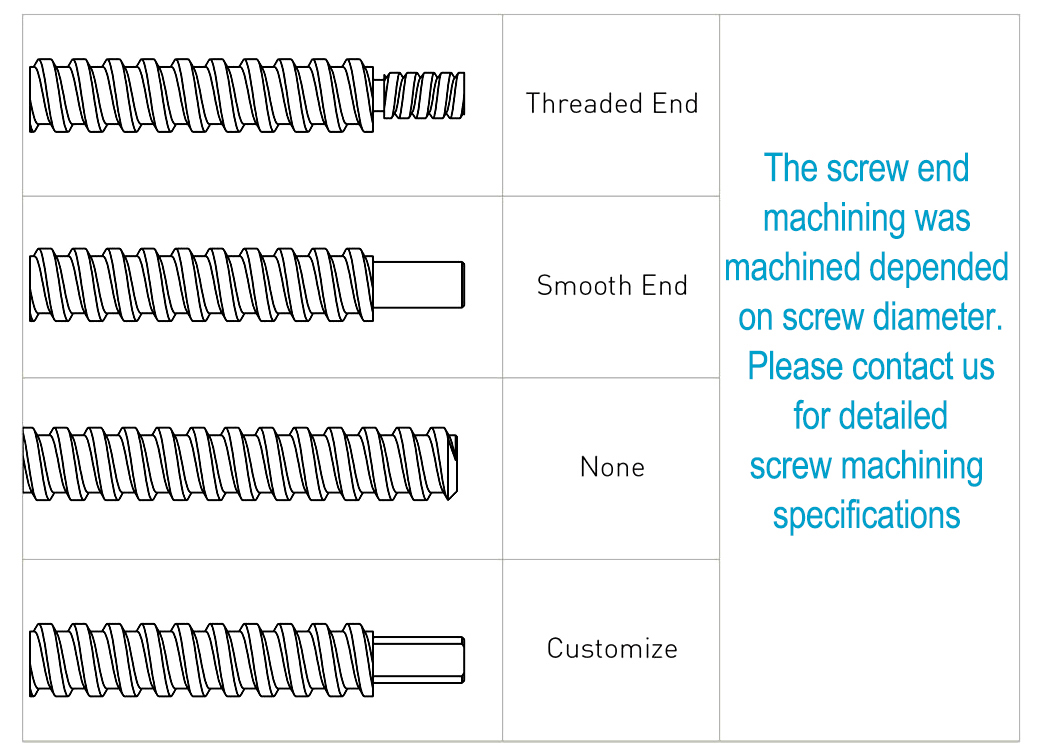
Options for screw end machining:
Catalog for download
More Information on detail, please feel free to contact me

NEMA34 Stepper Lead Screw Linear Actuators
The NEMA 6 is our smallest hybrid linear actuators.
This compact unit can be integrated into various
Applications to provide precise linear positioning while
occupying less than 1 in2 of mounting footprint and
providing up to 44.5N of continuous thrust.
The Working Type for the Different Application Demand:
E: External Linear
N: Non-captive
C: Captive
K: Kaptive
Motor Characteristics:
| Motor | Voltage[V] | Current[A] | Resistance[Ω] | Inductance[mH] | Weight[g] | Lead Wire No. | Motor Length[mm] |
|---|---|---|---|---|---|---|---|
| 34-2113 | 12 | 1.3 | 9.2 | 71 | 2370 | 4 | 76 |
| 34-2130 | 5.7 | 3 | 1.9 | 15 | 2370 | 4 | 76 |
| 34-2155 | 2.85 | 5.5 | 0.52 | 4.5 | 2370 | 4 | 76 |
Available Lead Screw and Travel per Step:
| Screw Dia.[inch] | Screw Dia.[mm] | Lead[inch] | Lead[mm] | Lead Code | Travel Per Step @ 1.8° [mm]* | Travel Per Step @ 0.9° [mm]* |
|---|---|---|---|---|---|---|
| 0.625 | 15.875 | 0.1 | 2.54 | K | 0.0127 | 0.0064 |
| 0.625 | 15.875 | 0.125 | 3.175 | L | 0.0159 | 0.0079 |
| 0.625 | 15.875 | 0.2 | 5.08 | R | 0.0254 | 0.0127 |
| 0.625 | 15.875 | 0.25 | 6.35 | S | 0.0318 | 0.0159 |
| 0.625 | 15.875 | 0.5 | 12.7 | Y | 0.0635 | 0.0318 |
| 0.625 | 15.875 | 1 | 25.4 | Z | 0.127 | 0.0635 |
NEMA 34 Stepper Lead Screw Linear Actuators (External Type):
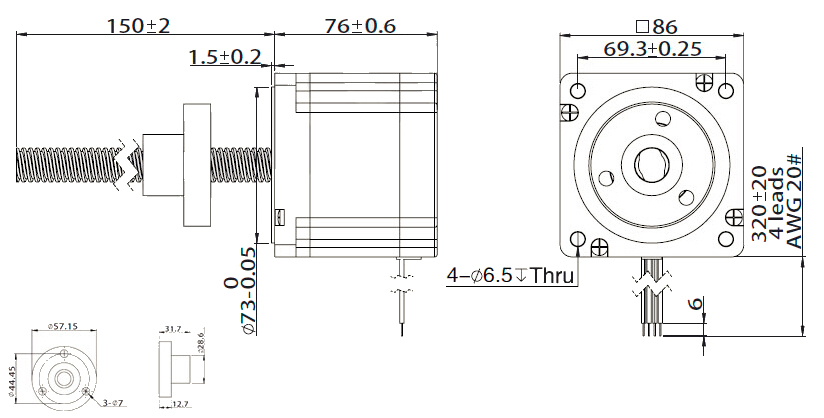
NEMA 34 Stepper Lead Screw Linear Actuators (Non-Captive Type):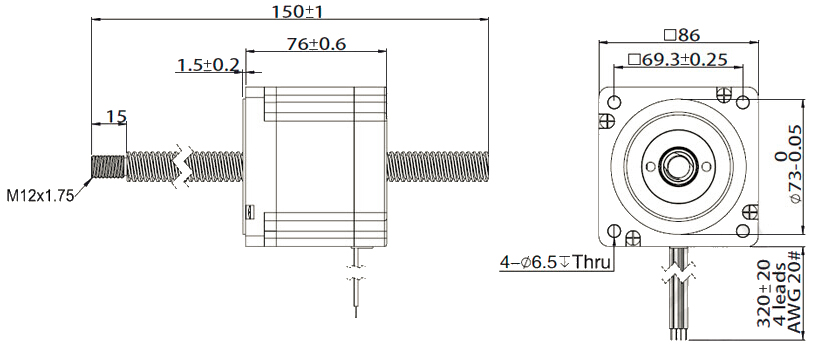
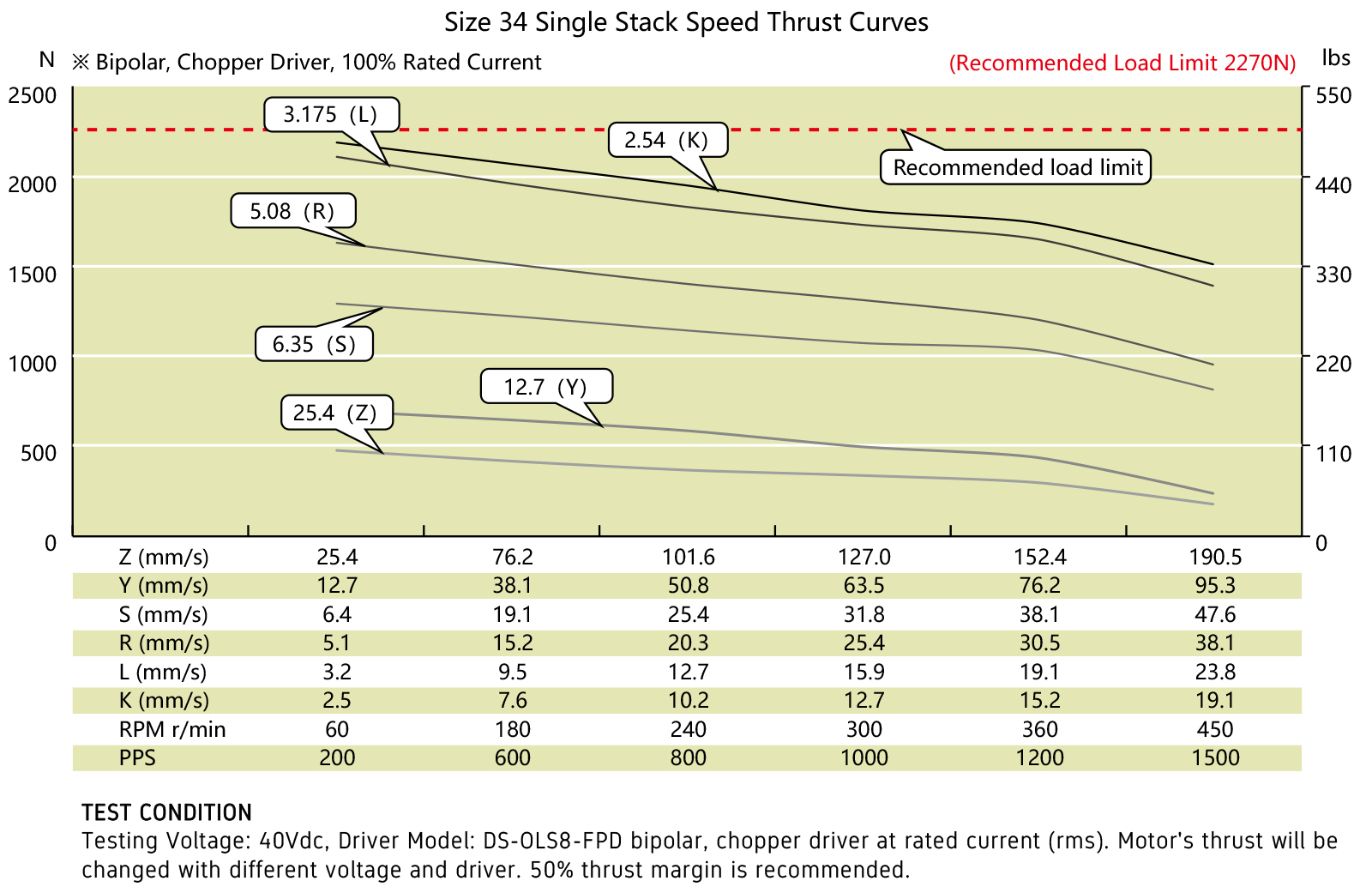
Speed Thrust Curves:
Options for screw end machining:
Catalog for download
More Information on detail, please feel free to contact me